












Windows · Reference
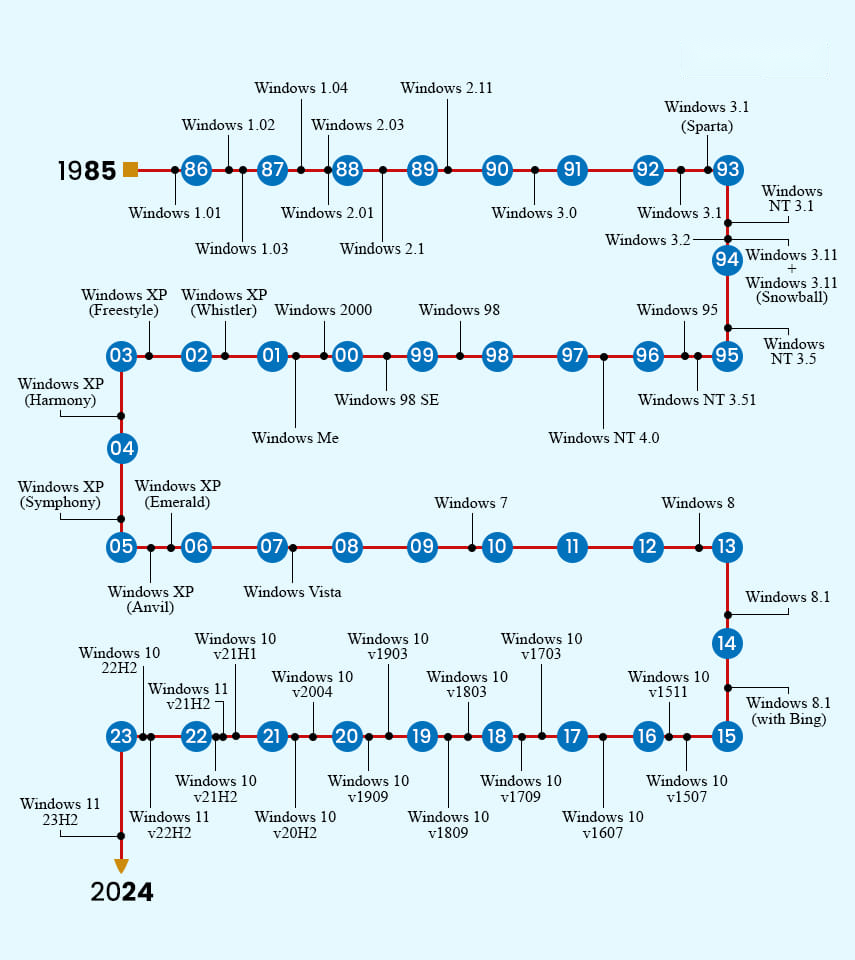
Microsoft Windows has been around since 1985, when Windows 1.01 first reached the public. Four decades later it has evolved into Windows 11, the current release. Along the way, each major version also spawned sub-versions delivered through feature updates — originally twice a year, and now once a year.
With so many releases over the years, it is easy to lose track of what came when. This TechHub reference lays out the full Windows timeline, summarizes the headline change in each version, and groups the releases into their three main technical families so the lineage is easy to follow.
Windows Version History
The table below lists every major Windows release, its codename, year, current support status, and the most significant change it introduced. (“Currently Supported” reflects status as of June 2026.)
| Name | Codename | Year | Supported | Key highlight |
|---|---|---|---|---|
| Windows 1.01 | Interface Manager | 1985 | No | First consumer Windows; introduced the MS-DOS Executive |
| Windows 1.0x | — | 1986–87 | No | Minor updates; added IBM driver support |
| Windows 2.0x | — | 1987 | No | Overlapping, resizable windows; ran multiple DOS apps; 386 enhanced mode |
| Windows 2.1x | — | 1988–89 | No | Better processor support, AppleTalk, faster printing |
| Windows 3.0 | — | 1990 | No | New colorful graphical user interface |
| Windows 3.1 | — | 1992 | No | More stable and faster; Workgroups added native networking |
| Windows NT 3.1 | Razzle | 1993 | No | First Windows with a 32-bit architecture |
| Windows 3.11 / 3.2 | Snowball | 1993 | No | 32-bit networking and file access; Simplified Chinese edition |
| Windows NT 3.5 / 3.51 | Daytona | 1994–95 | No | Winsock and TCP/IP; interoperability with Windows 95 |
| Windows 95 | Chicago | 1995 | No | Overhauled GUI and plug-and-play support |
| Windows NT 4.0 | Shell Update Release | 1996 | No | Introduced system policies |
| Windows 98 / 98 SE | Memphis | 1998–99 | No | Cosmetic UI refresh, deep web integration; SE shipped IE 5.0 |
| Windows 2000 | NT 5.0 | 2000 | No | NTFS 3.0, Encrypting File System, dynamic disks |
| Windows ME | Millennium | 2000 | No | Home-focused; IE 5.5 and Windows Movie Maker |
| Windows XP | Whistler | 2001 | No | Faster, more stable, intuitive UI, better hardware support |
| Windows XP Media Center / x64 | Freestyle / Anvil | 2002–05 | No | Media Center editions; Professional x64 edition |
| Windows Vista | Longhorn | 2007 | No | Reworked GUI, Windows Search, new networking/audio/display stacks |
| Windows 7 | — | 2009 | No | Touch & handwriting, virtual hard disks, faster boot, DirectAccess |
| Windows 8 | — | 2012 | No | Major touch-first UI redesign optimized for tablets |
| Windows 8.1 | Blue | 2013–14 | Yes (legacy) | Start button restored, four-app snap, boot to desktop; Bing search |
| Windows 10 (1507–21H1) | Threshold–Vibranium | 2015–21 | No | Unified UI, Edge, Sandbox, WSL, Chromium Edge over many updates |
| Windows 10 21H2 | — | 2021 | No | Wi-Fi 6E support, passwordless Windows Hello for Business |
| Windows 10 22H2 | — | 2022 | No (EOL Oct 2025) | Final Windows 10 feature update; minor UI and servicing changes |
| Windows 11 21H2 | Sun Valley | 2021 | No | Redesigned UI, widgets, Teams integration, centered taskbar |
| Windows 11 22H2 | Sun Valley 2 | 2022 | No | Spotlight desktop, new Media Player, live captions, Android subsystem |
| Windows 11 23H2 | Sun Valley 3 | 2023 | Yes | Copilot AI, dynamic lighting, native 7-zip/RAR, taskbar improvements |
| Windows 11 24H2 | — | 2024 | Yes | New platform base; Copilot+ PC features, Wi-Fi 7, LTSC/IoT releases |
| Windows 11 25H2 | — | 2025 | Yes | Latest annual update; lightweight enablement package over 24H2 |
Some early rows group several closely related minor releases for brevity. For exact support dates, see TechHub's Windows lifecycle guides.
The Three Windows Families
Every Windows release belongs to one of three technical lineages. Grouping them this way makes the overall hierarchy much clearer.
| DOS-based | Windows 9x | Windows NT |
|---|---|---|
| Windows 1.0x | Windows 95 | NT 3.1 |
| Windows 2.0x | Windows 98 | NT 3.5 / 3.51 |
| Windows 3.0 | Windows ME | NT 4.0 |
| Windows 3.1x | Windows 2000 | |
| Windows XP / Vista | ||
| Windows 7 / 8 / 8.1 | ||
| Windows 10 / 11 |
The modern Windows NT line is the foundation of every release from Windows 2000 onward, including today's Windows 11.
In Summary
From a simple DOS shell in 1985 to today's AI-assisted Windows 11, Microsoft has reshaped Windows through functional, cosmetic, and architectural change at every step — much of it refined through public testing in the Windows Insider Program. The tables above should make the long and sometimes confusing Windows family tree easier to navigate at a glance.
Want to know which Windows version your device runs, or whether it is still supported? Contact the TechHub support team or visit techhub.com.lk for more guides.