













DWORD vs QWORD in the Windows Registry: What’s the Difference?
Understand these Registry value types and know which to create for a given tweak.
Overview
When editing the Registry, you often create DWORD or QWORD values. They differ in size (bit width). This guide explains the difference and how to create/modify each correctly.
DWORD vs QWORD in the Windows Registry.
Warning: Editing the Registry incorrectly can cause problems. Back up the Registry (File > Export) before making changes.
Key Takeaways
- DWORD is a 32-bit value; QWORD is 64-bit.
- Most Windows tweaks use DWORD (32-bit).
- Create the type the instructions specify — they’re not interchangeable.
- Both store numeric values (hex or decimal).
DWORD (32-bit)
- "Double Word" = 32 bits (4 bytes).
- Range: 0 to 4,294,967,295 (unsigned).
- The most common type for on/off flags (0 or 1) and small numbers.
- Shown as "DWORD (32-bit) Value" in Registry Editor.
QWORD (64-bit)
- "Quad Word" = 64 bits (8 bytes).
- Much larger value range for big numbers.
- Used where a 32-bit value is too small.
- Shown as "QWORD (64-bit) Value" in Registry Editor.
Which Should You Choose?
- Follow the guide/tweak exactly — use the type it names.
- Most tweaks want DWORD, even on 64-bit Windows.
- QWORD only when a setting explicitly needs a 64-bit value.
- Wrong type = the setting is ignored.
Create/Modify a Value
1. Open regedit and navigate to the key.
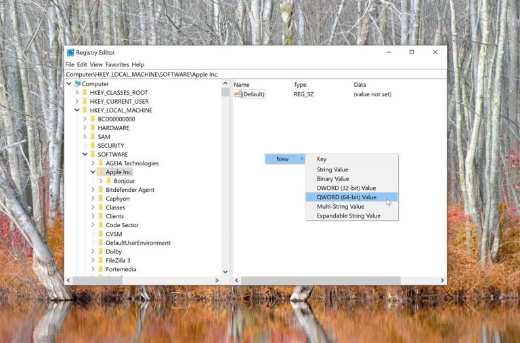
2. Right-click the right pane > New > "DWORD (32-bit) Value" or "QWORD (64-bit) Value".
3. Name it exactly as required.
4. Double-click it, choose Hexadecimal or Decimal base, and enter the value.
5. Click OK and restart/sign out if needed.
Troubleshooting
Problem: The tweak had no effect.
Solution: You likely created the wrong type — delete it and create the exact DWORD/QWORD the instructions specify.
Problem: Value seems wrong.
Solution: Check the Base (Hex vs Decimal) when entering the number.
Problem: Should I use QWORD on 64-bit Windows?
Solution: No — most settings still use DWORD; only use QWORD when explicitly required.
Problem: Change reverts.
Solution: A policy may control the key; verify the correct path and that no GPO overrides it.
Conclusion
DWORD (32-bit) and QWORD (64-bit) differ only in size. Most Windows Registry tweaks use DWORD regardless of your OS bitness — always create the exact type the instructions call for, since the wrong type is simply ignored. Back up before editing.