













DWORD vs QWORD in the Windows Registry: What's the Difference?
මේ Registry value types තේරුම්ගෙන, දීලා තියෙන tweak එකකට කොයි එක create කරන්නද කියලා දැනගන්න.
Overview
Registry එක edit කරනකොට, ඔබ නිතරම DWORD හෝ QWORD values හදනවා. ඒවා size (bit width) එකෙන් වෙනස්. මේ guide එකෙන් වෙනස සහ එක එක එක හරියට create/modify කරන ආකාරය පැහැදිලි කරනවා.
Windows Registry එකේ DWORD vs QWORD.
Warning: Registry එක වැරදියට edit කරන එකෙන් problems ඇති වෙන්න පුළුවන්. Changes කරන්න කලින් Registry එක backup කරන්න (File > Export).
Key Takeaways
- DWORD කියන්නේ 32-bit value එකක්; QWORD 64-bit.
- ගොඩක් Windows tweaks DWORD (32-bit) පාවිච්චි කරනවා.
- Instructions කියන type එක create කරන්න — ඒවා interchangeable නෑ.
- දෙකම numeric values (hex හෝ decimal) store කරනවා.
DWORD (32-bit)
- "Double Word" = bits 32 (bytes 4).
- Range: 0 සිට 4,294,967,295 දක්වා (unsigned).
- on/off flags (0 හෝ 1) සහ small numbers වලට වැඩිපුරම common type එක.
- Registry Editor එකේ "DWORD (32-bit) Value" විදිහට පෙන්නනවා.
QWORD (64-bit)
- "Quad Word" = bits 64 (bytes 8).
- ලොකු numbers වලට ගොඩක් ලොකු value range එකක්.
- 32-bit value එකක් පොඩි වැඩි තැන පාවිච්චි කරනවා.
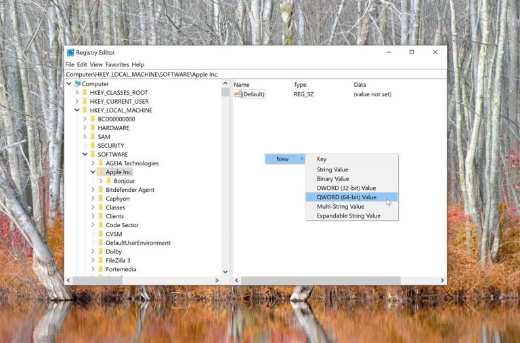
- Registry Editor එකේ "QWORD (64-bit) Value" විදිහට පෙන්නනවා.
කොයි එකද තෝරගන්න ඕන?
- Guide/tweak එක හරියටම follow කරන්න — ඒක කියන type එක පාවිච්චි කරන්න.
- ගොඩක් tweaks වලට DWORD ඕන, 64-bit Windows එකේත්.
- QWORD ඕන වෙන්නේ setting එකකට explicitly 64-bit value එකක් ඕන වෙලාවට විතරයි.
- වැරදි type = setting එක ignore වෙනවා.
Value එකක් Create/Modify කරන්න
1. regedit open කරලා key එකට navigate කරන්න.
2. දකුණු pane එක right-click > New > "DWORD (32-bit) Value" හෝ "QWORD (64-bit) Value".
3. ඕන කරන විදිහටම හරියටම name කරන්න.
4. Double-click කරලා, Hexadecimal හෝ Decimal base එක තෝරලා, value එක ඇතුළත් කරන්න.
5. OK click කරලා, ඕන නම් restart/sign out කරන්න.
Troubleshooting
Problem: Tweak එකට effect එකක් නෑ.
Solution: ඔබ බොහෝවිට වැරදි type එක create කරලා — ඒක delete කරලා instructions කියන exact DWORD/QWORD එක create කරන්න.
Problem: Value එක වැරදියි වගේ.
Solution: Number එක ඇතුළත් කරනකොට Base එක (Hex vs Decimal) බලන්න.
Problem: 64-bit Windows එකේ QWORD පාවිච්චි කරන්නද?
Solution: නෑ — ගොඩක් settings තවම DWORD පාවිච්චි කරනවා; explicitly required වෙලාවට විතරයි QWORD පාවිච්චි කරන්න.
Problem: Change එක reverts.
Solution: Key එක policy එකකින් control වෙන්න පුළුවන්; හරි path එකද, GPO එකක් override කරන්නේ නැද්ද කියලා verify කරන්න.
Conclusion
DWORD (32-bit) සහ QWORD (64-bit) වෙනස් වෙන්නේ size එකෙන් විතරයි. ගොඩක් Windows Registry tweaks ඔබේ OS bitness එක නොසලකා DWORD පාවිච්චි කරනවා — instructions කියන exact type එකම හැමවෙලේම create කරන්න, මොකද වැරදි type එක සරලවම ignore වෙනවා. Edit කරන්න කලින් backup කරන්න.