Overview
A free Microsoft account comes with only 5 GB of OneDrive storage, which fills quickly with photos and documents. The Microsoft 365 Developer Program is a legitimate way to obtain a Microsoft 365 E5 subscription sandbox that includes a generous OneDrive allocation (historically up to 5 TB per user) for development and testing. This guide explains how to enrol and covers other honest routes to more storage.
Unlocking a large OneDrive allocation through a Microsoft 365 subscription.
<w:bottom w:val="single" w:color="DEEAF6" w:sz="2" w:space="4"/><w:left w:val="single" w:color="0B5394" w:sz="24" w:space="8"/><w:right w:val="single" w:color="DEEAF6" w:sz="2" w:space="4"/></w:pBdr><w:shd w:fill="DEEAF6" w:color="auto" w:val="clear"/><w:spacing w:before="80" w:after="160"/><w:ind w:left="120" w:right="120"/></w:pPr><w:r><w:rPr><w:b/><w:bCs/><w:color w:val="0B5394"/><w:sz w:val="21"/><w:szCs w:val="21"/><w:rFonts w:ascii="Calibri" w:cs="Calibri" w:eastAsia="Calibri" w:hAnsi="Calibri"/></w:rPr><w:t xml:space="preserve">Note: Microsoft periodically changes the terms of the Developer Program, including eligibility and whether renewal requires ongoing development activity. Treat the exact storage figure as subject to change and review the current program terms before relying on it.
Key Takeaways
- A standard free Microsoft account includes 5 GB of OneDrive storage.
- The Microsoft 365 Developer Program provides an E5 sandbox intended for building and testing.
- The sandbox includes large per-user OneDrive storage while the subscription remains active.
- A paid Microsoft 365 Personal or Family plan is the simplest way to get 1 TB or more reliably.
Join the Microsoft 365 Developer Program
1. Visit the official Microsoft 365 Developer Program page and sign in with a Microsoft account.
2. Click "Join now" and enter your details, including country and company information.
3. Choose your primary focus and areas of interest when prompted.
4. Select the Microsoft 365 E5 sandbox type (instant or configurable).
5. Set an administrator username and password for your new developer tenant.
6. Verify your identity with a phone number and the code that is sent to you.
7. Wait for the sandbox to be provisioned, then sign in to the new tenant.
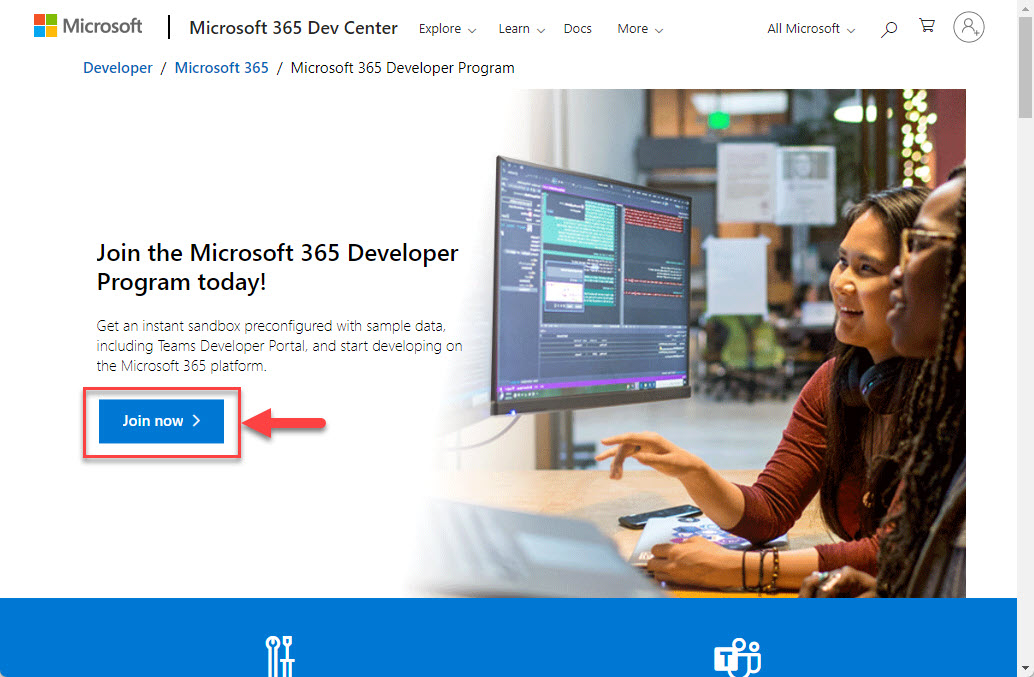
Enrolling in the Microsoft 365 Developer Program to create an E5 sandbox.
<w:bottom w:val="single" w:color="E2F0E1" w:sz="2" w:space="4"/><w:left w:val="single" w:color="2E7D32" w:sz="24" w:space="8"/><w:right w:val="single" w:color="E2F0E1" w:sz="2" w:space="4"/></w:pBdr><w:shd w:fill="E2F0E1" w:color="auto" w:val="clear"/><w:spacing w:before="80" w:after="160"/><w:ind w:left="120" w:right="120"/></w:pPr><w:r><w:rPr><w:b/><w:bCs/><w:color w:val="2E7D32"/><w:sz w:val="21"/><w:szCs w:val="21"/><w:rFonts w:ascii="Calibri" w:cs="Calibri" w:eastAsia="Calibri" w:hAnsi="Calibri"/></w:rPr><w:t xml:space="preserve">Tip: The developer sandbox is a separate tenant from your personal account. Sign in with the new administrator credentials to access its OneDrive and other Microsoft 365 apps.
Other Legitimate Ways to Get More Storage
- Microsoft 365 Personal includes 1 TB of OneDrive storage with a paid subscription.
- Microsoft 365 Family shares up to 6 TB (1 TB per person) across up to six people.
- Students and staff at eligible institutions may receive additional OneDrive storage through their organisation.
- Occasional Microsoft promotions and referral bonuses can add small amounts of free storage.
<w:bottom w:val="single" w:color="FBE4E4" w:sz="2" w:space="4"/><w:left w:val="single" w:color="C0392B" w:sz="24" w:space="8"/><w:right w:val="single" w:color="FBE4E4" w:sz="2" w:space="4"/></w:pBdr><w:shd w:fill="FBE4E4" w:color="auto" w:val="clear"/><w:spacing w:before="80" w:after="160"/><w:ind w:left="120" w:right="120"/></w:pPr><w:r><w:rPr><w:b/><w:bCs/><w:color w:val="C0392B"/><w:sz w:val="21"/><w:szCs w:val="21"/><w:rFonts w:ascii="Calibri" w:cs="Calibri" w:eastAsia="Calibri" w:hAnsi="Calibri"/></w:rPr><w:t xml:space="preserve">Warning: Avoid third-party "storage generators" or tools that promise free terabytes outside official Microsoft channels. They frequently violate Microsoft’s terms, can compromise your account, and often simply do not work.
Troubleshooting
Problem: The Developer Program will not let me join.
Solution: Eligibility rules change and some regions or account types are excluded. Use a personal Microsoft account, ensure your details are complete, and review the current program requirements.
Problem: My sandbox subscription expired and storage disappeared.
Solution: Developer sandboxes renew based on activity or a set period. Complete the required qualifying activity to renew, or move important data to a permanent paid plan before it lapses.
Problem: I cannot see the OneDrive storage in my normal account.
Solution: The storage belongs to the developer tenant, not your personal account. Sign in with the administrator credentials created during enrolment to access it.
Problem: I need dependable long-term storage.
Solution: Developer sandboxes are meant for testing and can change at any time. For data you cannot lose, choose a paid Microsoft 365 Personal or Family plan.
Conclusion
The Microsoft 365 Developer Program offers a legitimate way to access a large OneDrive allocation for development and testing, while paid Microsoft 365 plans remain the most dependable route to 1 TB or more. Enrol through official channels, keep the subscription active, and avoid unofficial tools that risk your account.
About TechHub
This guide is part of the TechHub Knowledge Base. For more step-by-step IT guides and support, visit techhub.com.lk.