Overview
Microsoft Copilot is available on the web at copilot.microsoft.com, and you can install it as a Progressive Web App (PWA) so it runs in its own window like a native app — on Windows 10/11, macOS, and Linux. This guide shows how, using Edge or Chrome.
Install Microsoft Copilot as a standalone desktop app.
Note: Microsoft also offers an official Copilot app in the Microsoft Store on Windows. If it is available to you, installing it from the Store is the simplest option.
Key Takeaways
- Copilot can be installed as a PWA from copilot.microsoft.com.
- Edge and Chrome both support installing it as an app.
- The PWA gets its own window, icon, and Start menu entry.
- An official Copilot Store app may also be available.
Before You Begin
- An up-to-date Microsoft Edge or Google Chrome.
- A Microsoft account to sign in to Copilot.
- An internet connection.
Install From Microsoft Edge
1. Open Edge and go to copilot.microsoft.com.
2. Click the three-dot menu > Apps > Install this site as an app.
3. Name it Copilot and click Install.
4. Pin it to the taskbar/Start if prompted.
Install From Google Chrome
1. Open Chrome and go to copilot.microsoft.com.
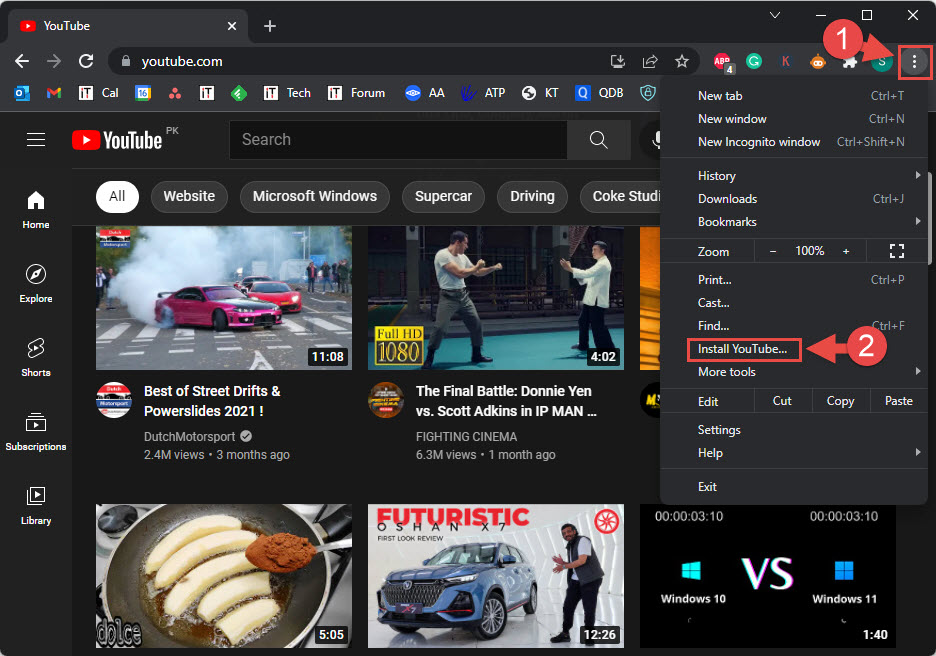
2. Click the three-dot menu > Cast, save, and share > Install page as app… (or the install icon in the address bar).
3. Confirm Install.
4. Copilot opens in its own window and appears in the Start menu.
How to Uninstall
1. Open the Copilot app, click its menu, and choose Uninstall — or
2. Open Settings > Apps > Installed apps, find Copilot, and uninstall it.
3. You can also remove it from the browser’s Apps page (edge://apps or chrome://apps).
Troubleshooting
Problem: There is no Install option.
Solution: Ensure you are on copilot.microsoft.com and your browser is updated; the install icon appears in the address bar on supported pages.
Problem: The app will not open.
Solution: It depends on the browser it was installed from — keep that browser installed, or reinstall the PWA.
Problem: Copilot is unavailable in your region.
Solution: Availability varies; use the web version where offered, or install the official Copilot Store app if available.
Problem: You keep getting signed out.
Solution: Sign in to Copilot with your Microsoft account inside the app window, and allow it to keep cookies/session data.
Conclusion
Installing Copilot as a PWA gives you a clean, dedicated desktop app for Microsoft’s AI assistant. Use Edge’s "Install this site as an app" or Chrome’s "Install page as app", or grab the official Copilot app from the Microsoft Store where available.
</w:pBdr><w:spacing w:before="220" w:after="40"/></w:pPr><w:r><w:rPr><w:b/><w:bCs/><w:color w:val="0B5394"/><w:sz w:val="21"/><w:szCs w:val="21"/><w:rFonts w:ascii="Calibri" w:cs="Calibri" w:eastAsia="Calibri" w:hAnsi="Calibri"/></w:rPr><w:t xml:space="preserve">About TechHub
This guide is part of the TechHub Knowledge Base. For more step-by-step IT guides and support, visit techhub.com.lk.