Overview
NTLM කියන්නේ compatibility වලට තවම support කරන පරණ Windows authentication protocol එකක්, ඒත් ඒකට known weaknesses තියෙනවා. මේ guide එකෙන් NTLM කියන්නේ මොකක්ද, ඇයි ඒක risk එකක්ද, සහ වඩා secure Kerberos එකට වෙනුවෙන් ඒක monitor කරලා ක්රමයෙන් restrict කරන ආකාරය පැහැදිලි කරනවා.
NTLM කියන්නේ known weaknesses තියෙන legacy authentication protocol එකක්.
Key Takeaways
- NTLM කියන්නේ legacy challenge-response authentication protocol එකක්.
- ඒක relay සහ pass-the-hash attacks වලට vulnerable.
- Apps break නොවෙන්න, block කරන්න කලින් NTLM usage audit කරන්න.
- Group Policy එකෙන් NTLM restrict කරලා, පුළුවන් තැන Kerberos වලට move වෙන්න.
NTLM කියන්නේ මොකක්ද?
NTLM (NT LAN Manager) එකෙන් password hash එකක් මත challenge-response handshake එකකින් users authenticate කරනවා. Windows ඒක තියාගන්නේ Kerberos support නොකරන පරණ systems සහ applications එක්ක backward compatibility වලට.
ඇයි ඒක Security Risk එකක්
- NTLM relay attacks වලට susceptible.
- Pass-the-hash වලට vulnerable — හොරකම් කරපු hash එකක් reuse කරනවා.
- Kerberos දෙන mutual authentication එකක් නෑ.
- Microsoft customers ලා Kerberos/modern auth දිහාට steer කරනවා.
NTLM Monitor කරන්නේ කොහොමද
1. Group Policy: Computer Configuration > Windows Settings > Security Settings > Local Policies > Security Options > usage log කරන්න "Network security: Restrict NTLM: Audit…" policies set කරන්න.
2. Event Viewer එකේ (Applications and Services Logs > Microsoft > Windows > NTLM) resulting events review කරන්න.
3. PowerShell: කොයි apps/users NTLM පාවිච්චි කරනවද බලන්න Get-WinEvent එකෙන් Operational NTLM log එක query කරන්න.
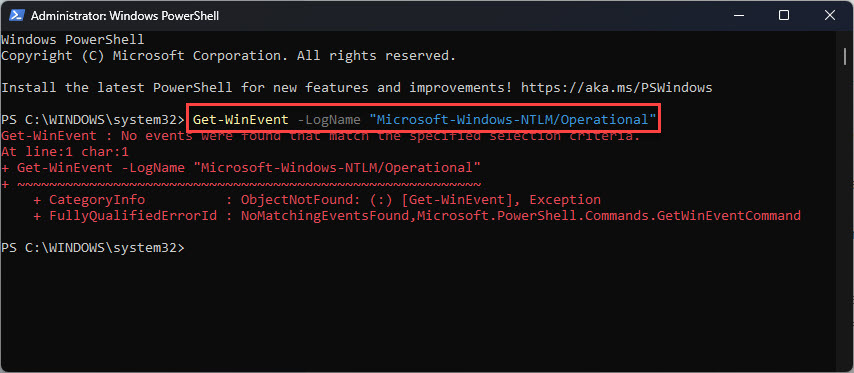
PowerShell එකෙන් NTLM usage logs බලන්න.
NTLM Restrict/Block කරන්නේ කොහොමද
Warning: මුලින් audit කරන්න. Dependencies identify කරන්න කලින් NTLM block කරන එකෙන් logons සහ applications break වෙන්න පුළුවන්.
1. Audit කළාට පස්සේ, "Network security: Restrict NTLM: NTLM authentication in this domain" එක Deny කරන්න (required servers වලට exceptions එක්ක).
2. Critical apps වැඩ කරගෙන යන්න necessary servers NTLM exception list එකට add කරන්න.
3. Gradually roll out කරලා failures වලට monitor කරමින්, apps Kerberos වලට move කරන්න.
Troubleshooting
Problem: NTLM block කළාට පස්සේ apps broke.
Solution: Dependency එකක් miss කළා — audit mode ආපහු enable කරලා, required servers NTLM exception list එකට add කරලා, ඒ apps Kerberos වලට migrate කරන්න.
Problem: NTLM logs එකක්වත් එන්නේ නෑ.
Solution: මුලින් "Restrict NTLM: Audit" policies enable කරන්න; logging default විදිහට off.
Problem: Available වුණත් Kerberos පාවිච්චි වෙන්නේ නෑ.
Solution: SPNs correctly register වෙලා, clients hostname එකෙන් (IP නෙවෙයි) connect වෙනවා කියලා බලන්න — ඒක NTLM force කරන්න පුළුවන්.
Problem: NTLM on තියන එක කොච්චර risky ද?
Solution: ඒක relay/pass-the-hash වලට exposure වැඩි කරනවා. Audit කරලා ඒක මත rely වීම අඩු කරන්න, අතරමගදී SMB signing සහ Extended Protection enforce කරමින්.
Conclusion
NTLM convenient ඒත් insecure. ඒක පාවිච්චි වෙන තැන් audit කරලා, carefully managed exceptions එක්ක Group Policy එකෙන් restrict කරලා, Kerberos දිහාට move වෙන්න — ඒකෙන් ඔබේ environment එකේ relay සහ pass-the-hash attacks වලට resistance එක වැඩිදියුණු වෙනවා.
About TechHub
මේ guide එක TechHub Knowledge Base එකේ කොටසක්. තව step-by-step IT guides සහ support වලට techhub.com.lk එකට යන්න.