3 Ways to Change the Primary Monitor in Windows 11 and 10
Set which display is your main screen via Settings or command-line tools.
Overview
Your primary monitor shows the taskbar, Start menu, and where most apps open. This guide shows how to change which display is primary in Windows 11 and 10, plus command-line options.
Changing the primary monitor in Windows.
Key Takeaways
- The primary monitor hosts the taskbar and new windows by default.
- Set it in Settings > System > Display.
- Identify screens first so you pick the right one.
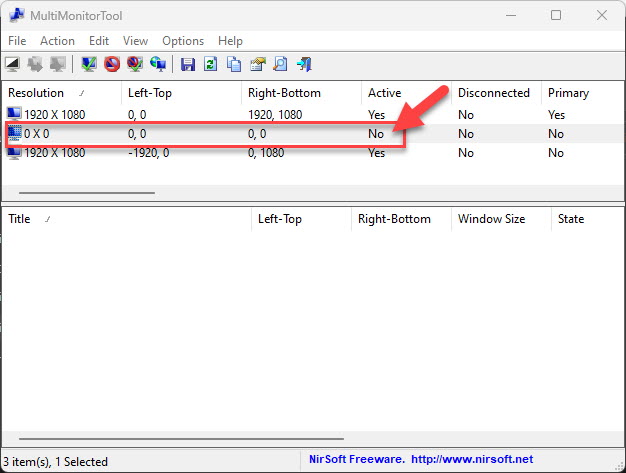
- NirCmd/MultiMonitorTool can change it from the command line.
Change the Primary Monitor (Settings)
1. Open Settings > System > Display.
2. Click "Identify" to see each monitor’s number.
3. Click the display you want as primary in the diagram.
4. Expand "Multiple displays" and tick "Make this my main display".
Change It from the Command Line
Note: Download NirSoft tools (NirCmd, MultiMonitorTool) only from the official nirsoft.net website.
1. Download NirCmd or MultiMonitorTool from NirSoft.
2. With MultiMonitorTool, run: MultiMonitorTool.exe /SetPrimary 2 (use the target monitor number).
3. Or use its GUI to right-click a monitor and choose "Set As Primary Monitor".
Troubleshooting
Problem: "Make this my main display" is greyed out.
Solution: The selected monitor is already primary — pick a different display first.
Problem: Taskbar didn’t move.
Solution: Sign out/in, or ensure the taskbar isn’t pinned to "all displays" with a fixed main setting.
Problem: Windows open on the wrong monitor.
Solution: Set the correct primary display; some apps remember their last position — move and close them there.
Problem: Second monitor not detected.
Solution: Click "Detect", check cables/inputs, and update the GPU driver.
Conclusion
Changing the primary monitor is quickest in Settings > System > Display — identify your screens, select one, and tick "Make this my main display". For automation, NirSoft’s MultiMonitorTool can set the primary from a command or script.