3 Ways to Prevent Command Prompt from Closing After Running Commands
Keep the CMD window open to read output using cmd /k, PAUSE, and a Registry tweak.
Overview
When you run a batch file or a command by double-clicking, the Command Prompt window often closes instantly — before you can read the output. This guide shows three ways to keep it open.
Key Takeaways
- cmd /k runs a command and keeps the window open.
- Adding PAUSE to a batch file waits for a keypress.
- A Registry tweak can stop all CMD windows auto-closing.
- Running from an already-open prompt also keeps output visible.
Method 1: cmd /k
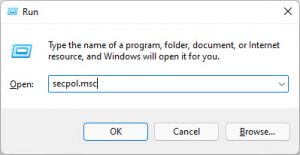
1. Open Run (Windows + R).
2. Type: cmd /k yourcommand (e.g., cmd /k ipconfig).
3. The command runs and the window stays open (/k = keep).
4. Use /c instead if you want it to close.
Method 2: Add PAUSE to a Batch File
1. Edit your .bat file in Notepad.
2. Add a new line at the end: pause
3. Save and run — it shows "Press any key to continue..." and waits.
4. This keeps output visible until you press a key.
Method 3: Run from an Open Prompt
1. Open Command Prompt first (so it’s already running).
2. Type or run your command/batch file from there.
3. The window stays open because you launched it, not the script.
Method 4: Registry (Keep Windows Open)
Warning: Editing the Registry incorrectly can cause problems. Back up the Registry first.
1. This is advanced and affects CMD behaviour globally.
2. Prefer cmd /k or PAUSE for most cases.
3. Only use a Registry change if you specifically need all CMD windows to persist.
Troubleshooting
Problem: Window still closes.
Solution: Use cmd /k or add pause as the last line of the batch file.
Problem: pause runs too early.
Solution: Place pause at the very end (or after the section you want to read).
Problem: Double-clicked .bat flashes and closes.
Solution: Add pause, or run it from an already-open Command Prompt.
Problem: Want it to close normally.
Solution: Use cmd /c, or remove pause, when you don’t need to read output.
Conclusion
To read command output, run with cmd /k or add a pause line to your batch file — the simplest, most reliable fixes. Launching from an already-open prompt also keeps everything visible without editing anything.