Outlook එකේ Email එකක් Send කිරීම Undo කරන ක්රම 3ක්
Outgoing mail delay කරන්න, sends schedule කරන්න, නැත්නම් දැනටමත් send කරපු message එකක් recall කරන්න.
Overview
Email එකක් ඉක්මනට වැඩිය send කරලද? Outlook එකට outgoing mail ඔක්කොම delay කරන්න පුළුවන් (එය නවත්තන්න window එකක් දෙනවා), specific sends schedule කරන්න පුළුවන්, තව Exchange organization එකක් ඇතුළේ messages recall කරන්නත් පුළුවන්. මේ guide එකෙන් ඒ තුනම cover කරනවා.
Outlook එකේ email එකක් send කිරීම undo කරමු.
Key Takeaways
- Delay rule එකක් outgoing mail මිනිත්තු කිහිපයක් රඳවා තියෙනවා.
- Individual emails පස්සේ send වෙන්න schedule කරන්න පුළුවන්.
- Recall වැඩ කරන්නේ එකම Exchange organization එක ඇතුළේ විතරයි.
- New Outlook/Outlook.com කෙටි "Undo send" window එකක් දෙනවා.
Method 1: Outgoing Mail ඔක්කොම Delay කිරීම (Rule)
1. Classic Outlook එකේ, File > Manage Rules & Alerts > New Rule වෙත යන්න.
2. "Apply rule on messages I send" තෝරන්න.
3. Condition එකක් set කරන්න (නැත්නම් ඔක්කොම වලට none), ඊට පස්සේ "defer delivery by a number of minutes" තෝරන්න.
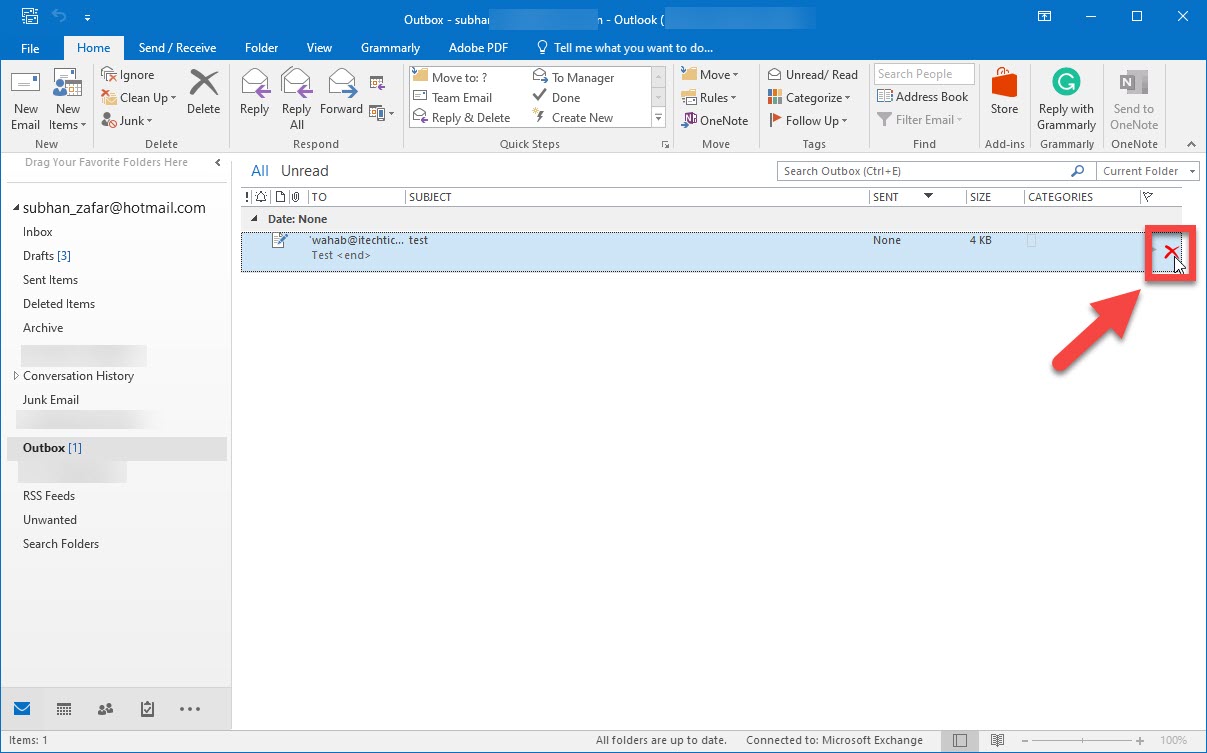
4. Delay එක set කරන්න (උදා: 2 minutes) සහ finish කරන්න; mail එක Outbox එකේ රැඳී ඉන්නවා, එතන ඔයාට edit/delete කරන්න පුළුවන්.
Method 2: Specific Email එකක් Schedule කිරීම
1. Email එක compose කරන්න.
2. Options > Delay Delivery click කරන්න (නැත්නම් new Outlook එකේ More options > Schedule send).
3. Send කරන date/time එක set කරන්න.
4. එතනකම්ම එය Outbox එකේ රැඳී ඉන්නවා — cancel කරන්න ඕන නම් එතනින් delete කරන්න.
Method 3: Send කරපු Email එකක් Recall කිරීම (Exchange)
1. Sent Items folder එකෙන් send කරපු message එක open කරන්න.
2. Message > Actions > Recall This Message වෙත යන්න (classic Outlook).
3. Unread copies delete කරන්නද නැත්නම් message එක replace කරන්නද කියලා තෝරන්න.
4. Recall වැඩ කරන්නේ දෙන්නම එකම Exchange server එකේ ඉන්නවා නම් සහ mail එක unread නම් විතරයි.
New Outlook / Outlook.com Undo Send
1. Settings > Mail > Compose and reply එකේ, "Undo send" period එකක් set කරන්න (~10 seconds දක්වා).
2. Send කරාට පස්සේ, ඒ window එක ඇතුළේ banner එකේ තියෙන "Undo" click කරන්න.
3. Typos වලට මේක තමයි වේගවත්ම safety net එක.
Troubleshooting
Problem: Recall වැඩ කළේ නෑ.
Solution: Recall වැඩ කරන්නේ එකම Exchange org එකක් ඇතුළේ සහ message එක තාම unread නම් විතරයි — external recipients වලට එය fail වෙනවා.
Problem: Delay rule එක apply වෙන්නේ නෑ.
Solution: Rule එක enabled බව සහ Outlook open වෙලා තියෙන බව confirm කරගන්න (classic Outlook run වෙද්දී Outbox එක process කරනවා).
Problem: "Delay Delivery" option එකක් නෑ.
Solution: New Outlook එකේ "Schedule send" පාවිච්චි කරන්න; classic delay rule එක desktop client එකට තමයි.
Problem: Undo window එක මගහැරුණා.
Solution: වැඩිය react වෙන්න වෙලාවක් ලැබෙන්න settings වල Undo send period එක වැඩි කරන්න.
Conclusion
විශ්වාසවන්ත safety net එකකට, delay rule එකක් add කරන්න (නැත්නම් Undo send period එකක් set කරන්න) එතකොට mail යන්න කලින් රැඳී ඉන්නවා. Specific timing වලට Schedule/Delay Delivery පාවිච්චි කරන්න, තව Recall කියන එක ඔයාගේම Exchange organization එක ඇතුළේ unread messages වලට විතරක් තියාගන්න.