Overview
Microsoft’s server operating systems have powered business infrastructure since 1993. Over three decades they evolved from the Windows NT Server line into the modern, cloud-connected Windows Server releases. This guide lists every major version in order and highlights what each one introduced.
Windows Server has evolved from NT Server 3.1 to Windows Server 2025.
Key Takeaways
- The server line began with Windows NT Server 3.1 in 1993.
- Microsoft rebranded the line to "Windows Server" starting with Windows Server 2000.
- Releases roughly follow a multi-year cadence, often with R2 mid-cycle updates.
- Windows Server 2025 is the latest major release.
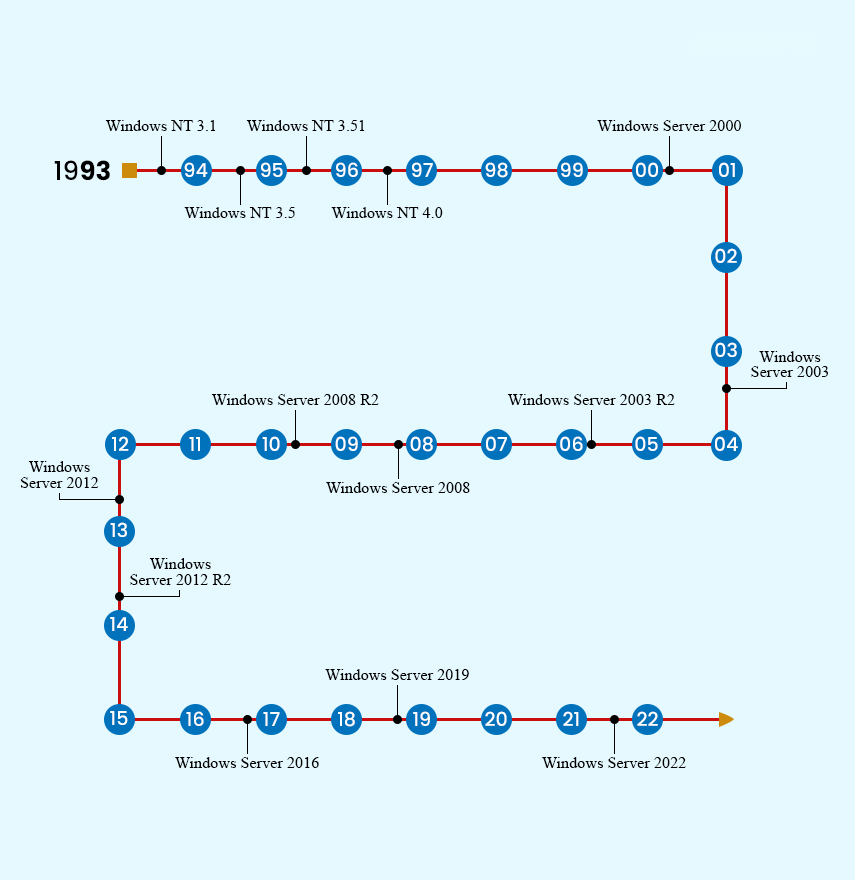
A timeline of the major Windows Server releases.
Windows NT Server Era
- Windows NT Server 3.1 (1993) — the first server OS in the line.
- Windows NT Server 3.5 (1994) — performance and networking improvements.
- Windows NT Server 3.51 (1995) — refinements and added hardware support.
- Windows NT Server 4.0 (1996) — introduced the Windows 95-style interface to the server.
The Windows Server Brand
- Windows Server 2000 — rebranded from NT; introduced Active Directory.
- Windows Server 2003 and 2003 R2 — improved security, IIS 6, and management.
- Windows Server 2008 and 2008 R2 — Server Core, Hyper-V virtualisation, and (in R2) a 64-bit-only release.
- Windows Server 2012 and 2012 R2 — major Hyper-V and storage advances, the modern UI, and cloud features.
Modern Windows Server
- Windows Server 2016 — Nano Server, containers, and Shielded VMs.
- Windows Server 2019 — Windows Admin Center, improved hybrid/Azure integration, and security.
- Windows Server 2022 — secured-core server and stronger TLS/SMB security.
- Windows Server 2025 — the latest release, with further security, performance, and hybrid-cloud improvements.
Servicing Channels
- Long-Term Servicing Channel (LTSC) — the numbered releases (2016, 2019, 2022, 2025) with ~10 years of support.
- These are the editions most organisations deploy for stable, long-supported infrastructure.
Frequently Asked Questions
Problem: Which Windows Server version should I use today?
Solution: For new deployments, use the latest LTSC release (Windows Server 2025) or the most recent your software supports, for the longest support window.
Problem: What does "R2" mean?
Solution: R2 releases were mid-cycle updates (e.g. 2008 R2, 2012 R2) adding features and improvements to the preceding version.
Problem: How long is each version supported?
Solution: LTSC server releases typically receive about 5 years of mainstream plus 5 years of extended support — roughly 10 years total.
Problem: Is Windows Server the same as Windows desktop?
Solution: They share a kernel but Windows Server is optimised for server roles (Active Directory, Hyper-V, IIS) and has different licensing and support.
Conclusion
From NT Server 3.1 to Windows Server 2025, each release built on the last with new virtualisation, security, and cloud capabilities. For new systems, choose the latest LTSC version your workloads support.
</w:pBdr><w:spacing w:before="220" w:after="40"/></w:pPr><w:r><w:rPr><w:b/><w:bCs/><w:color w:val="0B5394"/><w:sz w:val="21"/><w:szCs w:val="21"/><w:rFonts w:ascii="Calibri" w:cs="Calibri" w:eastAsia="Calibri" w:hAnsi="Calibri"/></w:rPr><w:t xml:space="preserve">About TechHub
This guide is part of the TechHub Knowledge Base. For more step-by-step IT guides and support, visit techhub.com.lk.