













Overview
Microsoft ගේ server operating systems 1993 සිට business infrastructure එකට බලය දෙනවා. දශක තුනකට වැඩි කාලයක් තුළ ඒවා Windows NT Server line එකේ සිට නවීන, cloud-connected Windows Server releases දක්වා පරිණාමය වුණා. මේ guide එකෙන් සෑම major version එකක්ම පිළිවෙළට list කරලා, ඒ එක එකෙන් අලුතෙන් හඳුන්වා දුන් දේවල් මොනවද කියලා පෙන්නනවා.
Windows Server එක NT Server 3.1 සිට Windows Server 2025 දක්වා පරිණාමය වෙලා තියෙනවා.
Key Takeaways
- Server line එක ආරම්භ වුණේ 1993 දී Windows NT Server 3.1 එකෙන්.
- Microsoft මේ line එක Windows Server 2000 එකේ ඉඳන් "Windows Server" විදිහට rebrand කළා.
- Releases බොහෝ විට අවුරුදු කිහිපයක cadence එකක් අනුගමනය කරනවා, බොහෝ විට mid-cycle R2 updates එක්කම.
- Windows Server 2025 තමයි අලුත්ම major release එක.
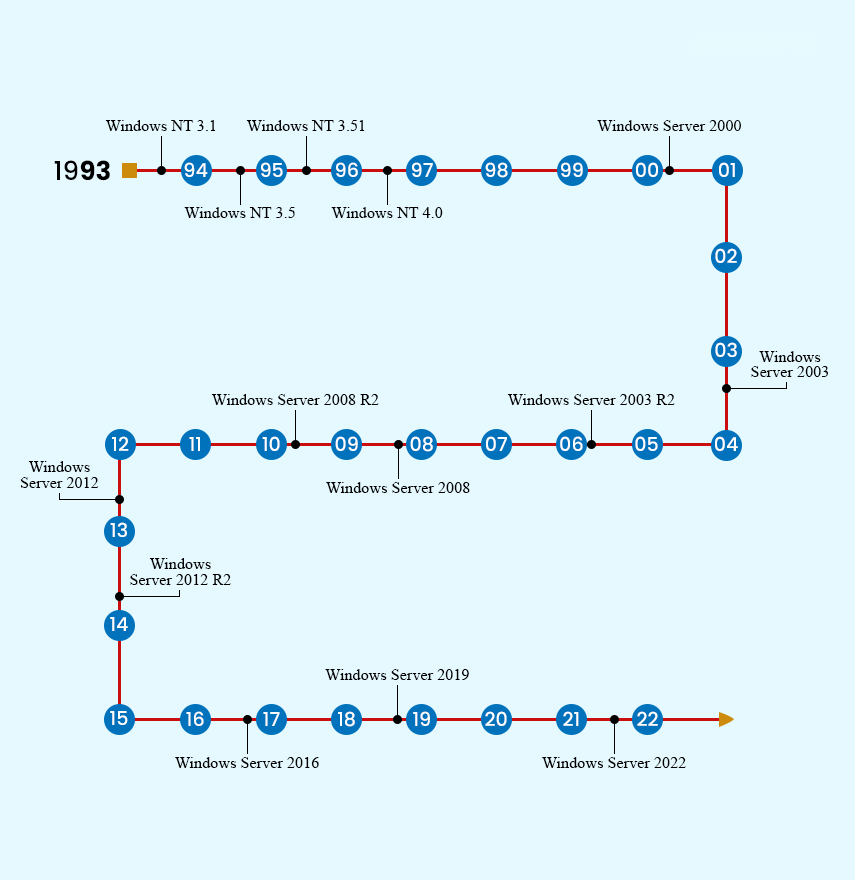
Major Windows Server releases වල timeline එකක්.
Windows NT Server Era
- Windows NT Server 3.1 (1993) — line එකේ පළවෙනි server OS එක.
- Windows NT Server 3.5 (1994) — performance සහ networking improvements.
- Windows NT Server 3.51 (1995) — refinements සහ අලුතෙන් එකතු කළ hardware support.
- Windows NT Server 4.0 (1996) — Windows 95-style interface එක server එකට හඳුන්වා දුන්නා.
The Windows Server Brand
- Windows Server 2000 — NT එකෙන් rebrand කරා; Active Directory හඳුන්වා දුන්නා.
- Windows Server 2003 සහ 2003 R2 — වැඩිදියුණු කළ security, IIS 6, සහ management.
- Windows Server 2008 සහ 2008 R2 — Server Core, Hyper-V virtualisation, සහ (R2 එකේ) 64-bit-only release එකක්.
- Windows Server 2012 සහ 2012 R2 — major Hyper-V සහ storage advances, නවීන UI එක, සහ cloud features.
Modern Windows Server
- Windows Server 2016 — Nano Server, containers, සහ Shielded VMs.
- Windows Server 2019 — Windows Admin Center, වැඩිදියුණු කළ hybrid/Azure integration, සහ security.
- Windows Server 2022 — secured-core server සහ ශක්තිමත් TLS/SMB security.
- Windows Server 2025 — අලුත්ම release එක, තවත් security, performance, සහ hybrid-cloud improvements එක්ක.
Servicing Channels
- Long-Term Servicing Channel (LTSC) — numbered releases (2016, 2019, 2022, 2025) අවුරුදු 10ක් පමණ support එක්ක.
- ස්ථාවර, දිගු කලක් support වන infrastructure එකට බොහෝ organisations deploy කරන්නේ මේ editions තමයි.
Frequently Asked Questions
Problem: අද කාලේ මම කුමන Windows Server version එකද පාවිච්චි කරන්න ඕන?
Solution: අලුත් deployments වලට, දිගුම support window එකට, අලුත්ම LTSC release එක (Windows Server 2025) හෝ ඔබේ software එකට support වන අලුත්ම එක පාවිච්චි කරන්න.
Problem: "R2" කියන්නේ මොකක්ද?
Solution: R2 releases කියන්නේ mid-cycle updates (උදා. 2008 R2, 2012 R2), කලින් version එකට features සහ improvements එකතු කරන.
Problem: එක එක version එකකට කොච්චර කාලයක් support එක තියෙනවද?
Solution: LTSC server releases වලට සාමාන්යයෙන් mainstream අවුරුදු 5ක් සහ extended අවුරුදු 5ක් පමණ ලැබෙනවා — මුළුමනින්ම අවුරුදු 10ක් පමණ.
Problem: Windows Server එකයි Windows desktop එකයි එකමද?
Solution: ඒවා kernel එකක් බෙදාගන්නවා, නමුත් Windows Server එක server roles (Active Directory, Hyper-V, IIS) වලට optimise කරලා තියෙනවා, තවද එයට වෙනස් licensing සහ support එකක් තියෙනවා.
Conclusion
NT Server 3.1 සිට Windows Server 2025 දක්වා, සෑම release එකක්ම කලින් එක මත අලුත් virtualisation, security, සහ cloud capabilities එක්ක ගොඩනැගුණා. අලුත් systems වලට, ඔබේ workloads support කරන අලුත්ම LTSC version එක තෝරන්න.
About TechHub
මේ guide එක TechHub Knowledge Base එකේ කොටසක්. තව step-by-step IT guides සහ support වලට techhub.com.lk එකට යන්න.