Overview
Event Viewer මගින් system, application, සහ security events වල විස්තරාත්මක logs record කරනවා, ඒ නිසා ප්රශ්න diagnose කරනකොට මුලින්ම යන තැන ඒක. Administrators ලට බොහෝවිට වෙන machine එකකට physically නොගිහින් ඒ logs inspect කරන්න වෙනවා. Event Viewer මගින් කෙලින්ම remote computer එකකට connect වෙන්න support කරනවා, ඒකෙන් ඔයාගේ desk එකෙන්ම ඒකේ logs review කරන්න පුළුවන්. මේ guide එකෙන් ඒක කොහොමද කියලා පැහැදිලි කරනවා.
Key Takeaways
- Event Viewer මගින් එකම network එකේ තියෙන remote computer එකකට connect වෙලා logs read කරන්න පුළුවන්.
- Remote PC එකේ අදාළ firewall rules enable කරලා තියෙන්න ඕන, ඒ වගේම ඒකේ administrative credentials ඔයාට ඕන.
- Computers දෙකම name එකෙන් හෝ IP address එකෙන් reach කරන්න පුළුවන් වෙන්න ඕන.
- මේ method එක read-focused: remote machine එකේ events ඔයා ඒක ළඟ ඉන්නවා වගේ බලනවා.
Open Event Viewer
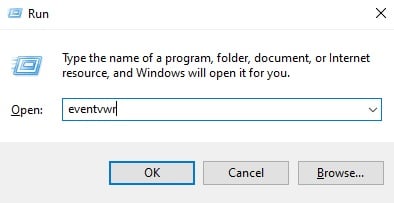
1. Run dialog එක open කරන්න Windows + R press කරන්න.
2. eventvwr.msc type කරලා Enter press කරන්න.
3. Event Viewer එක default විදිහට local computer එකේ logs පෙන්නමින් open වෙනවා.
eventvwr command එකෙන් Event Viewer එක launch කරනවා.
Connect to a Remote Computer
1. Event Viewer එකේ, වම් pane එකේ Event Viewer (Local) කියලා label කරපු top node එක right-click කරන්න.
2. context menu එකෙන් Connect to Another Computer තෝරන්න.
3. Another computer තෝරලා remote machine එකේ name එක හෝ IP address එක enter කරන්න.
4. අවශ්ය නම්, Connect as another user tick කරලා ඒ PC එකට administrator credentials දෙන්න.
5. remote computer එකේ logs console එකට load කරන්න OK click කරන්න.
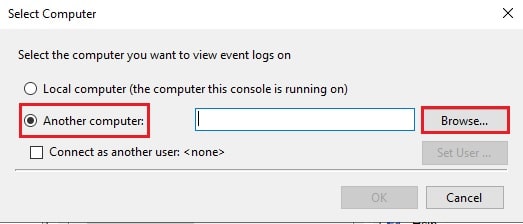
Connect dialog එකේ remote computer name එක enter කරනවා.
Note: Connection එකට ඉඩ දෙන්න, remote PC එකේ Windows Defender Firewall එකේ Remote Event Log Management rules enable කරලා තියෙන්න ඕන.
Enable the Firewall Rule on the Remote PC
1. remote computer එකේ, Windows Defender Firewall with Advanced Security open කරන්න.
2. Inbound Rules තෝරලා Remote Event Log Management group එක locate කරන්න.
3. Incoming Event Viewer connections වලට ඉඩ දෙන්න ඒ rules enable කරන්න.
4. Computers දෙකම එකම network එකේ තියෙනවා බවත් එකිනෙකා ping කරන්න පුළුවන් බවත් confirm කරන්න.
Warning: Remote log access enable කරන්නේ trusted, managed networks වල විතරයි. Untrusted network එකක මේ firewall rules විවෘත කරන එකෙන් ඔයාගේ exposure එක වැඩි කරනවා, ඒ නිසා ඒවා internal use එකට විතරක් සීමා කරගන්න.
Troubleshooting
Problem: Event Viewer එකෙන් RPC server එක unavailable කියලා report කරනවා.
Solution: remote PC එකේ Remote Event Log Management inbound firewall rules enable කරලා, Remote Procedure Call service එක run වෙනවද කියලා verify කරන්න.
Problem: Connect වෙනකොට Access is denied වෙනවා.
Solution: Connect as another user option එක පාවිච්චි කරලා, remote machine එකේ administrator rights තියෙන account එකක් දෙන්න.
Problem: Remote computer එක name එකෙන් හම්බවෙන්නේ නෑ.
Solution: Name resolution වැඩ කරනවද කියලා confirm කරන්න, නැත්නම් hostname එක වෙනුවට machine එකේ IP address එකෙන් connect කරන්න.
Problem: Connection එක හරහා logs load වෙන්නේ හරිම හෙමින්.
Solution: Entire ලොකු logs network එක හරහා load කරනවා වෙනුවට, ඔයාට ඕන specific log එකට සහ time range එකට filter කරන්න.
Conclusion
Remote Event Viewer access එකෙන් machine ගොඩක් support කරනකොට time save වෙනවා. Firewall rules තැනට දාලා හරි credentials ඔයාට තියෙන වෙලාවක, වෙන computer එකක logs review කරන එක ඔයාගේ console එකෙන් connect වෙනවා තරම්ම ලේසියි.
About TechHub
මේ guide එක TechHub Knowledge Base එකේ කොටසක්. තව step-by-step IT guides සහ support වලට techhub.com.lk එකට යන්න.