Overview
Bluetooth has advanced through versions 5, 5.2, and 5.3, each adding improvements in audio, power efficiency, and reliability. This guide explains the differences and shows how to check which Bluetooth version your Windows PC has.
Bluetooth versions 5, 5.2, and 5.3 each add new capabilities.
Key Takeaways
- Bluetooth 5.0 brought longer range, faster speed, and better Bluetooth Low Energy (LE).
- Bluetooth 5.2 introduced LE Audio and the efficient LC3 codec.
- Bluetooth 5.3 improved power efficiency, reliability, and connection performance.
- Both devices must support a version (and feature) to use it.
What Is Bluetooth?
Bluetooth is a short-range wireless standard for connecting devices like headphones, keyboards, and speakers. Newer versions are backward compatible, so devices connect at the highest version both support.
Bluetooth 5.0
- Up to roughly 2x the data speed and 4x the range of Bluetooth 4.2 (for LE).
- Bigger advertising data capacity for IoT/beacons.
- Stronger Bluetooth Low Energy for battery-friendly devices.
Bluetooth 5.2
- Introduced LE Audio, a new architecture for Bluetooth audio.
- Added the LC3 codec for better sound quality at lower bitrates.
- Isochronous Channels enable features like Auracast broadcast audio and better hearing-aid support.
- Enhanced Attribute Protocol (EATT) for improved performance.
Bluetooth 5.3
- Improved power efficiency for longer battery life.
- More reliable connections with periodic advertising enhancements.
- Faster, more secure connection establishment.
- Refinements that build on LE Audio from 5.2.
How to Check Your Bluetooth Version in Windows
1. Right-click Start and open Device Manager.
2. Expand Bluetooth and double-click your Bluetooth adapter.
3. Open the Advanced tab and find the LMP (Link Manager Protocol) version.
4. Match the LMP number to the Bluetooth version — for example LMP 11.x = Bluetooth 5.2, LMP 12.x = Bluetooth 5.3.
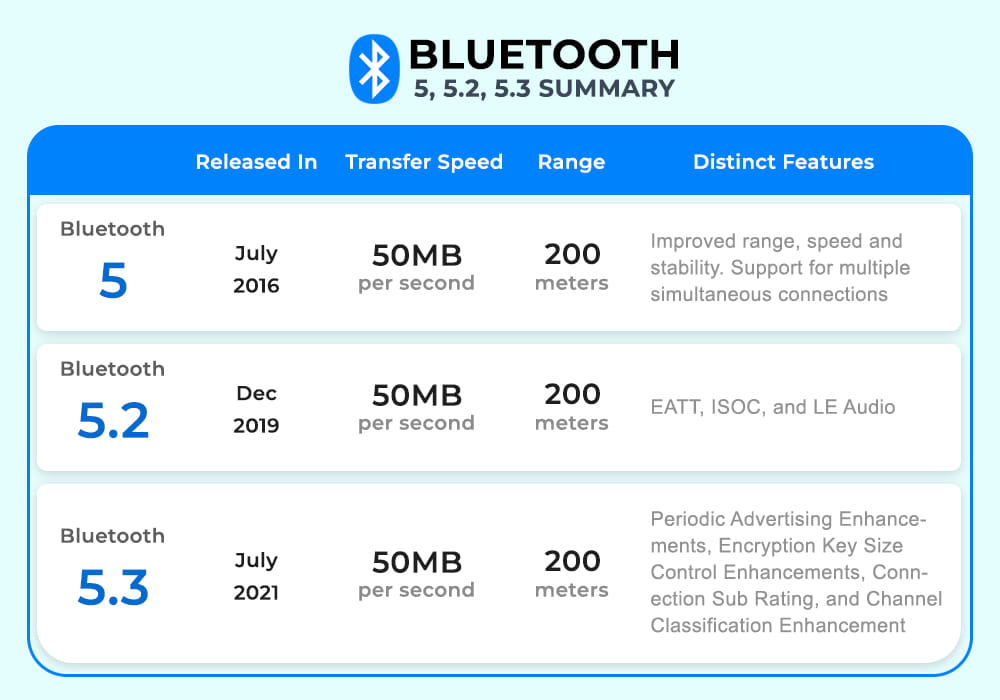
A comparison of Bluetooth versions and their features.
Frequently Asked Questions
Problem: My headphones support 5.3 but my PC is 5.0.
Solution: They connect at the lower common version (5.0). To use 5.2/5.3 features like LE Audio, both devices must support them.
Problem: How do I get a newer Bluetooth version?
Solution: Bluetooth is hardware-based. Add a USB Bluetooth 5.3 adapter to a PC, or upgrade the device, to gain newer features.
Problem: The LMP version is confusing.
Solution: Use the mapping: LMP 9.x = BT 5.0, 10.x = 5.1, 11.x = 5.2, 12.x = 5.3.
Problem: LE Audio is not working.
Solution: LE Audio needs Bluetooth 5.2+ on both devices and OS support; ensure drivers and firmware are up to date.
Conclusion
Each Bluetooth 5.x release refines audio, efficiency, and reliability. Check your LMP version in Device Manager to know what you have — and remember both devices must support a version and feature to benefit from it.
</w:pBdr><w:spacing w:before="220" w:after="40"/></w:pPr><w:r><w:rPr><w:b/><w:bCs/><w:color w:val="0B5394"/><w:sz w:val="21"/><w:szCs w:val="21"/><w:rFonts w:ascii="Calibri" w:cs="Calibri" w:eastAsia="Calibri" w:hAnsi="Calibri"/></w:rPr><w:t xml:space="preserve">About TechHub
This guide is part of the TechHub Knowledge Base. For more step-by-step IT guides and support, visit techhub.com.lk.