Overview
Bluetooth version 5, 5.2, සහ 5.3 හරහා advance වෙලා — හැම එකක්ම audio, power efficiency, සහ reliability වල improvements එකතු කරනවා. මේ guide එකෙන් වෙනස්කම් පැහැදිලි කරලා, ඔබේ Windows PC එකේ කොයි Bluetooth version එකද තියෙන්නේ කියලා බලන ආකාරය පෙන්නනවා.
Bluetooth versions 5, 5.2, සහ 5.3 හැම එකක්ම අලුත් capabilities එකතු කරනවා.
Key Takeaways
- Bluetooth 5.0 වැඩි range, වේගවත් speed, සහ හොඳ Bluetooth Low Energy (LE) ගෙනාවා.
- Bluetooth 5.2 LE Audio සහ efficient LC3 codec එක introduce කළා.
- Bluetooth 5.3 power efficiency, reliability, සහ connection performance වැඩිදියුණු කළා.
- Version එකක් (සහ feature එකක්) පාවිච්චි කරන්න devices දෙකම ඒක support කරන්න ඕන.
Bluetooth කියන්නේ මොකක්ද?
Bluetooth කියන්නේ headphones, keyboards, සහ speakers වගේ devices connect කරන short-range wireless standard එකක්. අලුත් versions backward compatible, ඒ නිසා devices connect වෙන්නේ දෙකම support කරන ඉහළම version එකේ.
Bluetooth 5.0
- Bluetooth 4.2 එකට වඩා ~2x data speed එකක් සහ 4x range එකක් (LE වලට).
- IoT/beacons වලට ලොකු advertising data capacity එකක්.
- Battery-friendly devices වලට strong Bluetooth Low Energy.
Bluetooth 5.2
- Bluetooth audio වලට අලුත් architecture එකක් — LE Audio introduce කළා.
- අඩු bitrates වල හොඳ sound quality වලට LC3 codec එක එකතු කළා.
- Isochronous Channels එකෙන් Auracast broadcast audio සහ හොඳ hearing-aid support වගේ features enable කරනවා.
- වැඩිදියුණු performance වලට Enhanced Attribute Protocol (EATT).
Bluetooth 5.3
- දිග battery life වලට වැඩිදියුණු power efficiency.
- Periodic advertising enhancements එක්ක වඩා reliable connections.
- වේගවත්, වඩා secure connection establishment.
- 5.2 එකේ LE Audio මත build වෙන refinements.
Windows එකේ ඔබේ Bluetooth Version එක බලන්නේ කොහොමද
1. Start එක right-click කරලා Device Manager open කරන්න.
2. Bluetooth expand කරලා ඔබේ Bluetooth adapter එක double-click කරන්න.
3. Advanced tab එක open කරලා LMP (Link Manager Protocol) version එක හොයන්න.
4. LMP number එක Bluetooth version එකට match කරන්න — උදාහරණයක් LMP 11.x = Bluetooth 5.2, LMP 12.x = Bluetooth 5.3.
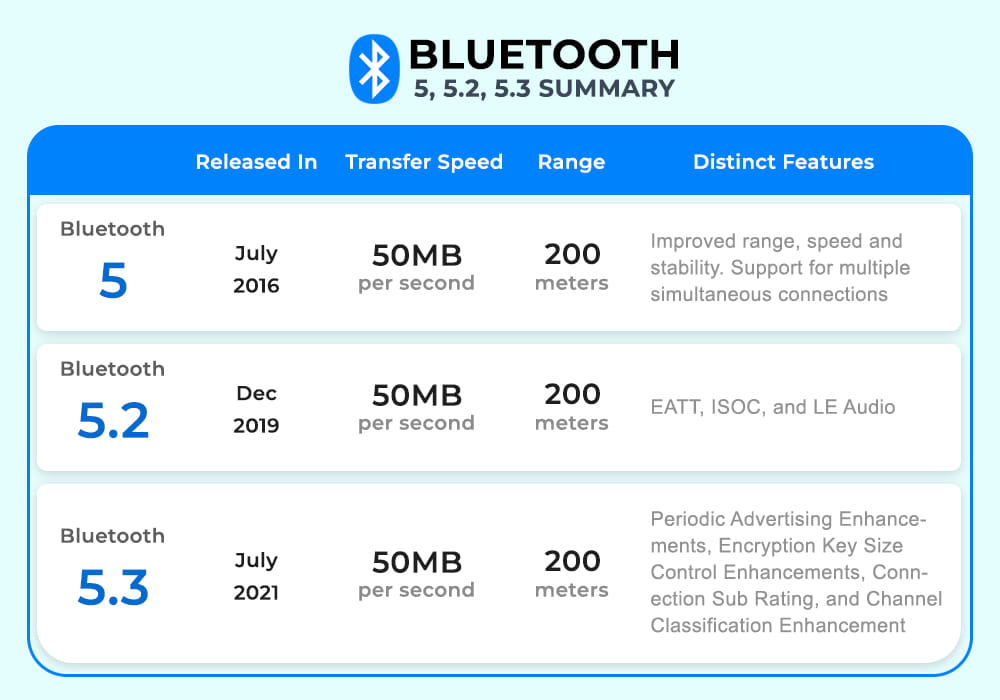
Bluetooth versions සහ ඒවායේ features compare කිරීමක්.
Frequently Asked Questions
Problem: මගේ headphones 5.3 support කරනවා, ඒත් PC එක 5.0.
Solution: ඒවා connect වෙන්නේ අඩු common version එකේ (5.0). LE Audio වගේ 5.2/5.3 features පාවිච්චි කරන්න, devices දෙකම ඒවා support කරන්න ඕන.
Problem: අලුත් Bluetooth version එකක් ගන්නේ කොහොමද?
Solution: Bluetooth hardware-based. PC එකකට USB Bluetooth 5.3 adapter එකක් add කරන්න, නැත්නම් device එක upgrade කරන්න, අලුත් features වලට.
Problem: LMP version එක confusing.
Solution: Mapping එක පාවිච්චි කරන්න: LMP 9.x = BT 5.0, 10.x = 5.1, 11.x = 5.2, 12.x = 5.3.
Problem: LE Audio වැඩ කරන්නේ නෑ.
Solution: LE Audio වලට devices දෙකේම Bluetooth 5.2+ සහ OS support ඕන; drivers සහ firmware up to date කියලා බලන්න.
Conclusion
හැම Bluetooth 5.x release එකක්ම audio, efficiency, සහ reliability refine කරනවා. ඔබට තියෙන්නේ මොකක්ද දැනගන්න Device Manager එකේ LMP version එක බලන්න — මතක තියාගන්න, version එකකින් සහ feature එකකින් benefit ගන්න devices දෙකම ඒක support කරන්න ඕන.
About TechHub
මේ guide එක TechHub Knowledge Base එකේ කොටසක්. තව step-by-step IT guides සහ support වලට techhub.com.lk එකට යන්න.