Overview
Windows start වෙන්නේ නෑ, Startup Repair එකෙනුත් fix කරන්න බෑ නම්, bootrec tool එකෙන් boot sector එක repair කරලා Boot Configuration Data (BCD) එක rebuild කරන්න පුළුවන්. මේ guide එකෙන් recovery environment එකට යන ආකාරය සහ Windows ආපහු boot කරගන්න bootrec පාවිච්චි කරන ආකාරය පෙන්නනවා.
Bootrec එකෙන් boot sector එක repair කරලා boot configuration එක rebuild කරනවා.
Key Takeaways
- bootrec run වෙන්නේ Windows Recovery Environment (WinRE) Command Prompt එකෙන්.
- මුලින්ම Startup Repair try කරන්න; fail වුණොත් bootrec පාවිච්චි කරන්න.
- Commands හතර: /fixmbr, /fixboot, /scanos, /rebuildbcd.
- Recovery Command Prompt එකට යන්න Windows installation media ඕන වෙන්න පුළුවන්.
Common Boot Problems
- Corrupted Master Boot Record (MBR) එකක් හෝ boot sector එකක්.
- Damaged හෝ missing BCD store එකක්.
- "Bootmgr is missing" හෝ operating system not found error එකක්.
- Failed update එකකට හෝ disk change එකකට පස්සේ boot files නැති වීම.
Step 1 — මුලින්ම Startup Repair Try කරන්න
1. Recovery එකට boot කරන්න (startup එක තුන් වතාවක් interrupt කරන්න, නැත්නම් Windows installation media එකෙන් boot කරන්න).
2. Troubleshoot > Advanced options > Startup Repair වලට යන්න.
3. ඒකෙන් issue එක fix වුණොත් ඉවරයි; නැත්නම් bootrec එකෙන් continue කරන්න.
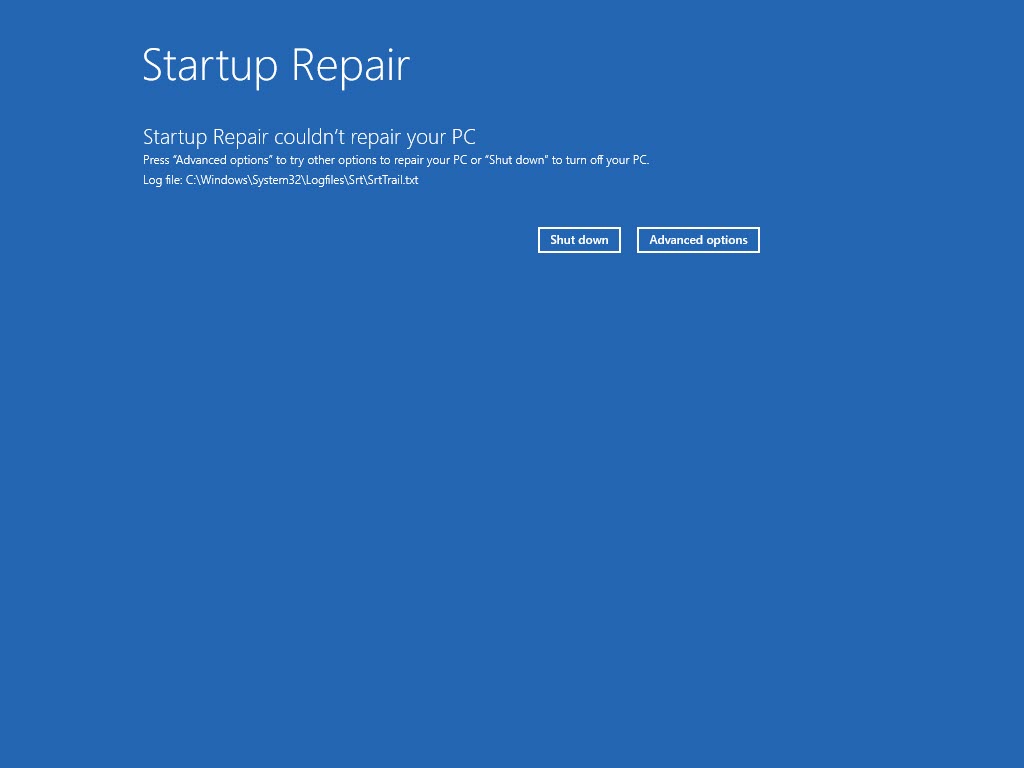
Startup Repair එකට PC එක fix කරන්න බැරි වුණා — දැන් bootrec පාවිච්චි කරන්න වෙලාව.
Step 2 — Recovery එකේ Command Prompt එක Open කරන්න
1. Recovery environment එකේ, Troubleshoot > Advanced options > Command Prompt තෝරන්න.
2. (නැත්නම් installation media එකෙන් boot කරලා "Repair your computer" > Command Prompt තෝරන්න.)
Step 3 — Bootrec Commands Run කරන්න
1. Run: bootrec /fixmbr (Master Boot Record එක repair කරනවා).
2. Run: bootrec /fixboot (අලුත් boot sector එකක් write කරනවා). "Access is denied" ආවොත්, මුලින් bootsect /nt60 sys run කරන්න, නැත්නම් EFI partition එක repair කරන්න.
3. Run: bootrec /scanos (Windows installations වලට scan කරනවා).
4. Run: bootrec /rebuildbcd (BCD එක rebuild කරලා හම්බ වුණ installations add කරනවා).
5. exit type කරලා PC එක restart කරන්න.
Note: UEFI/GPT systems වල, bootrec විතරින් fix නොවුණොත් EFI System Partition එක repair කරන්නත් වෙන්න පුළුවන් (bcdboot C:\Windows /s <EFI letter> /f UEFI පාවිච්චි කරලා).
Troubleshooting
Problem: bootrec /fixboot වලට "Access is denied".
Solution: UEFI systems වල common. bcdboot එකෙන් EFI partition එක repair කරන්න, නැත්නම් bootsect /nt60 sys run කරලා retry කරන්න.
Problem: bootrec /rebuildbcd installations හොයාගන්නේ නෑ.
Solution: මුලින් bootrec /scanos run කරන්න; තවම නැත්නම්, BCD path එක හෝ partition එක වැරදි වෙන්න පුළුවන් — ඔබේ Windows folder එකට point කරලා bcdboot එකෙන් rebuild කරන්න.
Problem: තවම boot වෙන්නේ නෑ.
Solution: BIOS/UEFI එකේ boot order එකයි, හරි disk එක boot වෙන්න set වෙලාද කියලා බලන්න; disk එක healthy ද බලන්න (chkdsk).
Problem: Recovery option එකක් නෑ.
Solution: වෙන PC එකක Windows installation media හදලා, ඒකෙන් boot කරලා, Repair your computer > Command Prompt තෝරන්න.
Conclusion
Windows start වෙන්නේ නැති වෙලාවට bootrec කියන්නේ powerful repair tool එකක්. මුලින්ම Startup Repair try කරලා, ඊට පස්සේ recovery Command Prompt එකෙන් /fixmbr, /fixboot, /scanos, සහ /rebuildbcd run කරලා boot configuration එක rebuild කරලා Windows එකට ආපහු එන්න.
About TechHub
මේ guide එක TechHub Knowledge Base එකේ කොටසක්. තව step-by-step IT guides සහ support වලට techhub.com.lk එකට යන්න.