Windows 11 සහ 10 වල Primary Monitor එක වෙනස් කරන ක්රම 3ක්
ඔබේ main screen එක කුමන display එකද කියලා Settings හරහා හෝ command-line tools හරහා set කරගන්නේ කොහොමද කියලා බලමු.
Overview
Primary monitor එකේ තමයි taskbar එක, Start menu එක පෙන්නන්නේ, apps ගොඩක් open වෙන්නෙත් එතනමයි. මේ guide එකෙන් Windows 11 සහ 10 වල කුමන display එක primary කරගන්නද කියලා set කරගන්නේ කොහොමද, ඒ වගේම command-line options මොනවද කියලා පෙන්නනවා.
Windows වල primary monitor එක වෙනස් කිරීම.
Key Takeaways
- Primary monitor එකේ තමයි default විදිහට taskbar එකයි අලුත් windows එනවා.
- ඒක set කරගන්නේ Settings > System > Display හරහා.
- මුලින්ම screens identify කරගන්න, එතකොට හරි එක තෝරගන්න පුළුවන්.
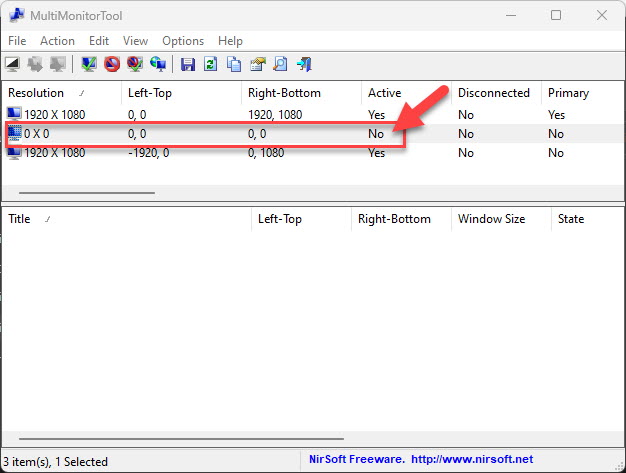
- NirCmd/MultiMonitorTool වලින් command line එකෙන් ඒක වෙනස් කරගන්න පුළුවන්.
Primary Monitor එක වෙනස් කිරීම (Settings)
1. Settings > System > Display open කරන්න.
2. "Identify" click කරලා එක එක monitor එකේ number එක බලාගන්න.
3. diagram එකේ primary කරගන්න ඕන display එක click කරන්න.
4. "Multiple displays" expand කරලා "Make this my main display" tick කරන්න.
Command Line එකෙන් වෙනස් කිරීම
Note: NirSoft tools (NirCmd, MultiMonitorTool) download කරන්නේ නම් official nirsoft.net website එකෙන් විතරයි කරන්න.
1. NirSoft එකෙන් NirCmd හෝ MultiMonitorTool download කරගන්න.
2. MultiMonitorTool එකෙන් නම් මේක run කරන්න: MultiMonitorTool.exe /SetPrimary 2 (ඔබට ඕන monitor number එක දාන්න).
3. නැත්නම් එකේ GUI එකෙන් monitor එකක් right-click කරලා "Set As Primary Monitor" තෝරන්න.
Troubleshooting
Problem: "Make this my main display" එක greyed out වෙලා.
Solution: තෝරගත්ත monitor එක දැනටමත් primary — මුලින්ම වෙනත් display එකක් තෝරන්න.
Problem: Taskbar එක move වුනේ නෑ.
Solution: Sign out/in කරන්න, නැත්නම් taskbar එක fixed main setting එකක් එක්ක "all displays" වලට pin වෙලා නැති බව confirm කරගන්න.
Problem: Windows වැරදි monitor එකේ open වෙනවා.
Solution: හරි primary display එක set කරන්න; සමහර apps ඒවගේ අන්තිම position එක මතක තියාගන්නවා — ඒවා move කරලා එතනම close කරන්න.
Problem: දෙවෙනි monitor එක detect වෙන්නෑ.
Solution: "Detect" click කරන්න, cables/inputs check කරන්න, GPU driver එක update කරන්න.
Conclusion
Primary monitor එක වෙනස් කරගන්න ඉක්මන්ම ක්රමය Settings > System > Display හරහා — screens identify කරලා, එකක් තෝරලා, "Make this my main display" tick කරන්න. Automation වලට නම්, NirSoft එකේ MultiMonitorTool එකෙන් command එකකින් හෝ script එකකින් primary එක set කරගන්න පුළුවන්.