Windows Activate වෙලාද කියලා check කරන ක්රම 3ක්
Settings, Control Panel සහ command line එක හරහා ඔබේ Windows activation status එක තහවුරු කරගන්න.
Overview
Windows activate වෙලාද කියලා දැනගැනීම updates, personalization සහ compliance වලට වැදගත්. මේ guide එකෙන් activation status එක check කරන්න ක්රම තුනක් — Settings, Control Panel සහ slmgr command එක — පෙන්නනවා.
Windows activation status එක check කිරීම.
Key Takeaways
- Windows 10/11 වල Settings > Activation එකෙන් status එක පෙන්නනවා.
- Control Panel (System) එකෙන් හැම version එකකම ඒක පෙන්නනවා.
- slmgr /xpr සහ /dlv වලින් විස්තරාත්මක status එකක් දෙනවා.
- Activate කරන්නේ genuine, licensed key එකකින් විතරයි.
Method 1: Settings
1. Settings > System > Activation (Windows 10/11) open කරන්න.
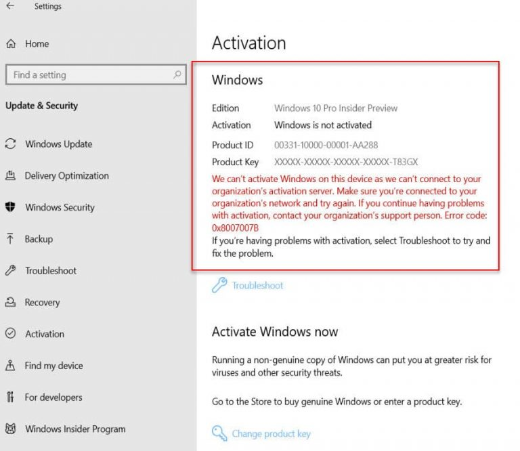
2. status එක කියවන්න: "Windows is activated…".
3. ඔබට license එක තියෙන්නේ කොහොමද (digital license හෝ product key) කියලත් පෙන්නනවා.
Method 2: Control Panel (System)
1. Control Panel > System and Security > System (හෝ sysdm.cpl ආසන්න view එක) open කරන්න.
2. පහළම තියෙන Windows activation කොටසට scroll කරන්න.
3. ඒකෙන් activation status එකයි Product ID එකයි පෙන්නනවා.
Method 3: Command Line (slmgr)
1. Command Prompt එක administrator විදිහට open කරන්න.
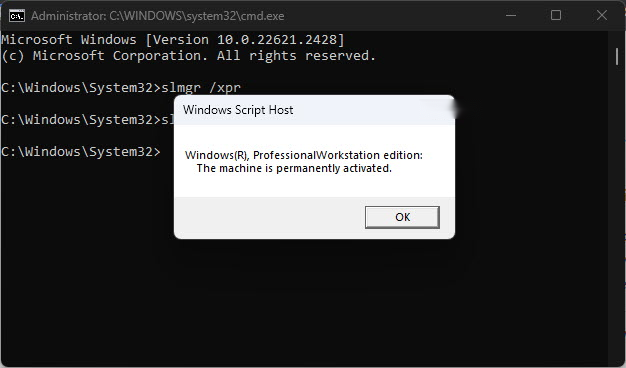
2. ඉක්මන් status එක: slmgr /xpr
3. විස්තරාත්මක info: slmgr /dlv (edition, license status, activation ID).
4. "The machine is permanently activated" කියන්නේ ඔබ පූර්ණ licensed කියන එකයි.
slmgr එකෙන් activation check කිරීම.
If Windows Isn’t Activated
1. Settings > System > Activation open කරන්න.
2. ඔබේ digital license එකට link වෙච්ච Microsoft account එකෙන් sign in කරන්න, නැත්නම් genuine product key එකක් enter කරන්න.
3. ඔබ recently hardware වෙනස් කරලා නම් Activation troubleshooter එක පාවිච්චි කරන්න.
4. නීත්යනුකූලව මිලදී ගත්ත licenses විතරක් පාවිච්චි කරන්න.
Troubleshooting
Problem: Hardware වෙනසකට පස්සේ "Windows not activated".
Solution: Activation troubleshooter එක run කරලා link වෙච්ච Microsoft account එකෙන් sign in කරලා ඔබේ digital license එක ආපහු apply කරන්න.
Problem: slmgr එකෙන් grace/notification period එකක් පෙන්නනවා.
Solution: valid key එකක් enter/reapply කරන්න; grace period එක ඉවර වුණාම activation එක අනිවාර්යයි.
Problem: Digital license එක හඳුනගන්නේ නෑ.
Solution: license එකට බැඳුණු හරි Microsoft account එකට ඔබ sign in වෙලාද කියලා තහවුරු කරගන්න.
Problem: key එකක් ඕන.
Solution: Microsoft වලින් හෝ authorized retailer කෙනෙකුගෙන් genuine license එකක් මිලදී ගන්න.
Conclusion
Activation එක ඉක්මනට check කරන්න Settings > System > Activation එකේ, Control Panel ගේ System page එකේ, නැත්නම් නිශ්චිත උත්තරයකට slmgr /xpr එකෙන් බලන්න. Windows activate වෙලා නැත්නම්, link වෙච්ච Microsoft account එකෙන් sign in කරලා නැත්නම් genuine key එකක් enter කරලා activate කරන්න.
About TechHub
මේ guide එක TechHub Knowledge Base එකේ කොටසක්. තව step-by-step IT guides සහ support වලට techhub.com.lk එකට යන්න.