Overview
Settings app එකේ තනි තනි pages hide කරන්න, නැත්නම් අනුමත pages list එකක් විතරක් පෙන්නන්න Windows එක administrators ට ඉඩ දෙනවා. Share කරන, family, හෝ managed computers වල යම් යම් තැන්වල වෙනස්කම් වළක්වන්න ඕන අවස්ථාවලට මේක ප්රයෝජනවත්. Pro සහ Enterprise editions වල Local Group Policy Editor එකෙන්, නැත්නම් ඕනෑම edition එකක registry එකෙන් මේක apply කරන්න පුළුවන්.
Key Takeaways
- ඔබට specific pages hide කරන්න, නැත්නම් තෝරගත් pages කට්ටලයක් විතරක් allow කරන්න පුළුවන්.
- Pro, Enterprise, සහ Education editions වල Group Policy තමයි ලේසිම ක්රමය.
- Registry method එක Home ඇතුළු සියලුම editions වල වැඩ කරනවා.
- හැම Settings page එකකටම ඒක reference කරන්න පාවිච්චි කරන URI identifier එකක් තියෙනවා (උදාහරණයක් විදිහට bluetooth).
Understanding Page URIs
හැම Settings page එකකටම කෙටි URI එකක් තියෙනවා, උදාහරණයක් විදිහට home, bluetooth, display, windowsupdate, හෝ about. මේවා semicolon වලින් වෙන් කරපු list එකකට එකතු කරලා, ඒ pages hide කරන්න "hide:" කියලා, නැත්නම් ඒ pages විතරක් පෙන්නන්න "showonly:" කියලා prefix කරනවා.
Method 1: Using Group Policy
1. Win + R press කරලා gpedit.msc type කරලා Enter press කරන්න.
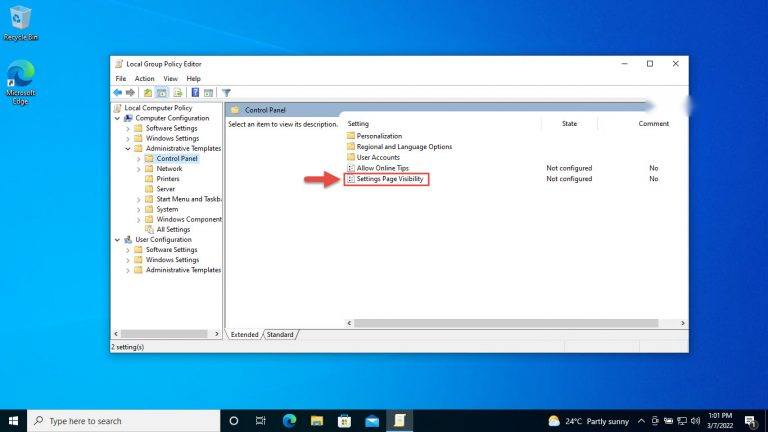
2. Computer Configuration > Administrative Templates > Control Panel වලට යන්න.
3. "Settings Page Visibility" double-click කරලා ඒක Enabled කරන්න.
4. Options box එකේ ඔබේ list එක ඇතුළත් කරන්න, උදාහරණයක් විදිහට hide:bluetooth;display, ඊට පස්සේ OK click කරන්න.
Settings Page Visibility policy එකේ hide: හෝ showonly: list එකක් ඇතුළත් කරන්න.
Method 2: Using the Registry
1. Win + R press කරලා regedit type කරලා Enter press කරන්න.
2. HKEY_LOCAL_MACHINE\SOFTWARE\Microsoft\Windows\CurrentVersion\Policies\Explorer වලට navigate කරන්න.
3. SettingsPageVisibility කියලා නමක් තියෙන අලුත් String Value එකක් හදන්න.
4. ඒකේ value data එකට ඔබේ list එක දෙන්න, උදාහරණයක් විදිහට showonly:home;windowsupdate, ඊට පස්සේ PC එක restart කරන්න.
WARNING: Registry එක edit කරන්න කලින් backup එකක් ගන්න (File > Export). Policies keys වලට වැරදි වෙනසක් කරාම Settings වල කොටස් වලින් ඔබව lock වෙන්න පුළුවන්.
TIP: වෙනස reverse කරන්න, SettingsPageVisibility value එක delete කරන්න, නැත්නම් Group Policy එක ආපහු Not Configured කරන්න.
Troubleshooting
Problem: List එකක් apply කරාට පස්සේ Settings app එක blank හෝ හිස් window එකකට open වෙනවා.
Solution: ඔබේ showonly: list එක වැඩිය restrictive වෙන්න පුළුවන්, නැත්නම් typo එකක් තියෙන්න පුළුවන්. List එකට home ඇතුළත් කරලා, හැම URI එකකම spelling එක නැවත check කරන්න.
Problem: Group Policy Editor එක නෑ.
Solution: gpedit.msc එක Home editions වල නෑ. ඒ වෙනුවට Policies\Explorer යටතේ registry method එක පාවිච්චි කරන්න.
Problem: වෙනස්කම් effect වෙන්නේ නෑ.
Solution: Elevated Command Prompt එකක gpupdate /force run කරන්න, නැත්නම් policy එක apply වෙන්න computer එක restart කරන්න.
Problem: හැම දෙයක්ම default එකට reset කරන්න ඕන.
Solution: SettingsPageVisibility registry value එක delete කරන්න, නැත්නම් policy එක Not Configured කරලා restart කරන්න.
Conclusion
Settings app එක පිළිවෙළට හදන්න හෝ lock down කරන්න Settings Page Visibility කියන්නේ සරල ක්රමයක්. Pages කීපයක් අයින් කරන්න hide: පාවිච්චි කරන්න, නැත්නම් users ට ඕන ඒවා විතරක් පෙන්නන්න showonly: පාවිච්චි කරන්න, සහ වෙනස කරන්න කලින් හැමවිටම registry backup එකක් තියාගන්න.
About TechHub
මේ guide එක TechHub Knowledge Base එකේ කොටසක්. තව step-by-step IT guides සහ support වලට techhub.com.lk එකට යන්න.