Overview
Intel’s Core processor names pack a lot of information — the brand, tier, generation, and a suffix that hints at its purpose. Knowing how to read them helps you compare CPUs and judge how modern a system is. This guide explains the naming scheme and walks through the generations.
Intel processor generations span from 1st-gen Nehalem to today’s Core Ultra.
Key Takeaways
- An Intel Core name encodes brand, tier (i3/i5/i7/i9), generation, SKU, and suffix.
- The first digits after the dash indicate the generation (e.g. i7-13700K is 13th gen).
- Higher tiers (i7/i9) and newer generations are generally faster.
- Suffixes like K, H, U, and F indicate the chip’s purpose.
How to Read an Intel Core Name
- Brand — Intel Core (or the newer Core Ultra).
- Brand modifier — i3, i5, i7, i9 (entry to high-end), or Ultra 5/7/9.
- Generation indicator — the first one or two digits of the number (e.g. the 13 in i7-13700K = 13th gen).
- SKU — the remaining digits showing the specific model within that tier.
- Suffix — letters indicating purpose (see below).
Common Suffixes
- K — unlocked for overclocking (desktop).
- F — no integrated graphics (needs a discrete GPU).
- H — high-performance laptop chip.
- U — low-power, efficient laptop chip.
- T — power-optimized desktop chip; G-series include stronger integrated graphics.
Intel Generations Timeline
- 1st Gen — Nehalem; 2nd — Sandy Bridge; 3rd — Ivy Bridge; 4th — Haswell; 5th — Broadwell.
- 6th — Skylake; 7th — Kaby Lake; 8th — Kaby Lake R/Coffee Lake; 9th — Coffee Lake.
- 10th — Comet Lake/Ice Lake; 11th — Tiger Lake/Rocket Lake; 12th — Alder Lake.
- 13th — Raptor Lake; 14th — Raptor Lake Refresh; newest — Core Ultra (Meteor Lake and later).
Why the Generation Matters
- Newer generations bring better performance per watt, efficiency, and features.
- From 12th gen, Intel uses a hybrid design with performance (P) and efficiency (E) cores.
- The Core Ultra branding marks a shift to new architectures with built-in AI (NPU) acceleration.
- Windows 11 officially supports 8th-gen and newer Intel CPUs.
Frequently Asked Questions
Problem: How do I tell which generation a CPU is?
Solution: Read the first digits after the dash: i5-1240P is 12th gen, i7-9700K is 9th gen. Core Ultra uses a new scheme (e.g. Core Ultra 7 155H).
Problem: Is a higher i-number always better?
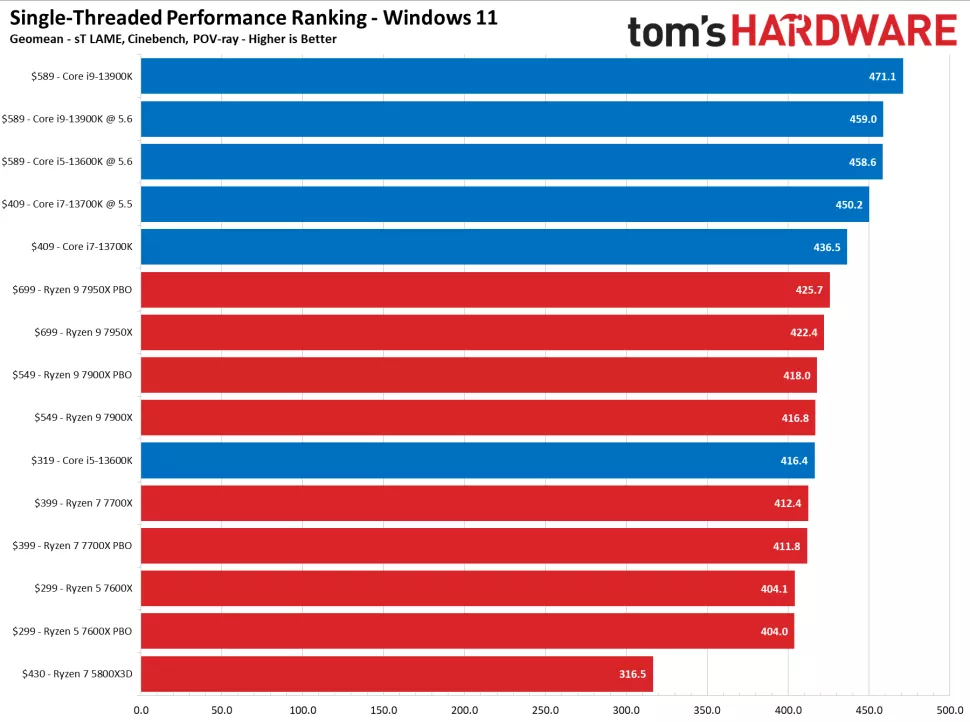
Solution: Within the same generation, yes (i7 > i5). Across generations, compare benchmarks — a newer i5 can beat an older i7.
Problem: What does the K suffix mean?
Solution: It marks an unlocked desktop chip that can be overclocked on a compatible (Z-series) motherboard.
Problem: Which generation do I need for Windows 11?
Solution: Windows 11 officially supports 8th-generation Intel Core and newer.
Conclusion
Once you can read an Intel Core name, comparing CPUs is easy: identify the tier, generation, and suffix, then check benchmarks for the exact models. Newer generations and the new Core Ultra line bring better efficiency and features.
</w:pBdr><w:spacing w:before="220" w:after="40"/></w:pPr><w:r><w:rPr><w:b/><w:bCs/><w:color w:val="0B5394"/><w:sz w:val="21"/><w:szCs w:val="21"/><w:rFonts w:ascii="Calibri" w:cs="Calibri" w:eastAsia="Calibri" w:hAnsi="Calibri"/></w:rPr><w:t xml:space="preserve">About TechHub
This guide is part of the TechHub Knowledge Base. For more step-by-step IT guides and support, visit techhub.com.lk.