Overview
Intel Core processor names වල ගොඩක් information තියෙනවා — brand එක, tier එක, generation එක සහ ඒකේ purpose එක කියන suffix එකක්. ඒවා කියවන්න දැනගත්තම CPUs compare කරන්නත්, system එකක් කොච්චර modern ද කියලා තේරුම්ගන්නත් ලේසියි. මේ guide එකෙන් naming scheme එකයි generations එකයි පැහැදිලි කරනවා.
Intel processor generations 1st-gen Nehalem සිට අද Core Ultra දක්වා විහිදෙනවා.
Key Takeaways
- Intel Core name එකකින් brand, tier (i3/i5/i7/i9), generation, SKU සහ suffix encode කරනවා.
- Dash එකට පස්සේ ඉස්සරහ digits වලින් generation එක පෙන්නනවා (බ. i7-13700K = 13th gen).
- ඉහළ tiers (i7/i9) සහ අලුත් generations සාමාන්යයෙන් වේගවත්.
- K, H, U, F වගේ suffixes වලින් chip එකේ purpose එක පෙන්නනවා.
Intel Core Name එකක් කියවන්නේ කොහොමද
- Brand — Intel Core (හෝ අලුත් Core Ultra).
- Brand modifier — i3, i5, i7, i9 (entry සිට high-end), හෝ Ultra 5/7/9.
- Generation indicator — number එකේ මුල් එක/දෙක digit (බ. i7-13700K එකේ 13 = 13th gen).
- SKU — ඒ tier එක ඇතුළේ specific model එක පෙන්නන ඉතුරු digits.
- Suffix — purpose එක පෙන්නන letters (පහත බලන්න).
Common Suffixes
- K — overclocking වලට unlocked (desktop).
- F — integrated graphics නෑ (discrete GPU එකක් ඕන).
- H — high-performance laptop chip.
- U — low-power, efficient laptop chip.
- T — power-optimized desktop chip; G-series වල හොඳ integrated graphics.
Intel Generations Timeline
- 1st Gen — Nehalem; 2nd — Sandy Bridge; 3rd — Ivy Bridge; 4th — Haswell; 5th — Broadwell.
- 6th — Skylake; 7th — Kaby Lake; 8th — Kaby Lake R/Coffee Lake; 9th — Coffee Lake.
- 10th — Comet Lake/Ice Lake; 11th — Tiger Lake/Rocket Lake; 12th — Alder Lake.
- 13th — Raptor Lake; 14th — Raptor Lake Refresh; අලුත්ම — Core Ultra (Meteor Lake සහ පස්සේ).
Generation එක වැදගත් ඇයි
- අලුත් generations වලින් හොඳ performance per watt, efficiency සහ features එනවා.
- 12th gen සිට, Intel performance (P) සහ efficiency (E) cores තියෙන hybrid design එකක් පාවිච්චි කරනවා.
- Core Ultra branding එකෙන් built-in AI (NPU) acceleration තියෙන අලුත් architectures වලට shift එකක් පෙන්නනවා.
- Windows 11 officially support කරන්නේ 8th-gen සහ ඊට අලුත් Intel CPUs.
Frequently Asked Questions
Problem: CPU එකක් කොයි generation එකද කියලා දැනගන්නේ කොහොමද?
Solution: Dash එකට පස්සේ මුල් digits කියවන්න: i5-1240P = 12th gen, i7-9700K = 9th gen. Core Ultra අලුත් scheme එකක් පාවිච්චි කරනවා (බ. Core Ultra 7 155H).
Problem: ඉහළ i-number එකක් හැමවෙලේම හොඳද?
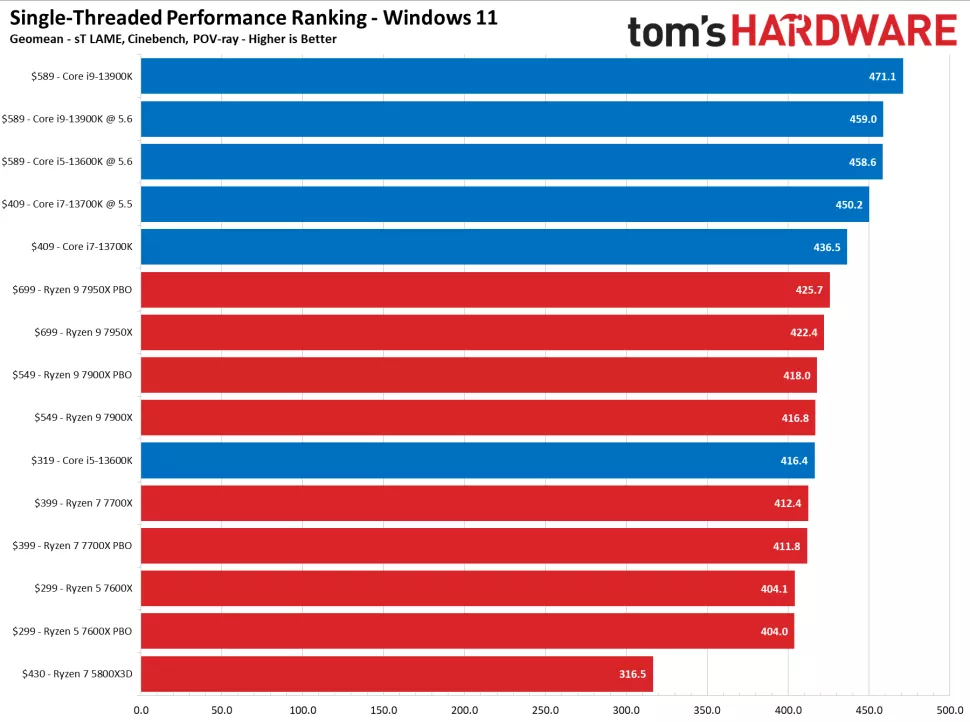
Solution: එකම generation එක ඇතුළේ, ඔව් (i7 > i5). Generations අතර, benchmarks compare කරන්න — අලුත් i5 එකක් පරණ i7 එකකට වඩා හොඳ වෙන්න පුළුවන්.
Problem: K suffix එකෙන් අදහස් වෙන්නේ මොකක්ද?
Solution: ඒ compatible (Z-series) motherboard එකක overclock කරන්න පුළුවන් unlocked desktop chip එකක්.
Problem: Windows 11 වලට කොයි generation එක ඕනද?
Solution: Windows 11 officially support කරන්නේ 8th-generation Intel Core සහ ඊට අලුත්.
Conclusion
Intel Core name එකක් කියවන්න පුළුවන් වුණාම CPUs compare කරන එක ලේසියි: tier, generation සහ suffix identify කරලා, exact models වලට benchmarks බලන්න. අලුත් generations සහ අලුත් Core Ultra line එකෙන් හොඳ efficiency සහ features එනවා.
About TechHub
මේ guide එක TechHub Knowledge Base එකේ කොටසක්. තව step-by-step IT guides සහ support වලට techhub.com.lk එකට යන්න.