Overview
NTLM is an older Windows authentication protocol still supported for compatibility, but it has known weaknesses. This guide explains what NTLM is, why it’s a risk, and how to monitor and gradually restrict it in favour of the more secure Kerberos.
NTLM is a legacy authentication protocol with known weaknesses.
Key Takeaways
- NTLM is a legacy challenge-response authentication protocol.
- It is vulnerable to relay and pass-the-hash attacks.
- Audit NTLM usage before blocking it, to avoid breaking apps.
- Restrict NTLM via Group Policy, moving to Kerberos where possible.
What Is NTLM?
NTLM (NT LAN Manager) authenticates users with a challenge-response handshake based on a password hash. Windows keeps it for backward compatibility with older systems and applications that do not support Kerberos.
Why It’s a Security Risk
- Susceptible to NTLM relay attacks.
- Vulnerable to pass-the-hash, where a stolen hash is reused.
- No mutual authentication like Kerberos provides.
- Microsoft is steering customers toward Kerberos/modern auth.
How to Monitor NTLM
1. Group Policy: Computer Configuration > Windows Settings > Security Settings > Local Policies > Security Options > set "Network security: Restrict NTLM: Audit…" policies to log usage.
2. Review the resulting events in Event Viewer (Applications and Services Logs > Microsoft > Windows > NTLM).
3. PowerShell: query the Operational NTLM log with Get-WinEvent to see which apps/users use NTLM.
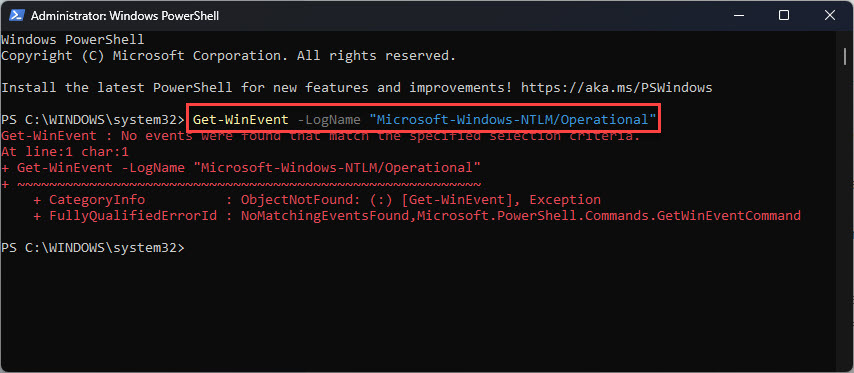
View NTLM usage logs with PowerShell.
How to Restrict/Block NTLM
Warning: Audit first. Blocking NTLM before identifying dependencies can break logons and applications.
1. After auditing, set "Network security: Restrict NTLM: NTLM authentication in this domain" to Deny (with exceptions for required servers).
2. Add necessary servers to the NTLM exception list so critical apps keep working.
3. Roll out gradually and monitor for failures, moving apps to Kerberos.
Troubleshooting
Problem: Apps broke after blocking NTLM.
Solution: You missed a dependency — re-enable audit mode, add the required servers to the NTLM exception list, and migrate those apps to Kerberos.
Problem: No NTLM logs appear.
Solution: Enable the "Restrict NTLM: Audit" policies first; logging is off by default.
Problem: Kerberos is not used even when available.
Solution: Ensure SPNs are registered correctly and clients connect by hostname (not IP), which can force NTLM.
Problem: How risky is leaving NTLM on?
Solution: It increases exposure to relay/pass-the-hash. Audit and reduce reliance on it, enforcing SMB signing and Extended Protection in the meantime.
Conclusion
NTLM is convenient but insecure. Audit where it’s used, then restrict it via Group Policy with carefully managed exceptions, moving toward Kerberos — improving your environment’s resistance to relay and pass-the-hash attacks.
</w:pBdr><w:spacing w:before="220" w:after="40"/></w:pPr><w:r><w:rPr><w:b/><w:bCs/><w:color w:val="0B5394"/><w:sz w:val="21"/><w:szCs w:val="21"/><w:rFonts w:ascii="Calibri" w:cs="Calibri" w:eastAsia="Calibri" w:hAnsi="Calibri"/></w:rPr><w:t xml:space="preserve">About TechHub
This guide is part of the TechHub Knowledge Base. For more step-by-step IT guides and support, visit techhub.com.lk.