Overview
Computer Management (compmgmt.msc) එකෙන් administrative tools ගොඩක් — Task Scheduler, Event Viewer, Device Manager, Disk Management, Services, සහ Local Users and Groups — එක console එකකට bundle කරනවා. මේ guide එකෙන් ඒක open කරන ඉක්මන් ක්රම අටක් පෙන්නනවා.
Computer Management එකෙන් key admin tools එක console එකකට bundle කරනවා.
Key Takeaways
- compmgmt.msc කියන්නේ Windows administrative tools වලට central hub එකක්.
- ඉක්මන්ම ක්රම: Run box, Win + X menu, සහ This PC > Manage right-click කරන එක.
- Command Prompt, PowerShell, Search, හෝ shortcut එකකින්ම open කරන්නත් පුළුවන්.
- Remote computer එකක්ම manage කරන්නත් පුළුවන්.
Computer Management කියන්නේ මොකක්ද?
ඒක Microsoft Management Console (MMC) snap-in collection එකක් — administrators ලාට system tools එක window එකකින් access කරන්න දෙනවා; disks, devices, services, scheduled tasks, සහ event logs manage කරන්න useful.
Open කරන ක්රම 8ක්
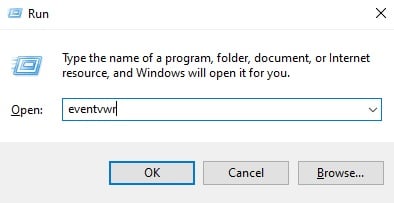
- Run box — Windows key + R press කරලා compmgmt.msc type කරලා Enter කරන්න.
- Power User menu — Windows key + X press කරලා Computer Management තෝරන්න.
- This PC right-click — File Explorer එකේ This PC right-click කරලා Manage තෝරන්න.
- Windows Search — "Computer Management" type කරලා open කරන්න.
- Control Panel — System and Security > Windows Tools > Computer Management වලට යන්න.
- Command Prompt / PowerShell — compmgmt.msc type කරලා Enter කරන්න.
- Shortcut එකක් හදන්න — compmgmt.msc එකට desktop shortcut එකක් හදන්න.
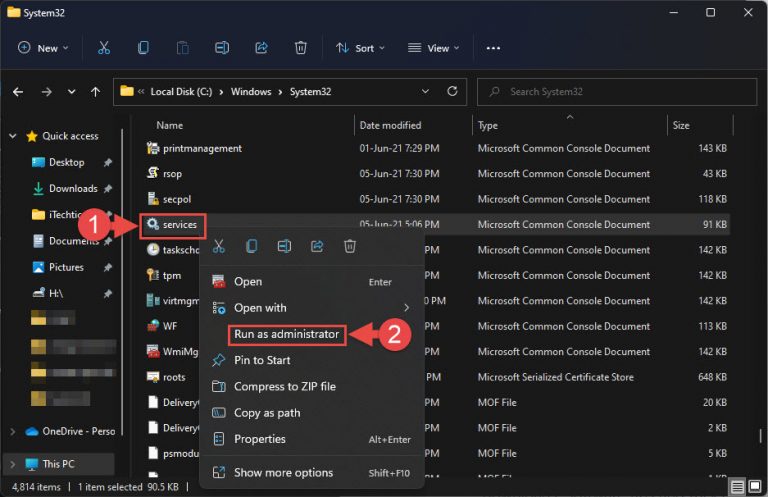
- Run as administrator — full access වලට උඩ ඕනෑම එකක් right-click කරලා Run as administrator තෝරන්න.
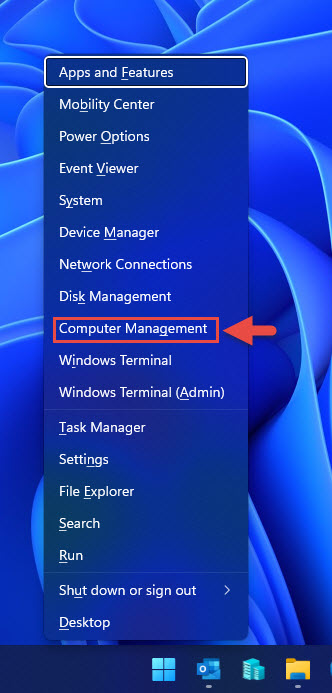
Win + X (Power User) menu එකේ Computer Management තියෙනවා.
Remote PC එකකට Computer Management Open කරන්න
1. Computer Management open කරන්න.
2. උඩ "Computer Management (Local)" right-click කරලා "Connect to another computer" තෝරන්න.
3. Remote computer name එක ඇතුළත් කරලා OK කරන්න (appropriate permissions ඕන).
Troubleshooting
Problem: සමහර tools නෑ, නැත්නම් read-only.
Solution: හැම snap-in එකකටම full access ගන්න Computer Management එක administrator විදිහට run කරන්න.
Problem: compmgmt.msc හොයාගන්න බෑ.
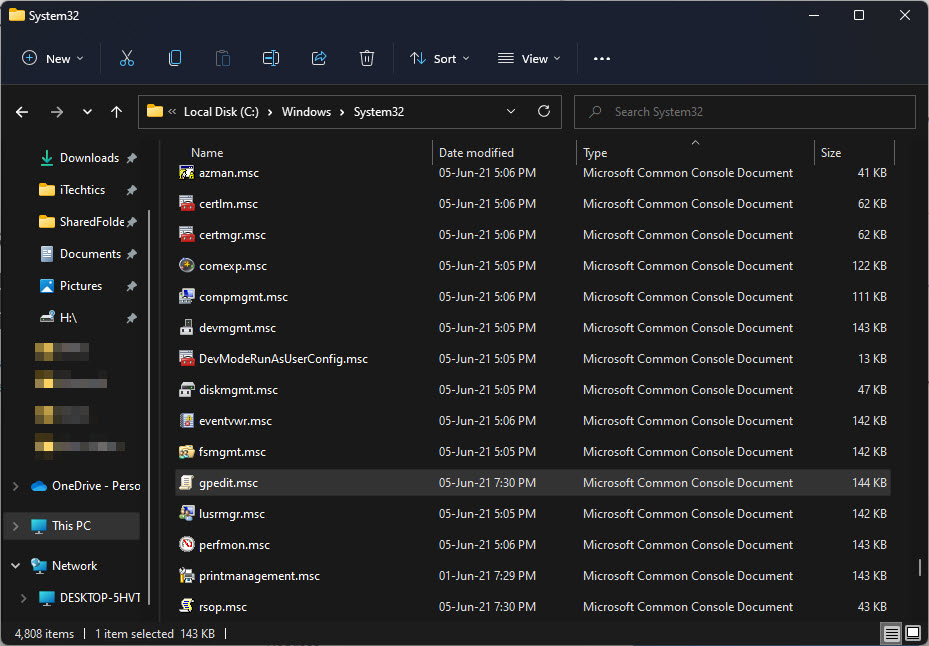
Solution: ඒක C:\Windows\System32\compmgmt.msc එකෙන් run කරන්න, නැත්නම් file එක නැත්නම් Windows repair කරන්න.
Problem: Remote PC එකකට connect වෙන්න බෑ.
Solution: Remote machine එකේ admin rights තියෙනවා, firewall එක remote management allow කරනවා, අදාළ services running කියලා බලන්න.
Problem: This PC එකේ Manage option එක නෑ.
Solution: Desktop එකේ This PC පෙන්නන්න (Desktop icon settings), නැත්නම් Run box / Win + X menu පාවිච්චි කරන්න.
Conclusion
Computer Management එකෙන් key admin tools එක තැනකට දානවා. Run box (compmgmt.msc), Win + X menu, සහ This PC > Manage right-click කරන එක තමයි ඇතුළට ඉක්මන්ම ක්රම — full control වලට administrator විදිහට run කරන්න.
About TechHub
මේ guide එක TechHub Knowledge Base එකේ කොටසක්. තව step-by-step IT guides සහ support වලට techhub.com.lk එකට යන්න.