Overview
ගොඩක් Windows applications සහ games Microsoft Visual C++ එකෙන් හදලා, run වෙන්න matching Visual C++ Redistributable runtime එක මත rely කරනවා. අවශ්ය runtime එක නැත්නම්, programs start වෙන්නේ නෑ, missing MSVCP හෝ VCRUNTIME DLL එකක් ගැන errors එනවා. මේ guide එකෙන් මේ runtimes කියන්නේ මොනවද, කවදද ඕන, සහ එක එක version එක හරියට download කරලා install කරන ආකාරය පැහැදිලි කරනවා.
Visual C++ Redistributable runtimes ගොඩක් Windows apps සහ games වලට ඕන.
Key Takeaways
- Visual C++ Redistributable එකෙන් Visual C++ එකෙන් හදපු apps වලට run වෙන්න ඕන runtime libraries දෙනවා.
- Tampered installers avoid කරන්න හැමවෙලේම redistributable එක Microsoft's official website එකෙන් download කරන්න.
- එක එක year/version (2005, 2008, 2010, 2012, 2013, 2015–2022) වෙනම, ගොඩක් systems වලට කිහිපයක් side by side install කරන්න ඕන.
- 64-bit Windows එකේ x64 සහ x86 packages දෙකම install කරන්න — මොකද සමහර apps 32-bit.
Microsoft Visual C++ Redistributable කියන්නේ මොකක්ද?
Visual C++ Redistributable කියන්නේ Microsoft හදපු shared runtime libraries (C Runtime, Standard C++ Library, සහ MFC/ATL components වගේ) package එකක්. Visual C++ එකෙන් software හදන developers ලා මේ libraries හැම program එකක් ඇතුළෙම ship කරන්නේ නෑ; ඒ වෙනුවට, program එක බලාපොරොත්තු වෙන්නේ හරි redistributable එක දැනටමත් PC එකේ install වෙලා තියෙන එකයි. Redistributable එක install කරන එකෙන් ඒ shared libraries ඒවා ඕන හැම app එකකටම available කරනවා.
කවදද මේක ඕන?
- Program එකක් හෝ game එකක් launch වෙන්නේ නෑ, MSVCP140.dll හෝ VCRUNTIME140.dll වගේ missing .dll එකක් report කරනවා.
- Installer එකක් කියනවා specific Visual C++ Redistributable version එකක් ඕන කියලා.
- Fresh Windows installation එකක් set කරලා common runtimes කලින්ම ready කරගන්න ඕන.
System Requirements
- Supported Windows version එකක් (latest 2015–2022 runtime එක Windows 10 සහ Windows 11 support කරනවා; පරණ runtimes පරණ Windows versions ත් support කරනවා).
- 32-bit (x86) සහ 64-bit (x64) packages දෙකම තියෙනවා — 64-bit Windows එකේ දෙකම install කරන්න පුළුවන්.
- Redistributable එකක් install/remove කරන්න administrator rights ඕන.
Available Versions
Microsoft එක එක major Visual Studio release එකකට වෙනම redistributable එකක් maintain කරනවා. ඔබට වැඩිපුරම ඕන වෙන්න පුළුවන් versions:
- Visual C++ 2015–2022 — single combined runtime එකක් (version 14.x); අද වැඩිපුරම ඕන වෙන package එක, 2015, 2017, 2019, සහ 2022 cover කරනවා.
- Visual C++ 2013 (12.0) — සමහර පරණ applications/games වලට තවම ඕන.
- Visual C++ 2012 (11.0).
- Visual C++ 2010 (10.0).
- Visual C++ 2008 (9.0).
- Visual C++ 2005 (8.0) — legacy software වලට විතරයි ඕන.
Note: 2015 ඉඳලා, Microsoft 2015, 2017, 2019, සහ 2022 එක combined "2015–2022" runtime එකක් විදිහට ship කරනවා. Latest 2015–2022 package එක install කරන එකෙන් අවුරුදු හතරේම requirements සම්පූර්ණ වෙනවා.
Safely Download කරන්නේ කොහොමද
1. Microsoft's official "Latest supported Visual C++ Redistributable downloads" page එක open කරන්න (ඒ title එක search කරලා learn.microsoft.com එකට යන්න).
2. 64-bit applications වලට X64 package (vc_redist.x64.exe) download කරන්න.
3. X86 package (vc_redist.x86.exe) එකත් download කරන්න — 64-bit Windows එකේත් ගොඩක් apps තවම 32-bit.
4. පරණ titles වලට, install කරන්න කියපු specific year (2013, 2012, 2010, ආදිය) එක download කරන්න.
Warning: Visual C++ Redistributables download කරන්නේ Microsoft's official domains (microsoft.com / learn.microsoft.com) එකෙන් විතරයි. Unofficial sources වල installers malware එක්ක bundle කරලා තියෙන්න පුළුවන්.
Install කරන්නේ කොහොමද
1. Download කරපු vc_redist.x64.exe (හෝ x86) file එක double-click කරන්න.
2. Licence terms accept කරලා Install click කරන්න.
3. Setup ඉවර වෙනකම් ඉඳලා Close click කරන්න.
4. x86 package එකටයි ඔබට ඕන අනිත් versions වලටයි repeat කරන්න.
5. Prompt වුණොත් PC එක restart කරලා, runtime එක ඕන කරපු app එක launch කරන්න.
Successful Visual C++ Redistributable installation එකක්.
All-in-One Runtime Installers
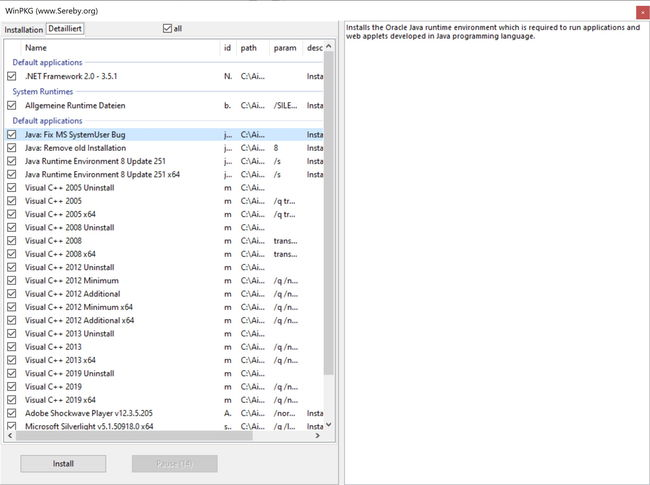
එකවර හැම version එකම ඕන නම් — උදාහරණයක් fresh Windows setup එකක — community "all-in-one" packages වලින් common runtimes (x86 සහ x64) ඔක්කොම එක pass එකකින් install කරන්න පුළුවන්. ඒවා convenient, ඒත් run කරන්න කලින් හැමවෙලේම source එක verify කරන්න.
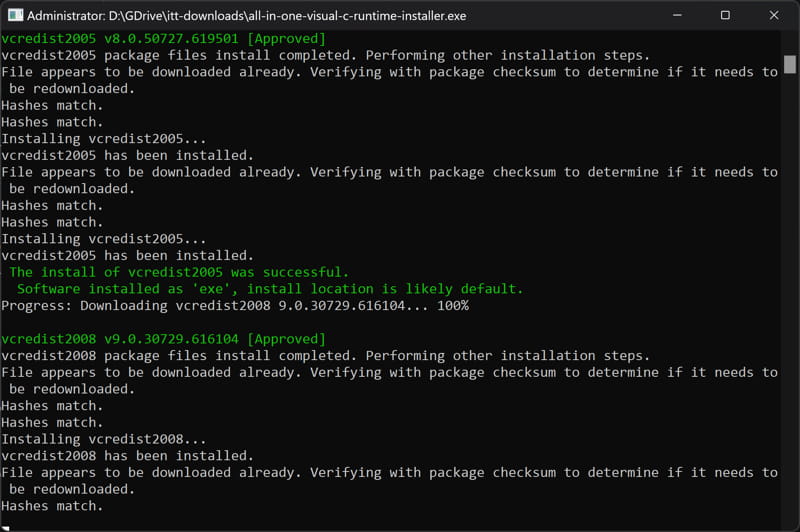
All-in-one installer එකකින් හැම common runtime එකම එක step එකකින් deploy කරන්න පුළුවන්.
Redistributable එකක් Remove කරන්නේ කොහොමද
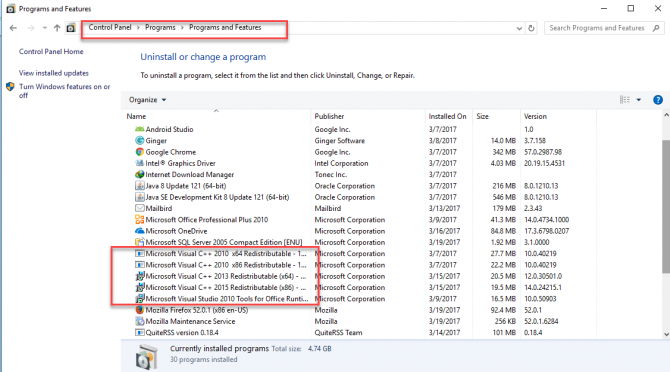
1. Settings > Apps > Installed apps (හෝ Control Panel > Programs and Features) open කරන්න.
2. Remove කරන්න ඕන Microsoft Visual C++ … Redistributable entry එක හොයන්න.
3. Click කරලා Uninstall තෝරලා prompts follow කරන්න.
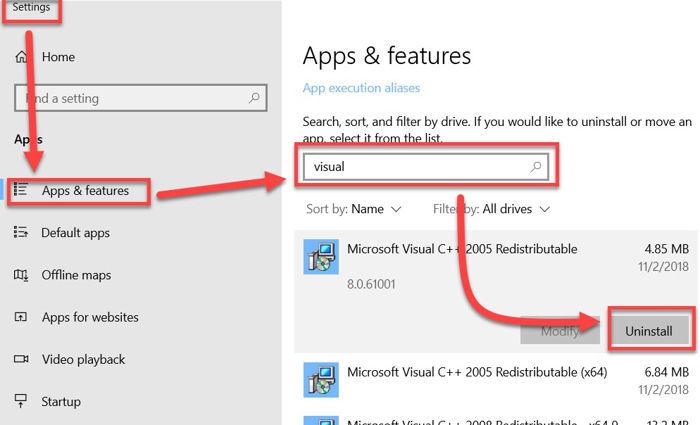
Installed apps එකෙන් Visual C++ Redistributable එකක් remove කරනවා.
Note: Corrupted install එකක් repair කරනවා නම් මිසක් redistributable එකක් remove කරන්න එපා — වෙන applications ඒක මත depend වෙන්න පුළුවන්.
Troubleshooting
Problem: Installation error 0x80070666 එකෙන් fail වෙනවා.
Solution: එම package එකේ අලුත් version එකක් දැනටමත් install වෙලා. Installed apps වලින් existing 2015–2022 x64/x86 entries uninstall කරලා ආපහු install කරන්න — නැත්නම් තියෙන අලුත් version එකම තියාගන්න.
Problem: Install කළාට පස්සෙත් app එකක් missing VCRUNTIME140.dll report කරනවා.
Solution: 2015–2022 runtime එකේ x64 සහ x86 versions දෙකම install කරන්න. 32-bit app එකකට 64-bit Windows එකේත් x86 package එක ඕන.
Problem: Setup කියනවා "another version of this product is already installed".
Solution: Redistributable එකෙන් Install වෙනුවට Repair පාවිච්චි කරන්න, නැත්නම් මුලින් conflicting version එක Installed apps වලින් remove කරන්න.
Problem: App එකකට කොයි version එකද ඕන කියලා විශ්වාස නෑ.
Solution: Application එකේ system requirements හෝ error message එක බලන්න; විශ්වාස නැත්නම්, ගොඩක් modern software cover කරන latest 2015–2022 runtime (x64 සහ x86) install කරන්න.
Conclusion
Visual C++ Redistributables කුඩා, free, Windows එකේ ගොඩක් software run කරන්න essential. Latest 2015–2022 runtime එක (x64 සහ x86 දෙකම) install කරලා, specific program එකකට ඕන පරණ versions add කරලා, secure වෙන්න හැමවෙලේම Microsoft's official site එකෙන් download කරන්න.
About TechHub
මේ guide එක TechHub Knowledge Base එකේ කොටසක්. තව step-by-step IT guides සහ support වලට techhub.com.lk එකට යන්න.