Overview
ඔයාගේ Downloads folder එකේ ".crdownload" කියලා අවසන් වෙන file එකක් දැක්කොත්, කරදර වෙන්න ඕන නෑ. ඒක Google Chrome සහ අනිත් Chromium-based browsers (Microsoft Edge, Brave, සහ Opera වගේ) විසින් file එකක් තාම download වෙමින් තියෙද්දී හදන temporary placeholder එකක්. මේ guide එකෙන් මේ files මොනවද, ඒවා ඇයි එන්නේ, සහ ඒවා open කරන, ඉවර කරන, හෝ පිරිසිදු කරන විදිය කියලා දෙනවා.
Key Takeaways
- .crdownload file එකක් කියන්නේ Chromium-based browser එකක් තාම disk එකට ලියමින් තියෙන incomplete download එකක්.
- download එක normal විදිහට ඉවර වුණාම, browser එක .crdownload extension එක automatically ඉවත් කරලා file එක usable වෙනවා.
- interrupted download එකක් ඔයාට resume කරලා open කරන්න පුළුවන්, නැත්නම් ඒක complete කියලා විශ්වාස වුණාම manually intended extension එකට rename කරලාත් open කරන්න පුළුවන්.
- කැඩුණු downloads වලින් ඉතුරු වෙන .crdownload files delete කරන එක safe, ඒකෙන් disk space නිදහස් වෙනවා.
What Is a CRDOWNLOAD File?
CRDOWNLOAD file එකක් කියන්නේ අඩක් download වුණු file එකක්. download එකක් progress වෙමින් තියෙද්දී, Chromium browsers එන data ".crdownload" extension එකක් තියෙන file එකකට stream කරනවා, එතකොට operating system එක ඒක ඉවර වුණු, open කරන්න පුළුවන් document එකක් විදිහට සලකන්නේ නෑ. හැම byte එකක්ම ආවම, browser එක file එක ඒකේ ඇත්ත name එකට සහ extension එකට rename කරනවා — උදාහරණයක් විදිහට "setup.exe.crdownload" එක "setup.exe" වෙනවා.
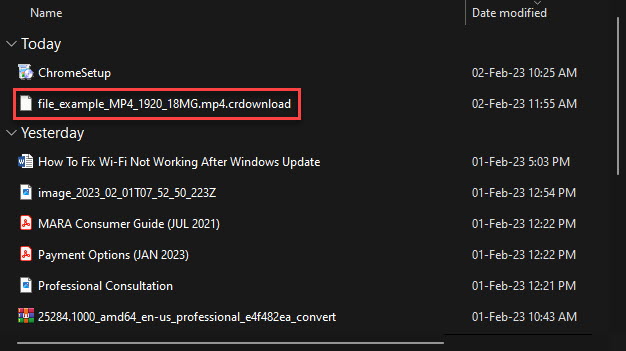
Downloads folder එකේ .crdownload extension එකක් තියෙන file එකක්.
Why Browsers Use the CRDOWNLOAD Extension
මේ temporary extension එකෙන් file එක complete වෙන්න කලින් ඔයා අහම්බෙන් ඒක open කරන එක හෝ run කරන එක වළක්වනවා. අඩක් download වුණු installer එකක් හෝ video එකක් corrupt වෙලා, fail වෙන්න හෝ predict කරන්න බැරි විදිහට හැසිරෙන්න පුළුවන්. transfer එක සාර්ථක වෙනකම් file එක ".crdownload" විදිහට mark කරලා තියෙන නිසා, browser එක සම්පූර්ණයෙන් download වුණු, intact files විතරක් ඒවගේ normal names වලින් පෙනෙන එක සහතික කරනවා.
How to Open a CRDOWNLOAD File
හරි විදිය රඳා පවතින්නේ download එක තාම active ද, paused ද, නැත්නම් permanently interrupted ද කියන එක උඩ.
Method 1: Complete the Download
1. ඔයාගේ browser එක open කරලා Downloads page එක open කරන්න Ctrl + J press කරන්න.
2. list එකේ interrupted item එක හොයන්න. ඒකේ "Resume" option එකක් පෙන්නනවා නම්, transfer එක continue කරන්න ඒක click කරන්න.
3. download එක 100% වෙනකම් ඉන්න. browser එක automatically .crdownload extension එක ඉවත් කරලා file එක පාවිච්චියට ready වෙයි.
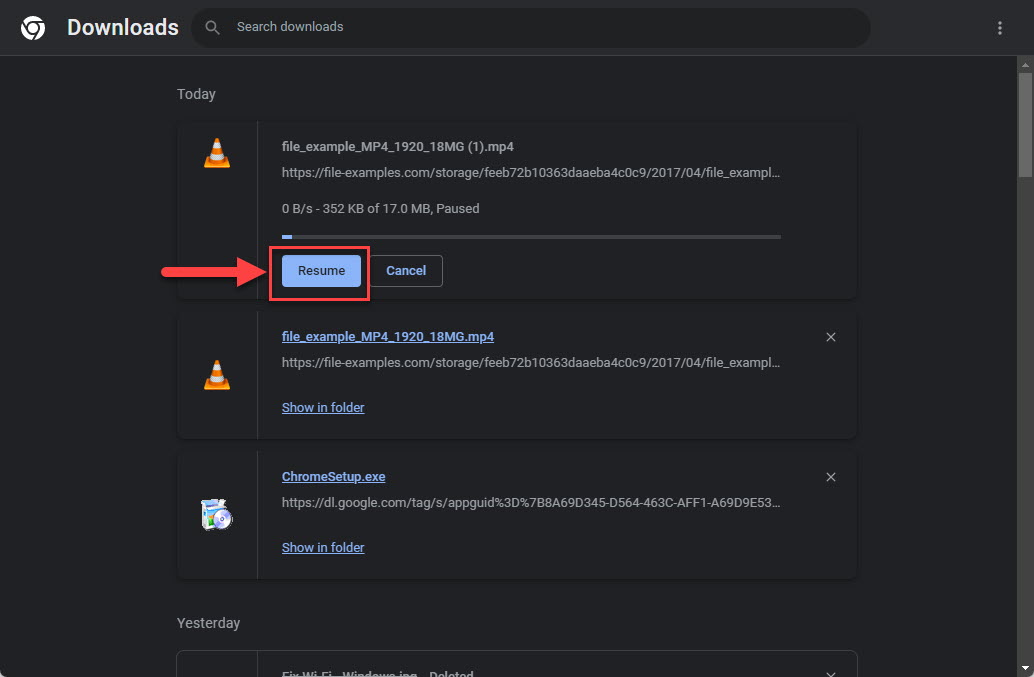
browser Downloads page එකෙන් paused download එකක් resume කරමින්.
Tip: original download link එක තව වැඩ නොකරනවා නම්, partial file එක repair කරන්න try කරනවා වෙනුවට source website එකෙන් download එක ආයෙත් පටන් ගන්න.
Method 2: Rename the File Manually
download එක resume කරන්න බැරි වුණත් file එක ඇත්තටම complete කියලා ඔයා විශ්වාස කරනවා නම් (උදාහරණයක් විදිහට, file size එක expected size එකට ගැළපෙනවා නම්), temporary extension එක ඉවත් කරන්න ඒක rename කරන්න පුළුවන්.
1. File Explorer එක open කරලා file extensions enable කරන්න: View menu එක click කරලා "File name extensions" එක on කරන්න.
2. .crdownload file එක right-click කරලා Rename තෝරන්න.
3. ".crdownload" කොටස delete කරන්න, එතකොට name එක හරි extension එකෙන් අවසන් වෙනවා (උදාහරණයක් විදිහට ".pdf", ".zip", හෝ ".exe").
4. Enter press කරන්න, Windows එක extension එක වෙනස් කරන්නද කියලා ඇහුවම වෙනස confirm කරන්න.
5. file එක වැඩ කරනවද කියලා බලන්න open කරන්න. ඒක corrupt හෝ incomplete නම්, ආයෙත් download කරන්න.
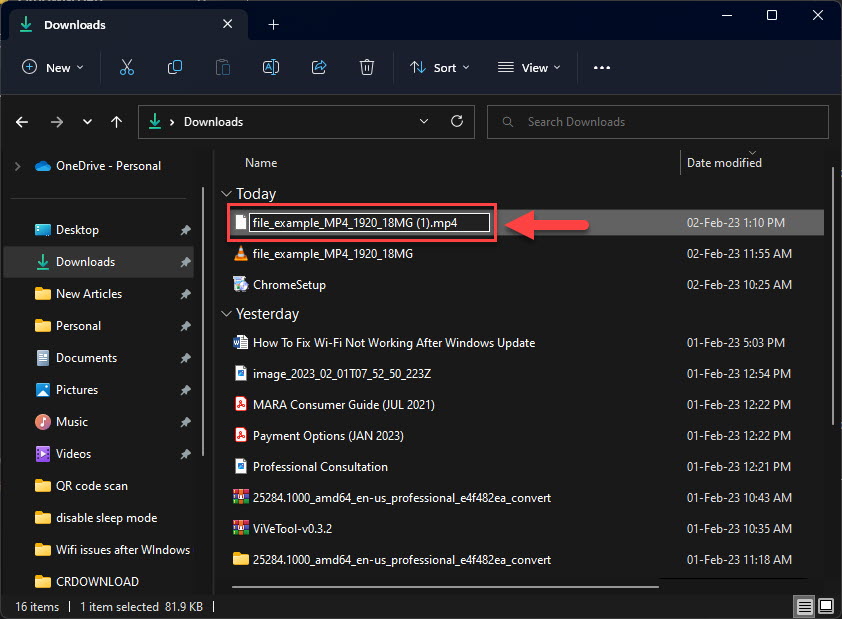
.crdownload extension එක ඉවත් කරලා file එක ඒකේ intended format එකට ගෙනියමින්.
Warning: download එක ඇත්තටම ඉවර වුණා කියලා විශ්වාස නම් විතරක් partial file එකක් rename කරන්න. ඇත්තටම incomplete file එකක් rename කරොත් corrupt document එකක් හැදෙනවා, corrupt executable එකක් run කරොත් errors එන්න පුළුවන්.
Cleaning Up Leftover CRDOWNLOAD Files
කැඩුණු හෝ cancel කරපු downloads බොහෝ වෙලාවට orphaned .crdownload files ඉතුරු කරලා දානවා. download එක fail වුණාට පස්සේ ඒවායින් වැඩක් නෑ, ඒ නිසා ඒවා delete කරන එක safe, ඒකෙන් disk space ආපහු ලැබෙනවා. ඔයාගේ Downloads folder එකේ තියෙන ඕනෑම leftover .crdownload files select කරලා delete කරන්න. Windows එකෙන් file එකක් in use කියලා කිව්වොත්, කලින් browser එක close කරලා ආයෙත් try කරන්න.
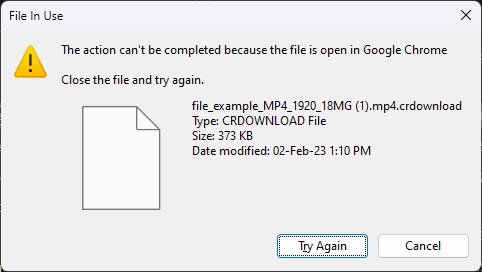
browser එක තාම download කරමින් නම් Windows එකෙන් file එකක් in use කියලා කියන්න පුළුවන්.
Troubleshooting
Problem: rename කළාට පස්සෙත් .crdownload file එක open වෙන්නේ නෑ.
Solution: download එක incomplete වෙලා. file එක delete කරලා original source එකෙන් ආයෙත් download කරන්න, එතකොට ඔයාගේ internet connection එක පුරාවටම stable ව තියෙනවා කියලා තහවුරු කරගන්න.
Problem: interrupted download එකට Resume option එකක් නෑ.
Solution: සමහර servers resuming support කරන්නේ නෑ. website එකෙන් අලුතෙන් download එකක් පටන් ගන්න, නැත්නම් pause සහ resume support කරන download manager එකක් පාවිච්චි කරන්න.
Problem: Windows එකෙන් .crdownload file එක in use, delete කරන්න බෑ කියනවා.
Solution: browser එක තාම file එක අල්ලගෙන ඉන්නවා. browser windows ඔක්කොම close කරන්න (නැත්නම් Task Manager එකෙන් browser එක සම්පූර්ණයෙන් quit කරන්න) ඊට පස්සේ file එක delete කරන්න.
Problem: .crdownload file එකක් safe ද කියලා විශ්වාස නෑ.
Solution: extension එකම malware නෙවෙයි, ඒත් යටින් තියෙන file එකට ඕනෑම download එකකට වගේම එකම විදිහට පරිස්සම් වෙන්න. විශ්වාස කරන sources වලින් files විතරක් තියාගන්න, executables run කරන්න කලින් ඔයාගේ antivirus එකෙන් scan කරන්න.
Conclusion
.crdownload file එකක් කියන්නේ හරියටම progress වෙමින් තියෙන download එකක්. බොහෝ වෙලාවට ඔයාට කරන්න තියෙන්නේ transfer එක ඉවර වෙන්න දෙන එක විතරයි, එතකොට browser එක ready-to-use file එකක් දෙයි. download එකක් කැඩුණම, ඔයාට ඒක resume කරන්න, ඇත්තටම complete file එකක් rename කරන්න, නැත්නම් Downloads folder එක පිරිසිදුව තියාගන්න ඉතුරු placeholder එක safe විදිහට delete කරන්න පුළුවන්.
About TechHub
මේ guide එක TechHub Knowledge Base එකේ කොටසක්. තව step-by-step IT guides සහ support වලට techhub.com.lk එකට යන්න.