Overview
IEEE 802.11 family එකෙන් define කරන Wi-Fi standards වලින් තමයි ඔබේ devices කොච්චර වේගවත්ද, විශ්වාසවන්තද wirelessly connect වෙන්නේ කියලා තීරණය වෙන්නේ. හැම generation එකක්ම speed, range, සහ efficiency වැඩි කරනවා. මේ guide එකෙන් Wi-Fi එකේ evolution — original 802.11 ඉඳලා Wi-Fi 7 දක්වා — network එක protect කරන security protocols, channel widths, සහ ඔබේ hardware එක කොයි standard එකද support කරන්නේ කියලා හොයාගන්න ආකාරය පැහැදිලි කරනවා.
Wi-Fi standards original 802.11 එකේ ඉඳලා Wi-Fi 7 දක්වා evolve වෙලා.
Key Takeaways
- Wi-Fi standards set කරන්නේ IEEE එකෙන් 802.11 නම යටතේ; "Wi-Fi 4/5/6/7" labels කියන්නේ සරල marketing names.
- අලුත් generations වලින් speed, crowded areas වල capacity, සහ හොඳ battery efficiency එකතු වෙනවා.
- Security WEP එකේ ඉඳලා WPA2 සහ දැන් WPA3 දක්වා progress වෙලා — ඔබේ devices support කරන අලුත්ම එක හැමවෙලේම පාවිච්චි කරන්න.
- Standard එකකින් benefit ගන්න ඔබේ router එකයි device එකයි දෙකම ඒක support කරන්න ඕන.
Wi-Fi Standards කියන්නේ මොනවද?
Wi-Fi standard එකක් කියන්නේ IEEE එකෙන් 802.11 family එකේ කොටසක් විදිහට publish කරන technical specifications set එකක් — wireless devices communicate කරන්නේ කොහොමද කියලා define කරනවා. Standardisation එකෙන් ඕනෑම manufacturer කෙනෙකුගේ laptop එකක්, phone එකක්, හෝ router එකක් interoperate වෙන එක සහතික කරනවා. Wi-Fi Alliance එකෙන් standards හඳුනාගන්න ලේසි කරන්න friendly generation names (Wi-Fi 4, 5, 6, 7) ත් දෙනවා.
Wi-Fi Standards වල Evolution
- 802.11 legacy (1997) — original standard එක, 2.4 GHz band එකේ 2 Mbps දක්වා.
- 802.11a / Wi-Fi 1 (1999) — 5 GHz එකේ 54 Mbps දක්වා.
- 802.11b / Wi-Fi 2 (1999) — 2.4 GHz එකේ 11 Mbps දක්වා, මුලදී widely adopt වුණා.
- 802.11g / Wi-Fi 3 (2003) — 2.4 GHz එකේ 54 Mbps දක්වා.
- 802.11n / Wi-Fi 4 (2009) — ~600 Mbps දක්වා, dual-band 2.4/5 GHz, MIMO introduce කළා.
- 802.11ac / Wi-Fi 5 (2014) — wider channels එක්ක 5 GHz එකේ multi-gigabit speeds.
- 802.11ax / Wi-Fi 6 (2019) — busy environments වල වැඩි efficiency; Wi-Fi 6E (2020) එකෙන් 6 GHz band එක එකතු කළා.
- 802.11be / Wi-Fi 7 (2024) — ඉතා ඉහළ throughput, 320 MHz channels, සහ multi-link operation.
Frequency Bands
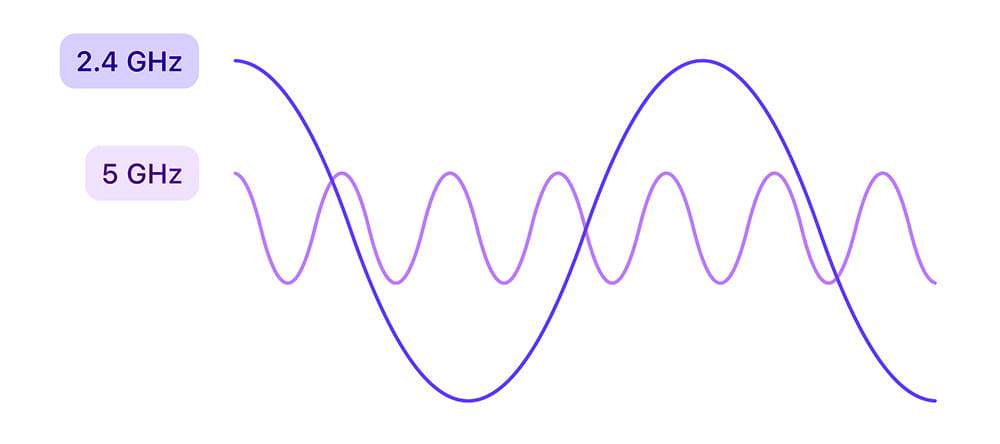
- 2.4 GHz — වැඩි range, walls හරහා හොඳ, ඒත් slow සහ congested.
- 5 GHz — වේගවත්, interference අඩු, ඒත් range අඩු.
- 6 GHz — clean, high-speed channels වලට Wi-Fi 6E/7 එක්ක introduce කළා (device සහ region support ඕන).
Wi-Fi Security Protocols
- WEP — original, දැන් obsolete සහ insecure; avoid කරන්න.
- WPA — WEP එකට වඩා interim improvement එකක්, එයත් outdated.
- WPA2 — ගොඩක් කල් standard එක; AES එක්ක පාවිච්චි කළොත් strong.
- WPA3 — දැනට standard එක — stronger encryption සහ password-guessing attacks වලට protection.
Tip: ඔබේ devices support කරන හොඳම security එකට router එක WPA3 (හෝ WPA2/WPA3 mixed mode) එකට set කරන්න.
Channel Widths
Wider channels වැඩි data carry කරනවා, ඒත් වැඩි spectrum පාවිච්චි කරලා crowded areas වල interference ඇති කරන්න පුළුවන්. Common widths: 20 MHz සහ 40 MHz (2.4 GHz), 80 MHz සහ 160 MHz (5 GHz), සහ 6 GHz මත Wi-Fi 7 එක්ක 320 MHz දක්වා. Busy 2.4 GHz networks වල, 20 MHz බොහෝවිට විශ්වාසවන්තම තේරීම.
ඔබේ PC එක කොයි Wi-Fi Standard එකද Support කරන්නේ කියලා බලන්න
1. Windows key + R press කරලා cmd type කරලා Enter කරන්න.
2. Command එක run කරන්න: netsh wlan show drivers
3. "Radio types supported" line එක බලන්න — ඒකේ ඔබේ adapter එක support කරන 802.11 standards (උදාහරණයක් 802.11ax) list වෙනවා.
4. Current connection details බලන්න, run කරන්න: netsh wlan show interfaces
Frequently Asked Questions
Problem: මගේ router එක Wi-Fi 6, ඒත් speeds slow.
Solution: Connect වෙන device එකත් Wi-Fi 6 support කරන්න ඕන, ඔබ 5 GHz (හෝ 6 GHz) band එකේ ඉන්න ඕන. Device එකේ adapter capabilities එකයි band එකයි බලන්න.
Problem: 2.4 GHz ද 5 GHz ද පාවිච්චි කරන්නේ?
Solution: Router එකට ළං වෙලා speed වලට 5 GHz (හෝ 6 GHz), walls හරහා හෝ දුරදී range වලට 2.4 GHz පාවිච්චි කරන්න.
Problem: Wi-Fi 7 backward compatible ද?
Solution: ඔව්. අලුත් standards backward compatible, ඒ නිසා පරණ devices තවම connect වෙනවා — ඒවායේම maximum standard එකේ.
Problem: කොයි security setting එකද safest?
Solution: Support කරන තැන WPA3. සමහර devices පරණ නම්, WPA2 only එකට බහින්නේ නැතුව WPA2/WPA3 mixed mode පාවිච්චි කරන්න.
Conclusion
Wi-Fi standards තේරුම්ගන්න එකෙන් ඔබේ අවශ්යතාවට හරි router, band, සහ security තෝරගන්න පුළුවන්. හොඳම experience එකට, ඔබේ devices support කරන අලුත්ම standard එකට match කරලා, speed වලට 5 GHz හෝ 6 GHz bands prefer කරලා, network එක WPA3 එකෙන් secure කරන්න.
About TechHub
මේ guide එක TechHub Knowledge Base එකේ කොටසක්. තව step-by-step IT guides සහ support වලට techhub.com.lk එකට යන්න.