Overview
Direct download link එකක් server එකක තියෙන single file එකකට point කරනවා. ඒ server එක slow නම්, rate-limited නම්, හෝ connection එක drop කරනවා නම්, download එක fail වෙන්න හෝ stall වෙන්න පුළුවන්. direct link එකක් torrent හෝ magnet link එකක් බවට convert කරන එකෙන් download clients වලට file එක resumable pieces වලට fetch කරන්නත්, අනිත් අය share කරාට පස්සේ multiple peers වලින් fetch කරන්නත් පුළුවන්. මේක ඔයාගේම large files බෙදන්නට හෝ විශාල public downloads වඩාත් විශ්වාසදායකව ලබාගන්නට ප්රයෝජනවත්. මේ guide එකෙන් online converter එකක් URL එකක් torrent එකක් බවට හරවන්නේ කොහොමද කියලා පෙන්නනවා.
Direct download link එකක් වඩාත් ලේසි, resumable downloading එකට torrent එකක් බවට convert කිරීම.
Warning: ඔයාට අයිති හෝ නීත්යානුකූලව distribute කරන්න ඉඩ දෙන files විතරක් convert කරලා share කරන්න. link එකක් torrent එකක් බවට හැරවීමෙන් content එකට කිසිම අයිතියක් ලැබෙන්නේ නෑ — copyright එකට සහ හැම site එකකම terms of service එකට ගරු කරන්න.
Key Takeaways
- torrent එකක් file එකක් pause කරන්න, resume කරන්න සහ verify කරන්න පුළුවන් pieces වලට කඩනවා.
- URL-to-torrent converters වගේ online tools direct URL එකකින් torrent හෝ magnet link එකක් generate කරනවා.
- result torrent එක open කරන්න ඔයාට BitTorrent client එකක් (උදාහරණයක් විදිහට qBittorrent) අවශ්යයි.
- ඔයාට distribute කරන්න අයිතිය තියෙන content විතරක් share කරන්න.
Convert a Link Using an Online Tool
urlhash.com වගේ web-based converters direct file URL එකක් accept කරලා torrent හෝ magnet link එකක් හදනවා. process එක සම්පූර්ණයෙන්ම browser-based.
1. ඔයාට convert කරන්න ඕන file එකේ direct download URL එක copy කරන්න.
2. ඔයාගේ browser එකේ urlhash.com වගේ URL-to-torrent converter එකක් open කරන්න.
3. direct link එක page එකේ URL field එකට paste කරන්න.
4. torrent එක create කරන්න button එක click කරන්න (tool එක file එක fetch කරලා hash කරනවා).
5. site එක file එක process කරලා result එක generate කරනකම් wait කරන්න.
6. generate කරපු magnet link එක copy කරන්න හෝ .torrent file එක download කරන්න.
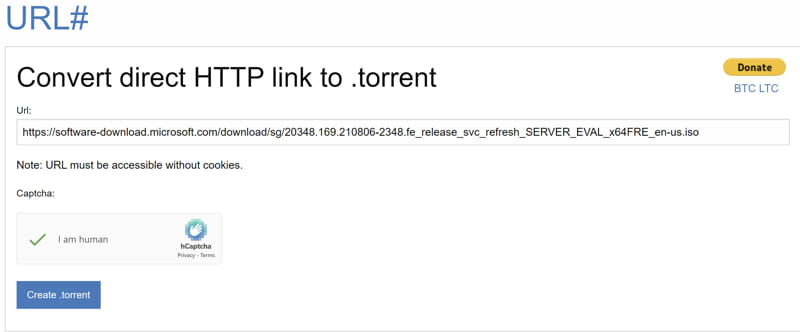
converter එකේ URL field එකට direct link එක paste කිරීම.
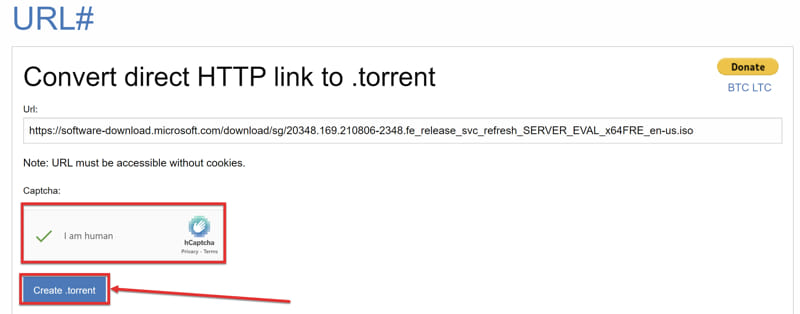
submit කරපු link එකෙන් torrent එක generate කිරීම.
Open the Torrent in a Client
1. qBittorrent වගේ reputable BitTorrent client එකක් එහි official website එකෙන් install කරන්න.
2. client එක open කරලා magnet link එකෙන් හෝ .torrent file එක open කිරීමෙන් torrent එකක් add කරන්න තෝරන්න.
3. destination folder එකක් select කරලා download එක start කරන්න.
4. එන හැම piece එකක්ම client එක verify කරන නිසා, ඔයාට safe විදිහට pause කරලා resume කරන්න පුළුවන්.
Tip: Magnet links වලට .torrent file එකක් අවශ්ය නෑ — magnet URL එක ඔයාගේ client එකට paste කරන්න විතරයි. transfer එක පටන්ගන්න මේ තමයි ඉක්මන්ම ක්රමය.
Troubleshooting
Problem: converter එකට link එක process කරන්න බෑ.
Solution: URL එක landing හෝ preview page එකකට නෙවෙයි, කෙලින්ම file එකකට point කරනවද කියලා තහවුරු කරගන්න. logins, captchas හෝ expiring tokens පිටිපස්සේ තියෙන links සාමාන්යයෙන් convert කරන්න බෑ.
Problem: torrent එකට seeders නෑ, download වෙන්නෙත් නෑ.
Solution: අලුතෙන් හදපු torrent එකකට seed විදිහට ඉන්නේ ඔයා (සහ source එක) විතරයි. client එක original server එකෙන් fetch කරන්න පුළුවන් වෙන්න open තියාගන්න, සහ අනිත් අයට seed කරන්න පුළුවන් වෙන්න magnet link එක share කරන්න.
Problem: download එක හරිම slow.
Solution: ඔයාගේ client එකේ ports open වෙලා firewall එකකින් block වෙලා නැද්ද, සහ source server එකට reach කරන්න පුළුවන්ද කියලා බලන්න. තව peers එකතු වෙනකම් speed එක original host එක මත රඳා පවතිනවා.
Problem: ඔයාගේ browser එක හෝ antivirus එක .torrent file එක block කරනවා.
Solution: Torrent files සමහර වෙලාවට generic විදිහට flag වෙනවා. source එක විශ්වාසදායකද කියලා verify කරලා, file එකට ඉඩ දෙන්න. file එකක්වත් download කරන්නේ නැතුව ඉන්න magnet links වඩාත් කැමති වෙන්න.
Conclusion
Direct download link එකක් torrent හෝ magnet link එකක් බවට convert කිරීමෙන් large downloads resumable කරනවා, සහ කාලයත් එක්ක peers එකතු වෙද්දී වේගවත් වෙනවා. link එක generate කරන්න browser-based converter එකක් පාවිච්චි කරන්න, trusted BitTorrent client එකක open කරන්න, සහ ඔයාට distribute කරන්න අයිතිය තියෙන files විතරක් share කරන්න.
About TechHub
මේ guide එක TechHub Knowledge Base එකේ කොටසක්. තව step-by-step IT guides සහ support වලට techhub.com.lk එකට යන්න.