Overview
Remote Desktop Connection එකෙන් Windows PC එකක් network එක හරහා වෙන computer එකකින් control කරන්න දෙනවා. Host feature එක Windows 11 Pro/Enterprise වල තියෙනවා (Home නෑ). මේ guide එකෙන් ඒක enable කරලා, users ලාට allow කරලා, firewall එක open කරලා, connect කරන ආකාරය පෙන්නනවා.
වෙන තැනකින් ඔබේ PC එක control කරන්න Remote Desktop enable කරන්න.
Key Takeaways
- Remote Desktop host කරන්න Windows 11 Pro/Enterprise ඕන.
- Settings > System > Remote Desktop එකේ enable කරන්න.
- Allowed users add කරලා firewall එකේ port 3389 open කියලා බලන්න.
- Remote Desktop Connection app (mstsc) එකෙන් connect කරන්න.
Step 1 — Remote Desktop On කරන්න
1. Settings > System > Remote Desktop open කරන්න.
2. Remote Desktop On toggle කරලා confirm කරන්න.
3. පෙන්නන PC name එක note කරන්න — connect කරන්න ඒක පාවිච්චි කරනවා.
Step 2 — Users ලාට Allow කරන්න
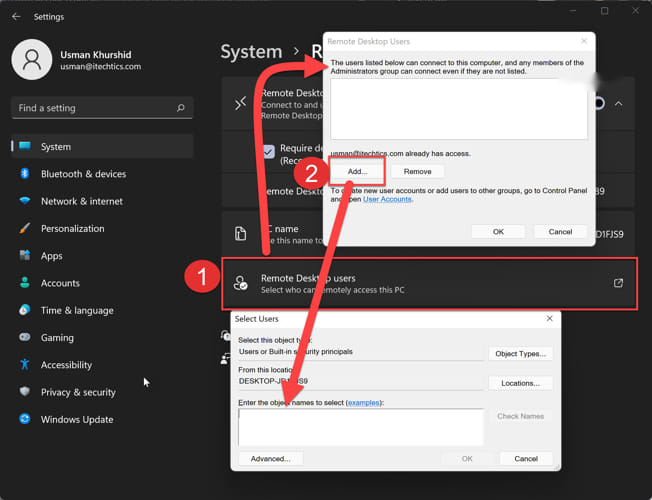
1. Remote Desktop යටතේ, "Remote Desktop users" click කරන්න.
2. Connect වෙන්න allowed accounts add කරන්න (administrators default විදිහට allowed).
3. එක එක account එකට password එකක් තියෙනවා කියලා බලන්න.
Step 3 — Firewall එකෙන් Allow කරන්න
1. Windows Defender Firewall > Allow an app or feature open කරන්න.
2. ඔබේ active network profile එකට Remote Desktop ticked කියලා බලන්න.
3. මේකෙන් incoming connections වලට TCP port 3389 open කරනවා.
Step 4 — වෙන PC එකකින් Connect කරන්න
1. අනිත් computer එකේ, Remote Desktop Connection open කරන්න (mstsc run කරන්න).
2. Host PC එකේ name එක හෝ IP address එක ඇතුළත් කරලා Connect click කරන්න.
3. Allowed account එකෙන් sign in වෙන්න.
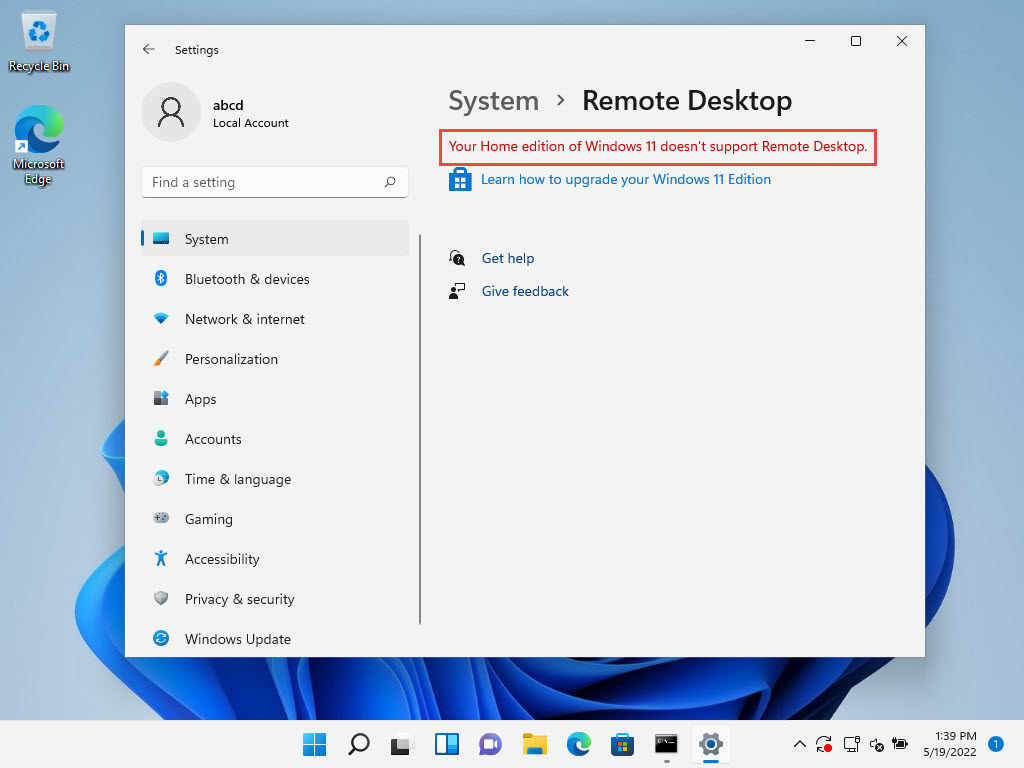
Windows 11 Home
- Home officially Remote Desktop host කරන්නේ නෑ.
- Connect out කරන්න RDC client එක පාවිච්චි කරන්න, host කරන්න Pro එකට upgrade කරන්න, නැත්නම් alternatives විදිහට Chrome Remote Desktop / Quick Assist පාවිච්චි කරන්න.
Troubleshooting
Problem: Host එකට connect වෙන්න බෑ.
Solution: Remote Desktop on ද, firewall එක allow කරනවද (port 3389), user එක Remote Desktop Users එකේද, හරි name/IP පාවිච්චි කරනවද කියලා confirm කරන්න.
Problem: "Your credentials did not work".
Solution: හරි account format එක (PCName\User හෝ Microsoft accounts වලට email) පාවිච්චි කරලා account එකට password එකක් තියෙනවා කියලා බලන්න.
Problem: Internet එක හරහා connect වෙන එක fail වෙනවා.
Solution: Router එකේ port 3389 forward කරන්න ඕන (පරිස්සමින්) නැත්නම් VPN එකක් පාවිච්චි කරන්න; RDP direct expose කරන එක security risk එකක්.
Problem: Home edition එකේ toggle එකක් නෑ.
Solution: Hosting වලට Pro ඕන — upgrade කරන්න, නැත්නම් Chrome Remote Desktop/Quick Assist පාවිච්චි කරන්න.
Conclusion
Windows 11 Pro එකේ, Remote Desktop enable කරන එක ඉක්මනුයි: on කරලා, users add කරලා, firewall එක open කරලා, mstsc එකෙන් connect කරන්න. Home එකේ, connect out විතරයි, නැත්නම් alternative remote-access tool එකක් පාවිච්චි කරන්න.
About TechHub
මේ guide එක TechHub Knowledge Base එකේ කොටසක්. තව step-by-step IT guides සහ support වලට techhub.com.lk එකට යන්න.