Windows එකේ Remote Desktop (RDP) Working නැති එක Fix කරන්නේ කොහොමද
Failed RDP connections firewall, settings, network, සහ scaling fixes වලින් resolve කරන්න.
Overview
Remote Desktop එක connect වෙන්නේ නැති වුනාම, බොහෝ වෙලාවට හේතුව RDP disable වෙලා තියෙන එක, firewall එකෙන් block වෙලා තියෙන එක, නැත්නම් network/scaling glitch එකක්. මේ guide එකෙන් common fixes ටික කරගෙන යනවා.
Remote Desktop working නැති එක fix කරන එක.
Key Takeaways
- Target PC එකේ Remote Desktop enable වෙලා තියෙන්න ඕන.
- Firewall එකෙන් RDP allow කරන්න ඕන.
- Network profile එකයි IPv6 එකයි interfere වෙන්න පුළුවන්.
- Home edition එකට RDP host කරන්න බෑ (connect out කරන්න විතරයි පුළුවන්).
Fix 1: Enable Remote Desktop
1. Target PC එකේ, Settings > System > Remote Desktop open කරන්න.
2. Remote Desktop On කරන්න.
3. Note: Windows Home එකට RDP host කරන්න බෑ — remote target එක වෙන්න Pro/Enterprise ඕන.
Fix 2: Allow RDP Through the Firewall
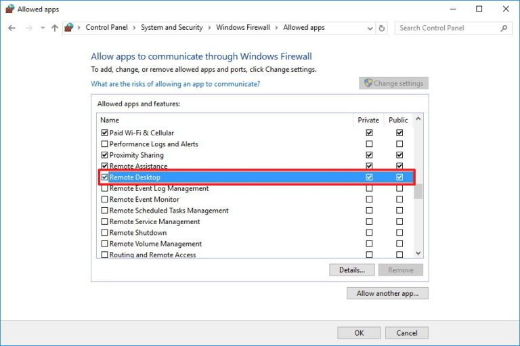
1. Windows Defender Firewall > Allow an app through firewall open කරන්න.
2. Current profile එකට "Remote Desktop" enable කරන්න.
3. Network එක Public නෙවෙයි Private එකට set කරලා තියෙනවද කියලා confirm කරන්න.
Fix 3: Network and IP Checks
1. PC දෙකම එකම network එකේ / reachable ද කියලා confirm කරන්න (host එක ping කරන්න).
2. හරි hostname/IP එක (port එක change කරලා නම් ඒකත්) පාවිච්චි කරන්න.
3. Test කරන්න adapter එකේ IPv6 එක තාවකාලිකව disable කරලා බලන්න.
4. ඕන නම් "Remote Desktop Services" restart කරන්න.
Fix 4: Turn Off Custom Scaling / Update
1. High custom DPI scaling එකෙන් RDP client display එක break වෙන්න පුළුවන් — test කරන්න scaling එක 100% කරන්න.
2. Machine දෙකෙම Windows update කරන්න.
3. Network drivers update කරන්න.
Troubleshooting
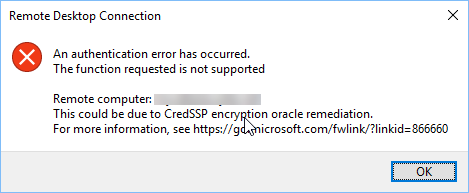
Problem: "Can’t connect to the remote computer".
Solution: RDP enable වෙලා firewall එකෙන් allow වෙලා තියෙනවද, host එක Pro/Enterprise එකක්ද reachable ද කියලා confirm කරන්න.
Problem: LAN එකේ වැඩ කරනවා, remotely වැඩ කරන්නේ නෑ.
Solution: VPN/RD Gateway එකක් පාවිච්චි කරන්න; RDP කෙළින්ම expose කරන්න එපා, ඕන නම් හරි port එක forward කරන්න.
Problem: Black screen නැත්නම් scaling issues.
Solution: Display scaling එක 100% කරලා GPU/RDP update කරන්න; "Reconnect if the connection is dropped" toggle කරන්න.
Problem: Home edition එකට target වෙන්න බෑ.
Solution: RDP hosting වලට Pro/Enterprise ඕන; Home එකේ Quick Assist නැත්නම් වෙන tool එකක් පාවිච්චි කරන්න.
Conclusion
බොහෝ RDP failures වෙන්නේ Remote Desktop off වෙලා තියෙන එක, firewall එකෙන් block වෙන එක, නැත්නම් network/scaling issues නිසා. RDP enable කරලා (Pro/Enterprise එකේ), Private network එකක firewall එකෙන් allow කරලා, connectivity verify කරලා, scaling adjust කරන්න — remote access ඕනම එකකට VPN එකක් පාවිච්චි කරන්න.