Overview
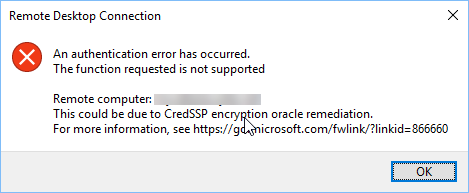
This Remote Desktop error appears when the client and the remote PC have mismatched CredSSP (Credential Security Support Provider) patch levels — the "Encryption Oracle Remediation" update. The correct fix is to update both machines; a registry/Group Policy workaround exists but lowers security. This guide covers both.
The CredSSP authentication error blocks the Remote Desktop connection.
Key Takeaways
- The error is a CredSSP patch-level mismatch between client and host.
- The proper fix is to install the latest Windows updates on both machines.
- The Group Policy/registry workaround sets Encryption Oracle Remediation to Vulnerable — only temporary.
- Re-secure both ends as soon as possible.
Solution 1 — Update Both Computers (Recommended)
1. On both the client and the remote PC, open Settings > Windows Update.
2. Install all pending updates and restart.
3. Try the Remote Desktop connection again — matched patch levels resolve the error securely.
Solution 2 — Group Policy Workaround (Temporary)
Warning: This lowers security by allowing connections to unpatched hosts. Use it only temporarily until both machines are updated.
1. On the client, open gpedit.msc.
2. Go to Computer Configuration > Administrative Templates > System > Credentials Delegation.
3. Open "Encryption Oracle Remediation", set it to Enabled, and choose Protection Level: Vulnerable.
4. Click OK and run gpupdate /force.
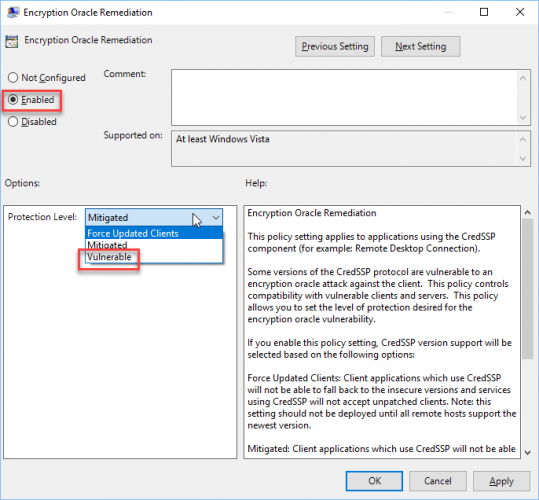
The Encryption Oracle Remediation policy.
Solution 3 — Registry Workaround (Home Editions)
Warning: Back up the registry first. This is a temporary, less-secure workaround.
1. Open Registry Editor and go to HKEY_LOCAL_MACHINE\SOFTWARE\Microsoft\Windows\CurrentVersion\Policies\System\CredSSP\Parameters (create the keys if missing).
2. Create a DWORD named AllowEncryptionOracle and set it to 2.
3. Restart and retry the connection.
4. Set it back (or delete it) once both machines are updated.
Solution 4 — Uninstall the Conflicting Update
1. If the issue began right after an update, open Settings > Windows Update > Update history > Uninstall updates.
2. Remove the recent CredSSP-related update on the machine that cannot connect (least preferred option).
3. Prefer updating both machines instead, then re-securing.
Troubleshooting
Problem: Updating did not help.
Solution: Ensure both client and host actually installed the latest updates and rebooted; a single unpatched side still triggers the error.
Problem: gpedit.msc is missing.
Solution: It is Pro/Enterprise only. Use the registry workaround (AllowEncryptionOracle) on Home editions.
Problem: The workaround is still in place.
Solution: After both machines are patched, set Encryption Oracle Remediation back to Force Updated Clients (or remove the registry value) to restore security.
Problem: It connects but warns about security.
Solution: That is the Vulnerable setting. Update both ends and revert the workaround as soon as possible.
Conclusion
This RDP error is a CredSSP mismatch. The secure fix is to fully update both the client and the remote PC. Use the Group Policy or registry "Vulnerable" workaround only as a temporary measure, and revert it once both machines are patched.
</w:pBdr><w:spacing w:before="220" w:after="40"/></w:pPr><w:r><w:rPr><w:b/><w:bCs/><w:color w:val="0B5394"/><w:sz w:val="21"/><w:szCs w:val="21"/><w:rFonts w:ascii="Calibri" w:cs="Calibri" w:eastAsia="Calibri" w:hAnsi="Calibri"/></w:rPr><w:t xml:space="preserve">About TechHub
This guide is part of the TechHub Knowledge Base. For more step-by-step IT guides and support, visit techhub.com.lk.