Overview
Error 0x800f081f එන්නේ Windows එකට feature එකක් (බොහෝවිට .NET Framework 3.5) හෝ update එකක් install කරන්න ඕන files හොයාගන්න බැරි වෙනකොට. හේතුව බොහෝවිට missing source එකක් හෝ corrupted system files. මේ guide එකෙන් fixes පිළිවෙළින් හරහා යනවා.
Error 0x800f081f බොහෝවිට කියන්නේ Windows එකට required source files හොයාගන්න බෑ කියලා.
Key Takeaways
- Error එකෙන් අදහස් වෙන්නේ required source file එකක් නෑ, නැත්නම් component store එක damaged කියලා.
- Source එකක් දෙන එකෙන් (හෝ Windows Update allow කරන එකෙන්) .NET 3.5 case එක fix වෙනවා.
- System files DISM සහ SFC වලින් repair කරන්න.
- Windows Update components reset කරන එකෙන් update-related corruption clear වෙනවා.
Fix 1 — Windows Update Troubleshooter Run කරන්න
1. Settings > System > Troubleshoot > Other troubleshooters open කරන්න.
2. Windows Update troubleshooter එක run කරලා fixes apply කරන්න.
3. Restart කරලා retry කරන්න.
Fix 2 — Source එකක් එක්ක .NET 3.5 Install කරන්න
1. Matching Windows ISO එකක් mount කරන්න (drive letter එක note කරන්න, බ. E:).
2. Command Prompt එක administrator විදිහට open කරන්න.
3. Run: DISM /Online /Enable-Feature /FeatureName:NetFx3 /All /Source:E:\sources\sxs /LimitAccess
4. මේකෙන් .NET 3.5 Windows Update වෙනුවට media එකෙන් install කරනවා.
Fix 3 — System Files Repair කරන්න (DISM සහ SFC)
1. Command Prompt එක administrator විදිහට open කරන්න.
2. Run: DISM /Online /Cleanup-Image /RestoreHealth
3. Run: sfc /scannow
4. PC එක restart කරන්න.
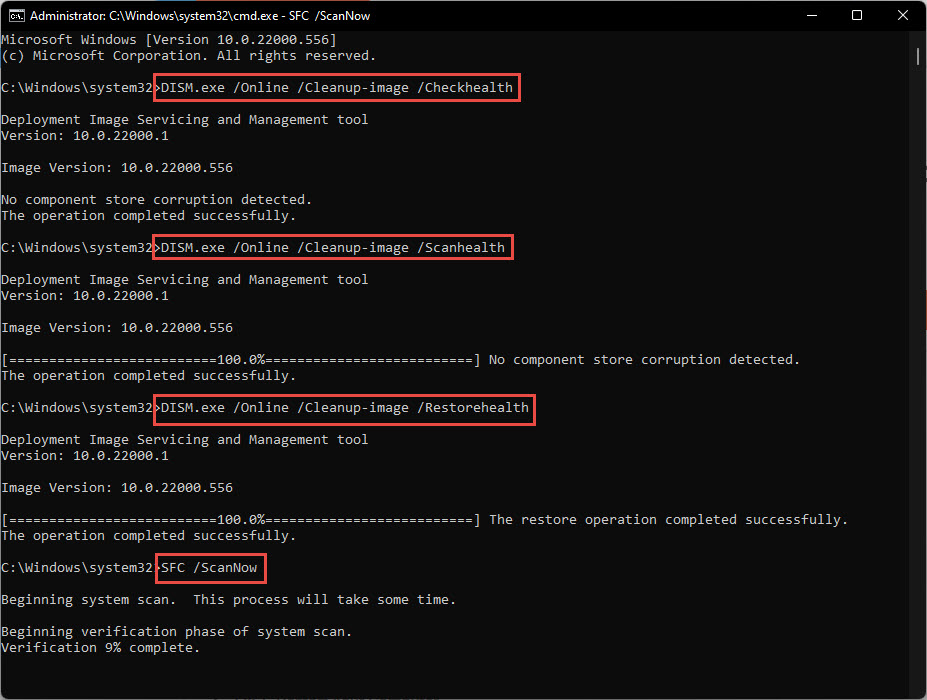
DISM සහ SFC වලින් Windows system files repair කරන්න.
Fix 4 — Windows Update Components Reset කරන්න
1. Command Prompt එක administrator විදිහට open කරන්න.
2. Services stop කරන්න: net stop wuauserv සහ net stop cryptsvc සහ net stop bits.
3. SoftwareDistribution සහ catroot2 folders rename කරන්න (බ. ren C:\Windows\SoftwareDistribution SoftwareDistribution.old).
4. Services restart කරලා Windows Update retry කරන්න.
Fix 5 — Windows Update එකෙන් Repair Content Allow කරන්න (Group Policy)
1. gpedit.msc open කරලා Computer Configuration > Administrative Templates > System වලට යන්න.
2. "Specify settings for optional component installation and component repair" enable කරන්න.
3. "Download repair content … directly from Windows Update instead of WSUS" tick කරලා apply කරන්න.
Fix 6 — In-Place Upgrade (Last Resort)
1. Matching Windows ISO එක Microsoft එකෙන් download කරලා mount කරන්න.
2. setup.exe run කරලා files සහ apps තියාගන්න තෝරන්න.
3. මේකෙන් ඔබේ data preserve කරමින් Windows repair කරලා බොහෝවිට persistent update errors clear කරනවා.
Troubleshooting
Problem: 0x800f081f එන්නේ .NET 3.5 වලට විතරයි.
Solution: /Source එක media එකේ sources\sxs folder එකට point කරලා /LimitAccess එක්ක DISM command එක පාවිච්චි කරන්න.
Problem: DISM වලට source files හොයාගන්න බෑ.
Solution: ඔබේ exact Windows build එකට match වෙන ISO එකක් mount කරලා DISM ඒකට point කරන්න; mismatched media common හේතුවක්.
Problem: WSUS-managed PC එක ආපහු ආපහු fail වෙනවා.
Solution: Repair content Windows Update එකෙන්ම download කරන්න Group Policy එක enable කරන්න, නැත්නම් local source එකක් දෙන්න.
Problem: මුකුත් වැඩ කරන්නේ නෑ.
Solution: Matching ISO එකෙන් in-place upgrade එකක්, නැත්නම් files තියාගෙන cloud reset (Reset this PC) එකක් කරන්න.
Conclusion
0x800f081f කියන්නේ missing source එකක් හෝ damaged component store එකක්. .NET 3.5 වලට source එකක් දීලා, DISM සහ SFC වලින් repair කරලා, Windows Update components reset කරලා, ස්ථිරවම clear කරන්න in-place upgrade එකකට යන්න.
About TechHub
මේ guide එක TechHub Knowledge Base එකේ කොටසක්. තව step-by-step IT guides සහ support වලට techhub.com.lk එකට යන්න.