Overview
Intel Driver & Support Assistant (Intel DSA) කියන්නේ Intel එකේ නොමිලේ දෙන official utility එකක්, ඒක ඔයාගේ PC එක scan කරලා, ඔයාගේ Intel components හඳුනගෙන, ගැලපෙන අලුත්ම drivers install කරනවා. නිවැරදි driver versions හොයන එකේ අනුමාන කරන එක ඉවත් කරනවා. මේ guide එකෙන් ඒක download කරලා, install කරලා, ඔයාගේ Intel drivers up to date තියාගන්න පාවිච්චි කරන හැටි පෙන්නනවා.
Intel Driver & Support Assistant එකෙන් ඔයාගේ Intel drivers automatically detect කරලා update කරනවා.
Key Takeaways
- Intel DSA ඔයාගේ Intel hardware automatically detect කරලා නිවැරදි drivers recommend කරනවා.
- ඒකට graphics, Wi-Fi, Bluetooth, chipset, සහ තව Intel drivers download කරලා install කරන්න පුළුවන්.
- ඒක ඔයාගේ browser එකේ run වෙනවා, අලුත් driver updates තියෙනකොට ඔයාට notify කරනවා.
- ඒක Intel එකේ official website එකෙන් විතරක් download කරන්න.
How to Download Intel DSA
1. Intel එකේ official Driver & Support Assistant page එක (intel.com/dsa) open කරන්න.
2. installer එක save කරන්න Download now click කරන්න.
3. ඒක run කරන්න කලින් download එක සම්පූර්ණ වුණාද කියලා confirm කරන්න.
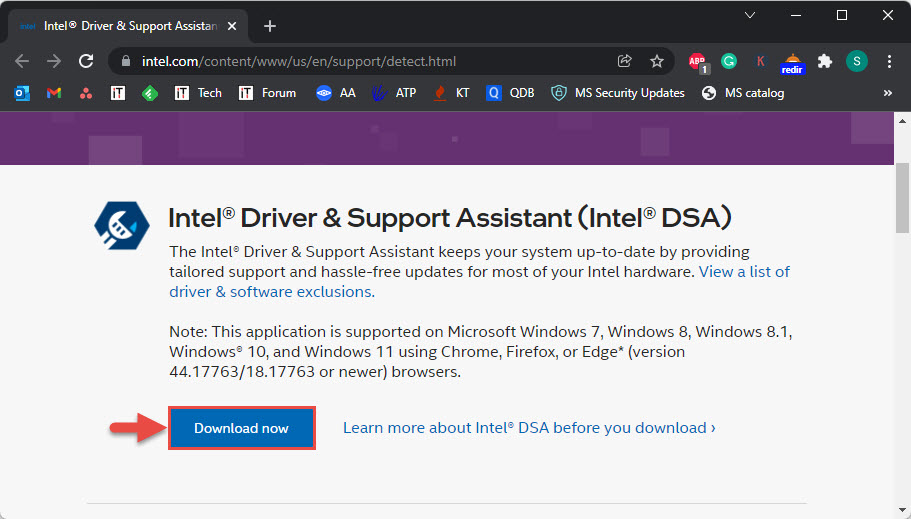
Intel Driver & Support Assistant එක Intel එකේ official site එකෙන් download කරන්න.
How to Install Intel DSA
1. download කරපු setup file එක run කරන්න.
2. licence terms accept කරන්න box එක tick කරලා Install click කරන්න.
3. Intel එකේ optional Computing Improvement Program එකට join වෙනවද කියලා තෝරන්න (ඔයාට decline කරන්නත් පුළුවන්).
4. installation එක ඉවර වුණාම, prompt වුණොත් PC එක restart කරන්න.
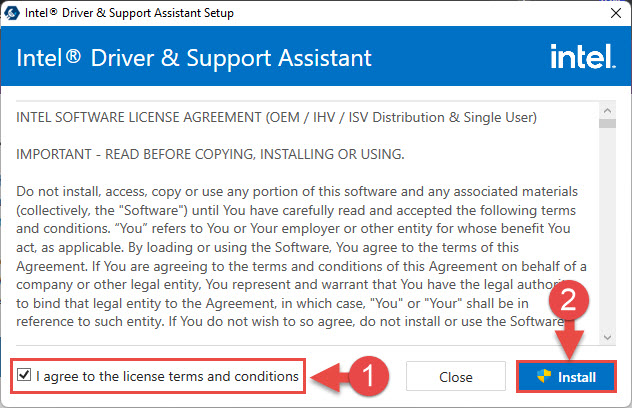
licence terms accept කරලා assistant එක install කරන්න.
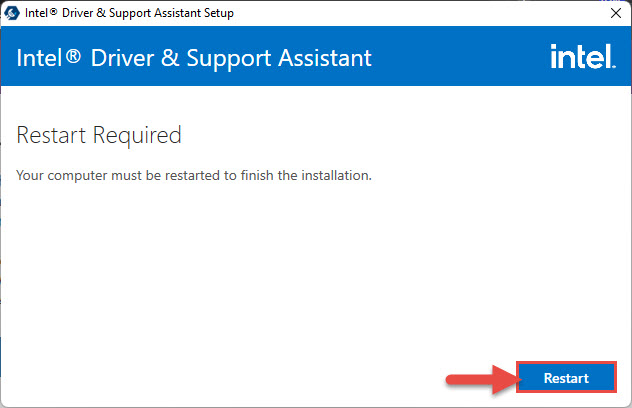
Intel DSA setup එක ඉවර කරන්න PC එක restart කරන්න.
How to Update Your Intel Drivers
1. Intel Driver & Support Assistant එක open කරන්න (ඒක ඔයාගේ web browser එකේ open වෙනවා).
2. තියෙන driver updates වලට ඔයාගේ system එක scan කරන්න දෙන්න.
3. recommend කරන updates ගන්න Download all click කරන්න.
4. ඒවා apply කරන්න Install click කරලා, එන on-screen prompts follow කරන්න.
5. ඇහුවොත් PC එක restart කරන්න, ඊට පස්සේ ඔක්කොම up to date ද කියලා confirm කරන්න scan එක ආයෙත් run කරන්න.
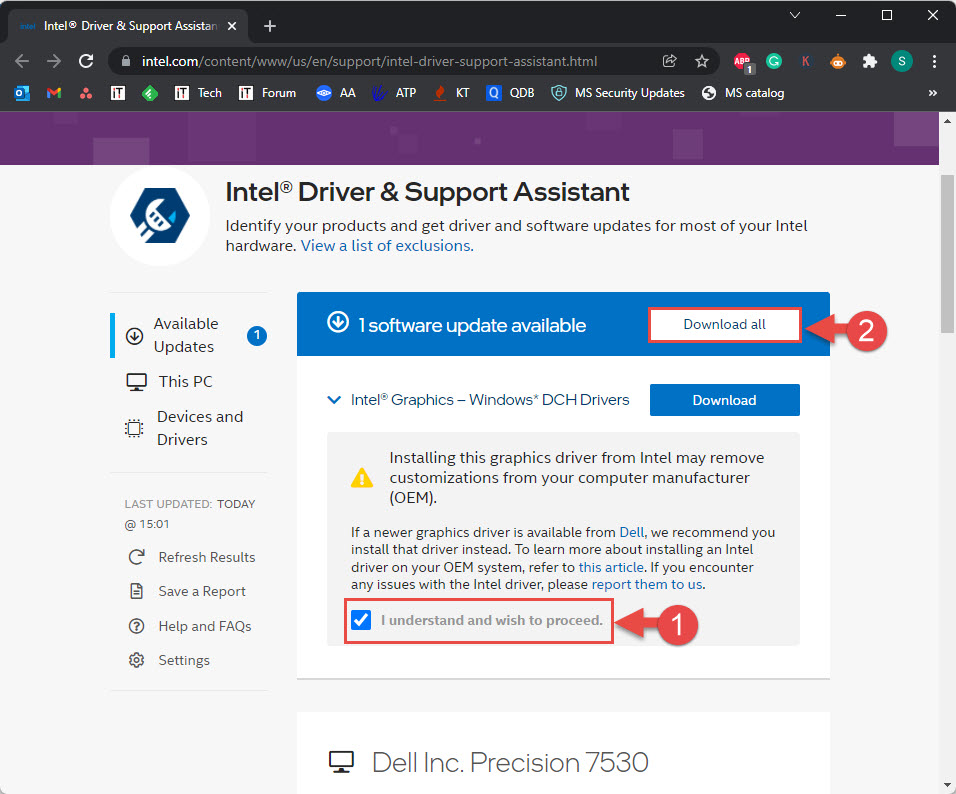
assistant එකෙන් තියෙන driver updates ඔක්කොම download කරන්න.
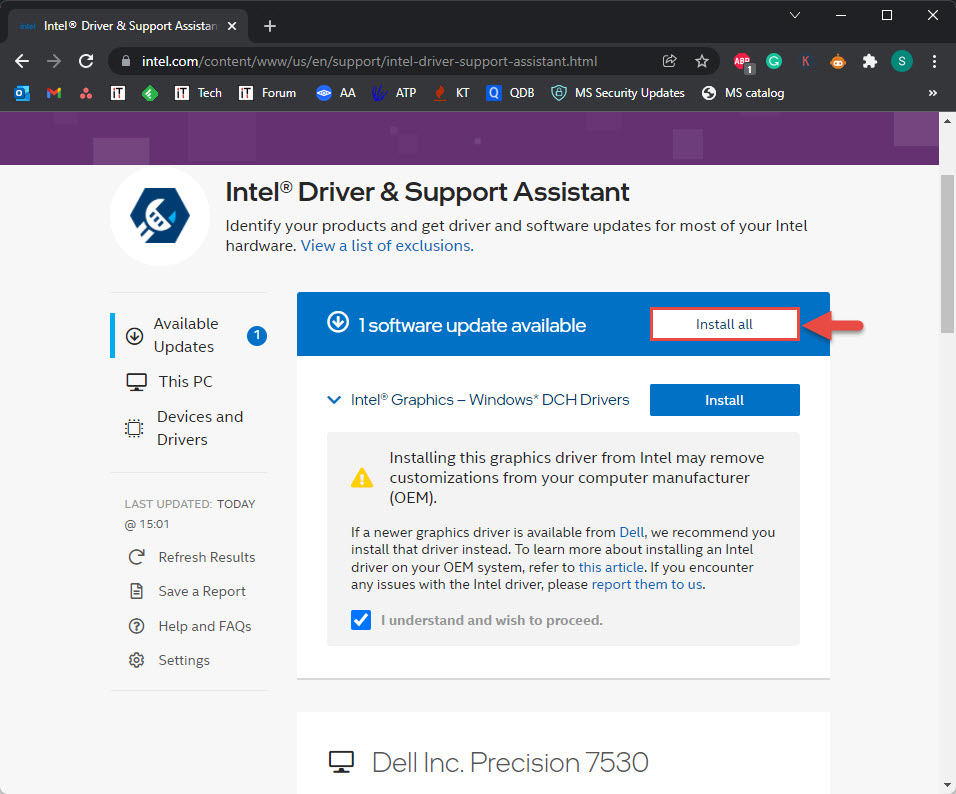
තියෙන driver updates install කරන්න.
Tip: අලුත් driver updates release වුණාම Intel DSA notification එකක් පෙන්නනවා, ඒ නිසා manually check කරන්නේ නැතුව ඔයාට system එක current තියාගන්න පුළුවන්.
Updating the Graphics Driver Specifically
1. Intel DSA run කරලා results වල Intel Graphics entry එක හොයන්න.
2. graphics driver update එකට Download click කරන්න.
3. installer එක run කරලා, offer කළොත් clean installation එකක් තෝරන්න.
4. restart කරලා version එක Device Manager > Display adapters වල verify කරන්න.
Troubleshooting
Problem: Intel DSA driver update එකක් detect කරන්නේ නෑ.
Solution: සමහර drivers ඔයාගේ PC manufacturer විසින් manage කරනවා. ඒවට ඔයාගේ OEM support page එක check කරන්න, ඊට පස්සේ restart කරලා DSA scan එක ආයෙත් run කරන්න.
Problem: assistant එක open වෙන්නේ නෑ.
Solution: ඒක ඔයාගේ default browser එකේ run වෙන්නේ — ඒක ඔයාගේ firewall එකෙන් allow කරන්න, වෙන supported browser එකක් try කරන්න, නැත්නම් Intel DSA reinstall කරන්න.
Problem: driver එකක් install වෙන්නේ නෑ.
Solution: assistant එක administrator විදිහට run කරන්න, තාවකාලිකව antivirus disable කරලා ආයෙත් try කරන්න. graphics එකට, clean installation එකක් try කරන්න.
Problem: ඔයාට manual control එක වඩා කැමතියි.
Solution: ඔයාට DSA හරහා ඔක්කොම install කරනවා වෙනුවට තනි තනි drivers Intel එකේ Download Center එකෙන් download කරන්නත් තාම පුළුවන්.
Conclusion
Intel Driver & Support Assistant එක තමයි Intel drivers current තියාගන්න ලේසිම, safest ම විදිහ. එක පාරක් install කරලා, scan එකක් run කරලා, නිවැරදි updates download කරලා install කරන්න දෙන්න — අලුත් ඒවා ආවම notifications එක්ක.
About TechHub
මේ guide එක TechHub Knowledge Base එකේ කොටසක්. තව step-by-step IT guides සහ support වලට techhub.com.lk එකට යන්න.