Overview
As a network grows, keeping track of which IP addresses are in use, which are free, and which device owns each one becomes difficult to do by hand. IP address tracking and management (IPAM) tools automate this by scanning your network, mapping addresses to hosts, and flagging conflicts. This guide surveys reliable tools for administrators who manage their own networks, from lightweight scanners to full IPAM platforms.
IP address tracking tools help administrators map and manage addresses across a network.
<w:bottom w:val="single" w:color="FBE4E4" w:sz="2" w:space="4"/><w:left w:val="single" w:color="C0392B" w:sz="24" w:space="8"/><w:right w:val="single" w:color="FBE4E4" w:sz="2" w:space="4"/></w:pBdr><w:shd w:fill="FBE4E4" w:color="auto" w:val="clear"/><w:spacing w:before="80" w:after="160"/><w:ind w:left="120" w:right="120"/></w:pPr><w:r><w:rPr><w:b/><w:bCs/><w:color w:val="C0392B"/><w:sz w:val="21"/><w:szCs w:val="21"/><w:rFonts w:ascii="Calibri" w:cs="Calibri" w:eastAsia="Calibri" w:hAnsi="Calibri"/></w:rPr><w:t xml:space="preserve">Warning: Use these tools only on networks you own or are authorised to administer. Scanning or tracking addresses on networks you do not control may breach acceptable-use policies and local laws.
Key Takeaways
- IPAM tools discover active hosts and record which IP addresses are allocated or free.
- Lightweight scanners like Advanced IP Scanner and Angry IP Scanner are ideal for quick audits.
- Full platforms such as GestioIP and phpIPAM manage subnets, DNS and DHCP at scale.
- Tracking should be limited to networks under your administration.
Advanced IP Scanner
Advanced IP Scanner is a free Windows tool that quickly scans a subnet and lists live hosts with their IP address, MAC address, manufacturer and shared folders. It can also wake, ping or remotely connect to discovered machines, making it handy for fast local-network audits.
Advanced IP Scanner listing active hosts on a local subnet.
Angry IP Scanner
Angry IP Scanner is a free, open-source and cross-platform scanner for Windows, macOS and Linux. It pings a range of addresses, resolves hostnames, detects open ports and exports results to CSV or other formats. Its small footprint and speed make it a favourite for on-the-spot checks.
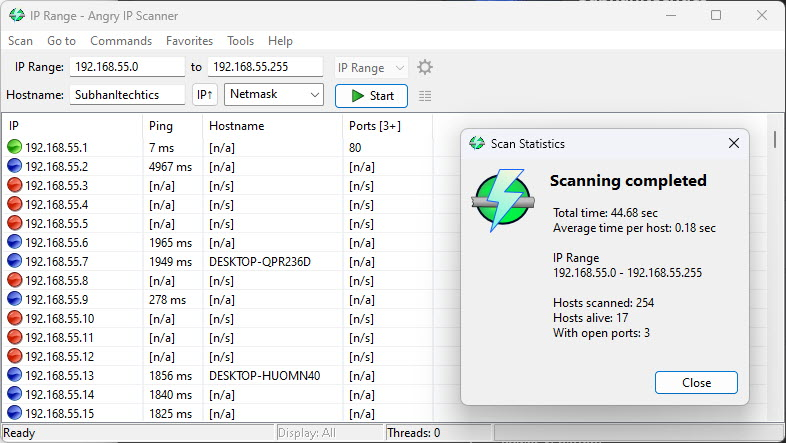
Angry IP Scanner sweeping a range of addresses and reporting live hosts.
GestioIP and phpIPAM
For ongoing management rather than one-off scans, dedicated IPAM platforms are a better fit. GestioIP is a free, web-based IPAM tool with automatic network discovery, powerful search and subnet management. phpIPAM is another popular open-source option that tracks subnets, VLANs, DNS records and DHCP leases from a clean web interface. Both scale well for medium and large networks.
Online IP Lookup Services
For public-facing addresses, web services such as WhatIsMyIPAddress provide geolocation, ISP and reverse-DNS details for a given public IP. These are useful for diagnosing external connectivity and confirming how your own public address appears to the internet.
<w:bottom w:val="single" w:color="E2F0E1" w:sz="2" w:space="4"/><w:left w:val="single" w:color="2E7D32" w:sz="24" w:space="8"/><w:right w:val="single" w:color="E2F0E1" w:sz="2" w:space="4"/></w:pBdr><w:shd w:fill="E2F0E1" w:color="auto" w:val="clear"/><w:spacing w:before="80" w:after="160"/><w:ind w:left="120" w:right="120"/></w:pPr><w:r><w:rPr><w:b/><w:bCs/><w:color w:val="2E7D32"/><w:sz w:val="21"/><w:szCs w:val="21"/><w:rFonts w:ascii="Calibri" w:cs="Calibri" w:eastAsia="Calibri" w:hAnsi="Calibri"/></w:rPr><w:t xml:space="preserve">Tip: Combine a fast scanner for daily checks with a full IPAM platform for record-keeping. The scanner finds what is live now; the IPAM system remembers what is assigned over time.
Troubleshooting
Problem: A scanner misses devices that you know are online.
Solution: Some hosts block ping (ICMP) by firewall. Enable additional discovery methods such as ARP or port scanning, and run the tool with administrator privileges.
Problem: The tool reports IP address conflicts.
Solution: Two devices share an address, usually from overlapping static assignments and DHCP. Reserve static addresses outside the DHCP pool and use an IPAM tool to track allocations.
Problem: Hostnames do not resolve during a scan.
Solution: Confirm reverse-DNS (PTR) records exist for your subnet and that the scanner is pointed at the correct DNS server.
Problem: An IPAM platform shows stale entries.
Solution: Schedule regular automatic discovery scans so the database reflects current usage, and remove decommissioned hosts promptly.
Conclusion
From quick scanners like Advanced IP Scanner and Angry IP Scanner to full platforms such as GestioIP and phpIPAM, IP tracking tools give administrators clear visibility over their address space. Choose a scanner for fast audits and an IPAM system for long-term records — and always confine tracking to networks you are authorised to manage.
About TechHub
This guide is part of the TechHub Knowledge Base. For more step-by-step IT guides and support, visit techhub.com.lk.