PhoneExperienceHost.exe (Phone Link) කියන්නේ මොකක්ද සහ එක Disable කරන්නේ කොහොමද
Phone Link background process එක තේරුම් අරගෙන එක run වීම හෝ auto-start වීම නවත්තන්න.
Overview
PhoneExperienceHost.exe කියන්නේ Microsoft ගේ Phone Link app එකේ background process එකයි, ඒක ඔබේ phone එක Windows එකට connect කරනවා. එක legitimate එකක්, නමුත් ඔබ Phone Link පාවිච්චි නොකරනවා නම් එක run වීම නවත්තන්න පුළුවන්. මේ guide එකෙන් පෙන්නනවා ඒක කොහොමද කියලා, සහ එක genuine එකක්ද කියලා confirm කරගන්නේ කොහොමද කියලා.
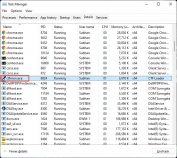
Phone Link (PhoneExperienceHost.exe) process එක.
Key Takeaways
- PhoneExperienceHost.exe අයිති වෙන්නේ Phone Link app එකට.
- එක legitimate — genuine file එක signed Microsoft app එකක්.
- පාවිච්චි නොකරනවා නම් එකේ background activity හෝ auto-start disable කරන්න.
- අවශ්ය නම් ඔබට PowerShell හරහා Phone Link uninstall කරන්න පුළුවන්.
Stop It Running in the Background
1. Settings > Apps > Installed apps open කරන්න.
2. "Phone Link" > three dots > Advanced options හොයාගන්න.
3. "Let this app run in the background" එක Never කරන්න.
Disable Auto-Start
1. Task Manager > Startup apps open කරන්න.
2. Phone Link හොයාගෙන Disable click කරන්න.
3. ඉතින් එක sign-in එකේදී launch වෙන්නේ නෑ.
Uninstall Phone Link (Optional)
1. Store එකෙන් uninstall වෙන්නේ නැත්නම්, PowerShell එක administrator විදිහට open කරන්න.
2. මේක run කරන්න: Get-AppxPackage Microsoft.YourPhone | Remove-AppxPackage
3. Phone Link සහ එකේ process එක remove වෙනවා.
Is It a Virus? How to Verify
1. Task Manager එකේදී process එක right-click කරලා > Open file location — genuine Phone Link එක WindowsApps package folder එකක තියෙනවා.
2. Microsoft signature එකකට එකේ Properties > Digital Signatures check කරන්න.
3. Windows Security එකෙන් එක scan කරන්න, නැත්නම් අවිශ්වාස නම් VirusTotal එකට upload කරන්න.
Troubleshooting
Problem: Process එක නැවත නැවත restart වෙනවා.
Solution: Phone Link එකට background activity සහ startup එක disable කරන්න; කවදාවත් පාවිච්චි නොකරනවා නම් එක uninstall කරන්න.
Problem: Settings වලින් uninstall කරන්න බෑ.
Solution: Administrator විදිහට PowerShell Remove-AppxPackage command එක පාවිච්චි කරන්න.
Problem: එක genuine ද කියලා අවිශ්වාසයි.
Solution: Microsoft digital signature එකයි file location එකයි verify කරන්න; Windows Security/VirusTotal එකෙන් scan කරන්න.
Problem: Phone Link ආපහු ඕන.
Solution: Microsoft Store එකෙන් "Phone Link" reinstall කරන්න.
Conclusion
PhoneExperienceHost.exe කියන්නේ genuine Phone Link background process එකයි. ඔබ phone එක link නොකරනවා නම්, එකේ background සහ startup activity එක disable කරන්න හෝ PowerShell හරහා Phone Link uninstall කරන්න — සහ කවදාවත් සැක නම් file එකේ Microsoft signature එක verify කරන්න.
About TechHub
මේ guide එක TechHub Knowledge Base එකේ කොටසක්. තව step-by-step IT guides සහ support වලට techhub.com.lk එකට යන්න.