Commands Run කළාට පස්සේ Command Prompt Close වීම වළක්වන ක්රම 3ක්
cmd /k, PAUSE, සහ Registry tweak එකක් පාවිච්චි කරලා output එක කියවන්න CMD window එක open තියාගන්න.
Overview
batch file එකක් හෝ command එකක් double-click කරලා run කරද්දී, Command Prompt window එක බොහෝ විට එකපාරටම close වෙනවා — ඔබට output එක කියවන්න කලින්. මේ guide එකෙන් ඒක open තියාගන්න ක්රම තුනක් පෙන්නනවා.
Key Takeaways
- cmd /k command එක run කරලා window එක open තියාගන්නවා.
- batch file එකකට PAUSE එකතු කිරීම keypress එකකට wait කරනවා.
- Registry tweak එකකට හැම CMD windows auto-close වීම නවත්තන්න පුළුවන්.
- දැනටමත් open prompt එකකින් run කිරීමෙනුත් output එක visible වෙනවා.
Method 1: cmd /k
1. Run (Windows + R) open කරන්න.
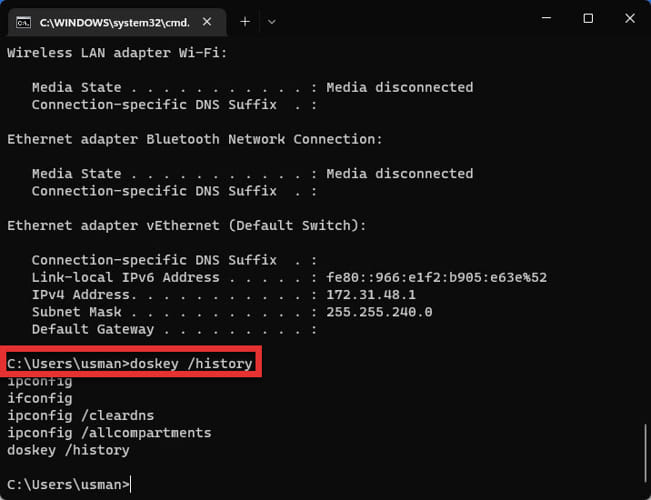
2. Type කරන්න: cmd /k yourcommand (උදා: cmd /k ipconfig).
3. command එක run වෙනවා window එක open තියෙනවා (/k = keep).
4. ඒක close වෙන්න ඕන නම් ඒ වෙනුවට /c පාවිච්චි කරන්න.
Method 2: Batch File එකකට PAUSE එකතු කරන්න
1. ඔබේ .bat file එක Notepad එකේ edit කරන්න.
2. අන්තිමට අලුත් line එකක් එකතු කරන්න: pause
3. Save කරලා run කරන්න — ඒක "Press any key to continue..." පෙන්නලා wait කරනවා.
4. ඔබ key එකක් press කරනකම් output එක visible විදිහට තියෙනවා.
Method 3: Open Prompt එකකින් Run කරන්න
1. මුලින්ම Command Prompt එක open කරන්න (එතකොට ඒක දැනටමත් run වෙනවා).
2. ඒකෙන් ඔබේ command/batch file එක type කරන්න හෝ run කරන්න.
3. script එක නෙවෙයි ඔබ ඒක launch කරපු නිසා window එක open තියෙනවා.
Method 4: Registry (Windows Open තියාගන්න)
Warning: Registry එක වැරදියට edit කරොත් ප්රශ්න ඇති වෙන්න පුළුවන්. මුලින්ම Registry එක back up කරන්න.
1. මේක advanced එකක් සහ CMD behaviour එකට globally බලපානවා.
2. බොහෝ cases වලට cmd /k හෝ PAUSE තෝරගන්න.
3. හැම CMD windows එකම persist වෙන්න ඕන කියලා specifically ඕන නම් විතරක් Registry change එකක් පාවිච්චි කරන්න.
Troubleshooting
Problem: Window එක තාමත් close වෙනවා.
Solution: cmd /k පාවිච්චි කරන්න හෝ batch file එකේ අන්තිම line එක විදිහට pause එකතු කරන්න.
Problem: pause එක ඉක්මනට run වෙනවා.
Solution: pause එක හරියටම අන්තිමට (හෝ ඔබට කියවන්න ඕන section එකට පස්සේ) දාන්න.
Problem: Double-click කරපු .bat එක flash වෙලා close වෙනවා.
Solution: pause එකතු කරන්න, හෝ දැනටමත් open Command Prompt එකකින් run කරන්න.
Problem: ඒක normally close වෙන්න ඕන.
Solution: output එක කියවන්න ඕන නැති වෙලාවට cmd /c පාවිච්චි කරන්න, හෝ pause එක අයින් කරන්න.
Conclusion
command output එක කියවන්න, cmd /k එකෙන් run කරන්න හෝ ඔබේ batch file එකට pause line එකක් එකතු කරන්න — ලේසිම, විශ්වාසවන්තම fixes ඒවා. දැනටමත් open prompt එකකින් launch කිරීමෙනුත් මුකුත් edit කරන්නෙ නැතුව හැම දේම visible තියෙනවා.