Overview
PowerShell එකෙන් .exe files run කරන එක scripting සහ automation වලට useful. මේ guide එකෙන් විශ්වාසවන්ත methods හතරක් cover කරනවා — directly run කරන එක, & call operator එක, Invoke-Expression, සහ Start-Process (arguments සහ elevation එක්ක).
PowerShell එකෙන් EXE files run කරන්න.
Key Takeaways
- exe එකක ඒකේ path එක type කරලා directly run කරන්න.
- & call operator එකෙන් spaces තියෙන paths handle කරනවා.
- Start-Process එකෙන් arguments, elevation, සහ waiting support කරනවා.
- Invoke-Expression එකෙන් command string එකක් run කරනවා (පරිස්සමින්).
Method 1: Directly Run කරන්න
1. Folder එකට navigate කරන්න: cd "C:\Path\To\App"
2. Relative path එකකින් run කරන්න: .\app.exe
3. නැත්නම් full path එක දෙන්න: C:\Path\To\app.exe
PowerShell එකෙන් executable එකක් directly run කරනවා.
Method 2: & Call Operator එක
1. Quoted path එකක් එක්ක & පාවිච්චි කරන්න: & "C:\Program Files\App\app.exe"
2. Path එකට පස්සේ arguments pass කරන්න: & "C:\...\app.exe" "/silent"
3. Spaces තියෙන paths run කරන්න මේ standard ක්රමය.
Method 3: Start-Process
1. exe එකක් run කරන්න: Start-Process -FilePath "C:\...\app.exe"
2. Arguments add කරන්න: Start-Process "app.exe" -ArgumentList "/install","/quiet"
3. Elevated run කරන්න: Start-Process "app.exe" -Verb RunAs
4. ඉවර වෙනකම් wait කරන්න: -Wait add කරන්න
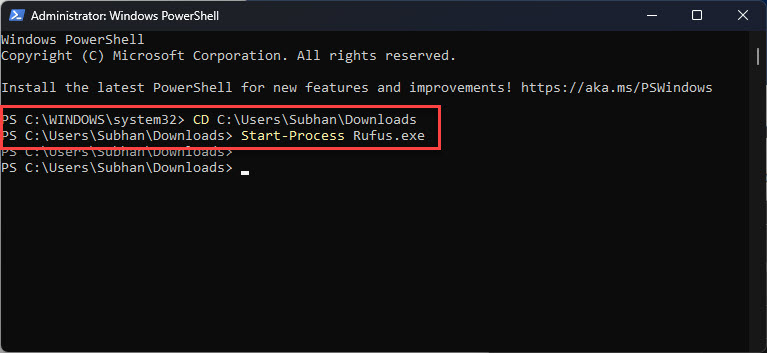
Start-Process එකෙන් executable එකක් run කරනවා.
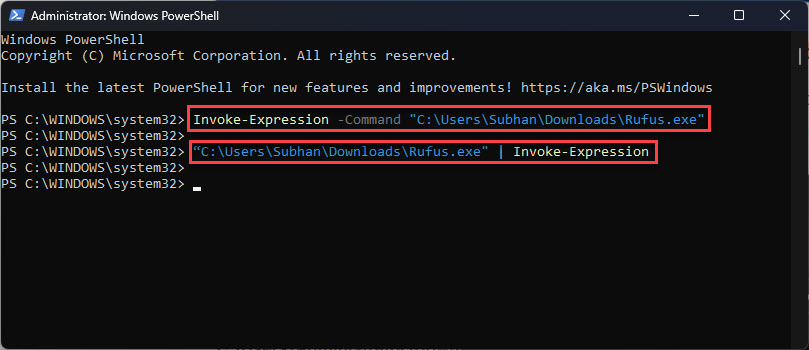
Method 4: Invoke-Expression
Warning: Invoke-Expression එකෙන් දෙන ඕනෑම string එකක් run කරනවා — untrusted input කවදාවත් pass කරන්න එපා, ඒක code-injection risk එකක්.
1. Command string එක build කරන්න: $cmd = "C:\...\app.exe"
2. Run කරන්න: Invoke-Expression $cmd
3. Normal use වලට & හෝ Start-Process prefer කරන්න; IEX තියාගන්නේ dynamic, trusted commands වලට.
Troubleshooting
Problem: "The term ... is not recognized".
Solution: Full හෝ .\ relative path එකක් පාවිච්චි කරන්න; PowerShell current folder එකෙන් .\ නැතුව run කරන්නේ නෑ.
Problem: Spaces තියෙන path එකක් fail වෙනවා.
Solution: Path එක quote කරලා & call operator එකෙන් prefix කරන්න.
Problem: Admin rights ඕන.
Solution: UAC elevation prompt එක trigger කරන්න Start-Process -Verb RunAs පාවිච්චි කරන්න.
Problem: App එක ඉවර වෙන්න කලින් script එක continue වෙනවා.
Solution: Start-Process එකට -Wait add කරන්න, එතකොට program එක exit වෙනකම් script එක pause වෙනවා.
Conclusion
PowerShell එකෙන් executables launch කරන්න ක්රම කිහිපයක් දෙනවා: simple cases වලට directly run කරන්න, quoted paths වලට & පාවිච්චි කරන්න, arguments, elevation, හෝ completion එකට wait ඕන වෙලාවට Start-Process. Invoke-Expression තියාගන්නේ trusted, dynamic commands වලට විතරයි.
About TechHub
මේ guide එක TechHub Knowledge Base එකේ කොටසක්. තව step-by-step IT guides සහ support වලට techhub.com.lk එකට යන්න.