Overview
Listening port එකක් කියන්නේ program එකක් incoming connections accept කරන්න open තියාගෙන ඉන්න network port එකක්. Open ports normal දෙයක්, ඒත් බලාපොරොත්තු නොවුණු හෝ අනවශ්ය එකක් security concern එකක් වෙන්න පුළුවන්, නැත්නම් වෙන application එකකට එකම port එක ඕන වුණාම conflicts ඇති කරන්න පුළුවන්. මේ guide එකෙන් listening ports list කරන්නෙ කොහොමද, එකක් පිටිපස්සෙ තියෙන process එක හොයාගන්නෙ කොහොමද, සහ ඒක පිරිසිදුව close කරන්නෙ කොහොමද කියලා පෙන්නනවා.
Key Takeaways
- netstat command එකෙන් හැම listening port එකක්ම සහ ඒක own කරන process ID එක list කරනවා.
- Port එකක් close කරන්නේ ඒක පාවිච්චි කරන process එක නවත්තලා, port එක කෙලින්ම නෙවෙයි.
- Task Manager සහ taskkill දෙකෙන්ම responsible process එක end කරන්න පුළුවන්.
- Firewall rule එකකින් underlying service එක නොනවත්තා port එකක් block කරන්න පුළුවන්.
Find Listening Ports
1. Command Prompt එක administrator විදිහට open කරන්න.
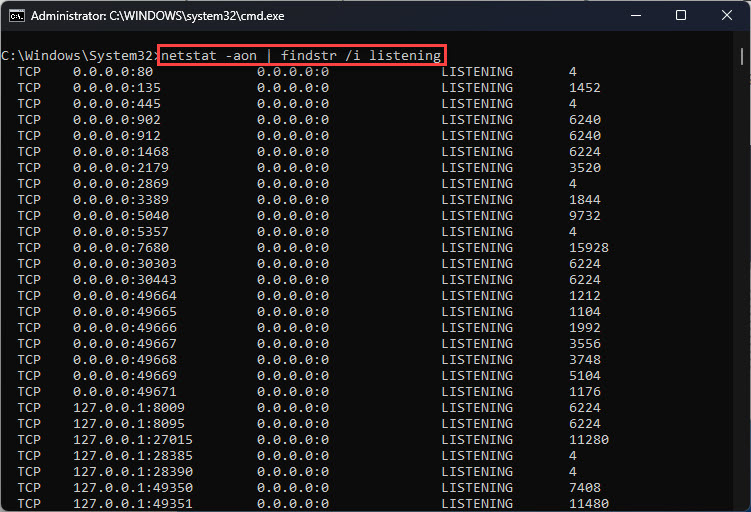
2. Run: netstat -ano | findstr LISTENING
3. port numbers බලන්න local address column එකයි, owning process ID (PID) එක බලන්න අන්තිම column එකයි read කරන්න.
netstat එකෙන් listening ports සහ ඒවගේ process IDs list කරනවා.
Identify the Process
1. ඔයාට close කරන්න ඕන port එක ළඟ පෙන්නන PID එක note කරගන්න.
2. Task Manager open කරලා Details tab එකට switch වෙන්න.
3. port එක open තියාගෙන ඉන්න program එක හොයාගන්න PID column එක match කරන්න.
Close the Port
Port එකක් process එකකින් open තියාගෙන ඉන්න නිසා, ඒ process එක end කරාම port එක release වෙනවා.
1. Task Manager එකේ, process එක right-click කරලා End task තෝරන්න, නැත්නම්
2. elevated Command Prompt එකකින් run: taskkill /PID <number> /F
3. port එක තව listening වෙන්නේ නෑ කියලා confirm කරන්න netstat command එක ආපහු run කරන්න.
Tip: Service එක නවත්තන්න බැරි වුණත් access block කරන්න ඕන නම්, ඒ specific port එක block කරන inbound firewall rule එකක් හදන්න.
Warning: නවත්තන්න safe කියලා identify කරන්න බැරි processes end කරන්න එපා. Essential Windows service එකක් පාවිච්චි කරන port එකක් close කරන එකෙන් networking හෝ system stability එකට බාධා වෙන්න පුළුවන්, ඒ නිසා මුලින්ම process එක verify කරන්න.
Troubleshooting
Problem: Close කරාට පස්සේ port එක එකෙන්ම ආපහු open වෙනවා.
Solution: Service එකක් automatically restart වෙන්න set කරලා තියෙනවා; process එක විතරක් end කරනවා වෙනුවට Services console එකේ ඒ service එක stop හෝ disable කරන්න.
Problem: taskkill එකෙන් access denied report කරනවා.
Solution: Command Prompt එක administrator විදිහට run කරන්න, මොකද system-level processes terminate කරන්න elevated privileges අවශ්යයි.
Problem: මොන application එකද port එකක් own කරන්නේ කියලා විශ්වාස නෑ.
Solution: Act කරන්න කලින් process එක නම් කරගන්න, netstat එකෙන් ගත්ත PID එක tasklist command එක එක්ක හෝ Task Manager Details tab එක එක්ක පාවිච්චි කරන්න.
Problem: Port එක පිටස්තරයන්ට close කරන්න ඕන ඒත් service එක run වෙන්න ඕන.
Solution: Service එක නවත්තනවා වෙනුවට port එක block කරන Windows Defender Firewall inbound rule එකක් add කරන්න.
Conclusion
Listening ports manage කරන එක එන්නේ owning process එක identify කරලා ඒක stop කරන්නද firewall එකෙන් block කරන්නද කියලා තීරණය කරන එකට. netstat සහ Task Manager එක්ක open ports minutes කිහිපයකින් audit කරලා control කරන්න පුළුවන්.
About TechHub
මේ guide එක TechHub Knowledge Base එකේ කොටසක්. තව step-by-step IT guides සහ support වලට techhub.com.lk එකට යන්න.