Overview
Windows එකේ දෙවන නැත්නම් තුන්වන monitor එකක් physically unplug නොකර deactivate කරන්න පුළුවන් — display එකක් තාවකාලිකව disable කරන්න ප්රයෝජනවත්. මේ guide එකෙන් Settings සහ Win + P quick menu එකෙන් ඒක කරන හැටි පෙන්නනවා.
Unplug නොකර monitors disconnect කරන ආකාරය.
Key Takeaways
- Win + P එකෙන් ඉක්මනට display modes switch කරනවා.
- Settings එකෙන් specific monitor එකක් disconnect කරන්න පුළුවන්.
- "Show only on 1" එකෙන් අනිත් ඒවා disable කරනවා.
- එකදු cable එකක්වත් unplug කරන්න ඕන නෑ.
Method 1: Win + P Quick Menu
1. Windows + P press කරන්න.
2. Primary display එක විතරක් පාවිච්චි කරන්න "PC screen only" තෝරන්න.
3. නැත්නම් අවශ්ය පරිදි "Second screen only" / "Duplicate" / "Extend" තෝරන්න.
Method 2: Settings (Disconnect a Specific Monitor)
1. Settings > System > Display open කරන්න.
2. Diagram එකේ disable කරන්න ඕන monitor එක click කරන්න.
3. Multiple-displays dropdown එක open කරලා "Disconnect this display" තෝරන්න.
4. තෝරගත්ත monitor එක plug කරලා තියෙද්දිම inactive වෙනවා.
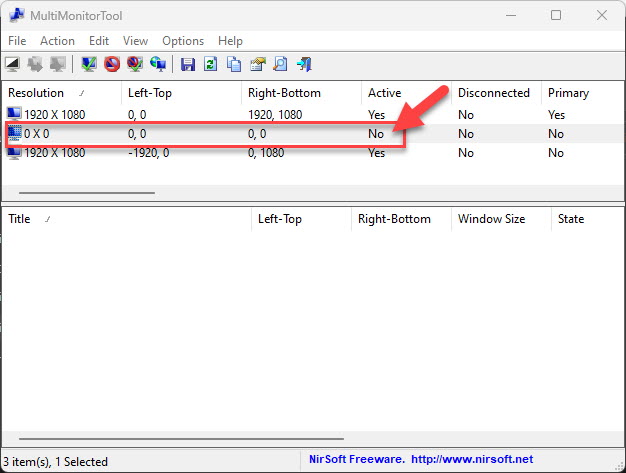
Inactive කරලා තියෙන monitor එක.
Triple-Monitor Setup
1. Settings > System > Display එකේ specific තුන්වන monitor එක select කරන්න.
2. ඒකට "Disconnect this display" තෝරන්න, අනිත් දෙක active විදිහට තියලා.
3. ඕන නම් ඉතුරු displays rearrange කරන්න.
Troubleshooting
Problem: "Disconnect this display" පෙන්නන්නේ නෑ.
Solution: Win + P > "PC screen only" පාවිච්චි කරන්න, නැත්නම් extend/duplicate options; options අඩු නම් GPU driver එක update කරන්න.
Problem: Reboot එකෙන් පස්සේ monitor එක ආපහු reactivate වෙනවා.
Solution: Windows එක ඒක ආපහු re-detect කරන්න පුළුවන් — preferred layout එක ආපහු set කරන්න, නැත්නම් monitor එක unit එකෙන්ම off කරන්න.
Problem: Windows disable කරපු screen එකට move වෙලා.
Solution: මුලින්ම primary display එක set කරලා, ඊට පස්සේ secondary එක disconnect කරන්න — එතකොට windows පේන විදිහට තියෙනවා.
Problem: එකක් disable කරාට පස්සේ resolution වෙනස් වුණා.
Solution: Display settings එකේ active display එකට resolution එක reset කරන්න.
Conclusion
Extra monitor එකක් disable කරන්න cables ඇදගන්න ඕන නෑ — Win + P එකෙන් ඉක්මන් mode switching, සහ Settings එකෙන් specific display එකක් plug කරලා තියෙද්දිම disconnect කරන්න පුළුවන්. මුලින්ම ඔයාගේ primary display එක set කරන්න — එතකොට ඔයාගේ windows බලාපොරොත්තු වෙන තැන තියෙනවා.
About TechHub
මේ guide එක TechHub Knowledge Base එකේ කොටසක්. තව step-by-step IT guides සහ support වලට techhub.com.lk එකට යන්න.