How to Download Google Chrome Offline Installers (Stable, Beta, Canary)
Get the full standalone Chrome installer for offline setup, plus how to check and update your version.
Overview
The standard Chrome download is a small online stub. The offline (standalone) installer contains everything, so you can install Chrome on PCs without internet or on multiple machines. This guide shows how to get it and manage versions.
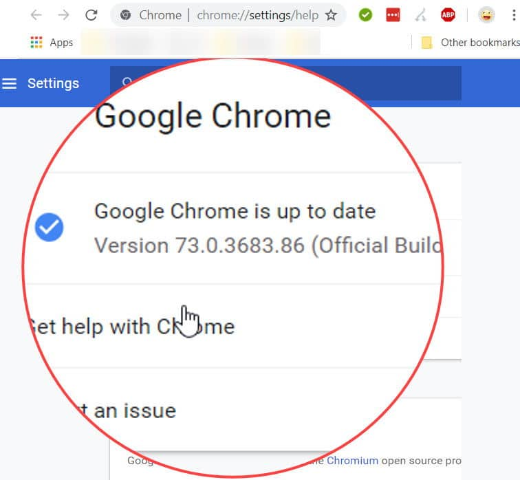
Checking the Google Chrome version.
Note: Download Chrome only from Google’s official site (google.com/chrome). Use the official offline-installer URLs rather than third-party mirrors.
Key Takeaways
- The offline installer is a complete, standalone setup file.
- Available for Stable, Beta, Dev, and Canary channels.
- Ideal for offline PCs or bulk installs.
- Chrome auto-updates, but you can update manually too.
Download the Offline (Standalone) Installer
1. Visit Google’s official Chrome page: google.com/chrome/.
2. Use the "alternate installer" link (or the standalone/offline installer URL) to get the full package.
3. Choose 64-bit (recommended) or 32-bit as needed.
4. Run the downloaded installer on the target PC — no internet required.
Beta, Dev, and Canary Channels
- Beta: near-final features, fairly stable.
- Dev: earlier features, less stable.
- Canary: bleeding-edge nightly build (can be unstable); installs alongside stable.
- Download each from Google’s official channel pages.
Check Your Chrome Version
1. Open Chrome and go to chrome://settings/help (Menu > Help > About Google Chrome).
2. The version is shown, and Chrome checks for updates automatically.
Update Chrome
1. On the About page, let Chrome download any update.
2. Click "Relaunch" to apply it.
3. Or reinstall with the latest offline installer to update manually.
Troubleshooting
Problem: The standard download needs internet.
Solution: Use the offline/standalone installer link so setup doesn’t download components during install.
Problem: Update stuck or failing.
Solution: Reinstall using the latest offline installer, or check that the Google Update service isn’t blocked.
Problem: Need 32-bit.
Solution: Download the 32-bit standalone installer explicitly; 64-bit is default and recommended.
Problem: Want to test features safely.
Solution: Install Beta or Canary, which run alongside stable Chrome.
Conclusion
Chrome’s offline installer is the way to set up the browser without relying on a download during install — handy for offline or multiple PCs. Grab it from Google’s official site, pick your channel, and keep Chrome current via the About page or a fresh offline installer.