Opera Browser එක Download කරලා Install කරන හැටි (Offline Installer)
Opera එකේ standalone installer එක අරගෙන ඒකේ built-in VPN, ad blocker, සහ battery saver set කරගන්න.
Overview
Opera කියන්නේ built-in ad blocker එකක්, free VPN එකක්, battery saver එකක්, සහ messenger integrations එක්ක එන Chromium-based browser එකක්. මේ guide එකෙන් offline installer එක download කිරීමයි ඒකේ standout features එකයි ආවරණය කරනවා.
Opera browser එක download කිරීම.
Note: Fake හෝ bundled installers වළක්වා ගන්න official opera.com website එකෙන් විතරක් Opera download කරන්න.
Key Takeaways
- Opera කියන්නේ Chromium-based, ඒ නිසා Chrome extensions run කරනවා.
- ඒකේ free built-in VPN එකකුයි ad blocker එකකුයි තියෙනවා.
- Offline installer එක setup එකේදී download කරන්නේ නැතුව වැඩ කරනවා.
- Battery saver එකයි workspaces එකයි ප්රයෝජනවත් extras.
Download the Offline Installer
1. Official Opera website එකට (opera.com) යන්න.
2. Offline/standalone installer option එක හොයන්න.
3. ඔයාගේ OS එකට (Windows, macOS, Linux) version එක download කරන්න.
4. Target PC එකේ installer එක run කරන්න — install වෙද්දී internet එකක් ඕන නෑ.
Key Features
- Basic privacy වලට free built-in VPN.
- Native ad සහ tracker blocking.
- Laptops වලට battery saver mode.
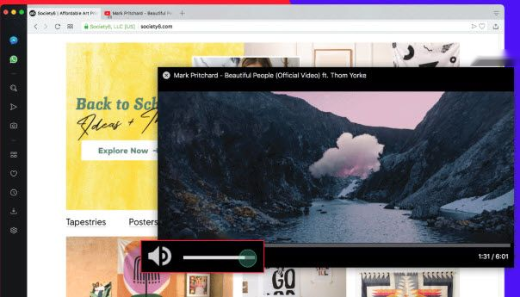
- Sidebar messengers, workspaces, සහ My Flow device sync.
- Web Store හරහා Chrome extension support.
First-Time Setup
1. Opera launch කරලා prompt කළොත් bookmarks/passwords import කරන්න.
2. ඕන නම් Settings වල ad blocker එකයි VPN එකයි enable කරන්න.
3. Devices අතර sync කරන්න Opera එකට sign in වෙන්න (optional).
Troubleshooting
Problem: Installer එකට internet ඕන.
Solution: Official site එකෙන් offline/standalone installer එක පාවිච්චි කරන්න.
Problem: VPN එක connect වෙන්නේ නෑ.
Solution: Settings > Privacy & security > VPN වල ඒක enable කරලා region එකක් තෝරන්න; ඒක browser traffic වලට තියෙන proxy-style VPN එකක්.
Problem: Extension එක install වෙන්නේ නෑ.
Solution: Opera එකෙන් Chrome extensions support කරනවා — Chrome Web Store එක enable කරන්න Opera add-on එක install කරන්න.
Problem: Update issues.
Solution: නවතම offline installer එකෙන් reinstall කරන්න හෝ updates වලට opera://about check කරන්න.
Conclusion
Opera එකෙන් free VPN එකක්, ad blocker එකක්, සහ battery saver එකක් එක්ක feature-rich, Chromium-based browsing experience එකක් දෙනවා. opera.com එකෙන් offline installer එක download කරලා, ඒක run කරලා, ඒකෙන් උපරිම ප්රයෝජන ගන්න built-in privacy tools enable කරන්න.