













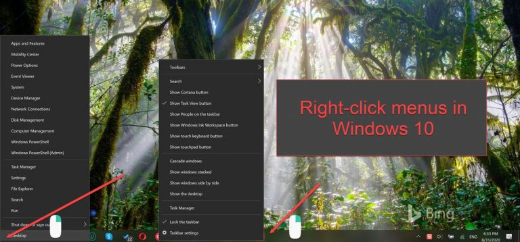
Taskbar එකේයි Start Menu එකේයි Right-Click වැඩ නොකරන එක Fix කරන්නේ කොහොමද
Explorer, Registry, සහ PowerShell fixes එක්ක right-click context menu එක ආපහු restore කරගන්න.
Overview
Taskbar එකේ හෝ Start menu එකේ right-click වැඩ නවත්තද්දී, ඒක සාමාන්යයෙන් Explorer glitch එකක් හෝ corrupt වුණු shell component එකක්. මේ guide එකෙන් ඉක්මන්ම එකේ ඉඳලා වඩාත් thorough එක දක්වා fixes cover කරනවා.
Right-click වැඩ නොකරන එක fix කරමින්.
Key Takeaways
- Explorer එක restart කරාම බොහෝ transient cases fix වෙනවා.
- SFC/DISM එකෙන් corrupt system files repair කරනවා.
- PowerShell හරහා shell packages re-register කරන එක උදව් වෙනවා.
- WinX folder එක rebuild කරාම power-user menu එක restore වෙනවා.
Fix 1: Windows Explorer එක Restart කරන්න
1. Task Manager එක open කරන්න (Ctrl + Shift + Esc).
2. "Windows Explorer" > Restart right-click කරන්න.
3. ආපහු right-click test කරන්න.
Fix 2: System Files Repair කරන්න
1. Command Prompt එක administrator විදිහට open කරන්න.
2. මේක run කරන්න: sfc /scannow
3. ඊට පස්සේ: DISM /Online /Cleanup-Image /RestoreHealth
4. Restart කරලා test කරන්න.
Fix 3: Shell Packages Re-register කරන්න (PowerShell)
1. PowerShell එක administrator විදිහට open කරන්න.
2. මේක run කරන්න: Get-AppxPackage -AllUsers | Foreach {Add-AppxPackage -DisableDevelopmentMode -Register "$($_.InstallLocation)\AppXManifest.xml"}
3. PC එක restart කරන්න.
4. මේකෙන් Start/Shell components re-register කරනවා.
Fix 4: WinX Menu Folder එක Rebuild කරන්න
1. Win+X menu එක එන්නේ %LocalAppData%\Microsoft\Windows\WinX වෙතින්.
2. Healthy profile එකකින් (හෝ default user එකෙන්) WinX folder එක ඔයාගේ profile එකට copy කරන්න.
3. Explorer එක restart කරන්න.
වෙනත් Checks
- ShellExView එකෙන් third-party shell extensions disable කරන්න (ඒවා right-click block කරන්න පුළුවන්).
- Windows සහ graphics drivers update කරන්න.
- Profile corruption එකක් නැහැ කියලා තහවුරු කරගන්න අලුත් user profile එකක් හදන්න.
Troubleshooting
Problem: Right-click වෙන තැන්වල වැඩ කරනවා ඒත් taskbar එකේ නෑ.
Solution: Explorer එක restart කරන්න; තවම තියෙනවා නම්, PowerShell හරහා shell packages re-register කරන්න.
Problem: Context menu එක එනවා ඊට පස්සේ අතුරුදහන් වෙනවා.
Solution: faulty shell extension එකක් වෙන්න ඉඩ තියෙනවා — ShellExView එකෙන් non-Microsoft extensions disable කරන්න.
Problem: PowerShell command එක සමහර apps වල error වෙනවා.
Solution: ඒක normal; ඒක continue වෙනවා — පස්සේ reboot කරලා ආපහු test කරන්න.
Problem: අලුත් profile එකෙන් විතරයි fix වෙන්නේ.
Solution: ඔයාගේ profile එකේ shell data corrupt වෙලා — අලුත් profile එකට migrate වෙන්න.
Conclusion
මුලින්ම Explorer එක restart කරන්න, ඊට පස්සේ SFC/DISM එකෙන් system files repair කරලා PowerShell හරහා shell packages re-register කරන්න. Win+X menu එක තමයි ප්රශ්නය නම්, ඒකේ folder එක rebuild කරන්න — සහ stubborn cases වලට ShellExView එකෙන් shell extensions check කරන්න.





