Overview
Many Windows programs and games depend on shared runtime libraries such as the Visual C++ Redistributables, the .NET Framework, Java, Silverlight and DirectX. Installing each one manually is tedious, and a missing runtime often causes cryptic "DLL not found" errors. Runtime bundlers let you install the most common libraries together in a single pass. This guide explains how to use them safely and points to the official sources for each component.
Installing a full set of common Windows runtime libraries in one step.
<w:bottom w:val="single" w:color="FBE4E4" w:sz="2" w:space="4"/><w:left w:val="single" w:color="C0392B" w:sz="24" w:space="8"/><w:right w:val="single" w:color="FBE4E4" w:sz="2" w:space="4"/></w:pBdr><w:shd w:fill="FBE4E4" w:color="auto" w:val="clear"/><w:spacing w:before="80" w:after="160"/><w:ind w:left="120" w:right="120"/></w:pPr><w:r><w:rPr><w:b/><w:bCs/><w:color w:val="C0392B"/><w:sz w:val="21"/><w:szCs w:val="21"/><w:rFonts w:ascii="Calibri" w:cs="Calibri" w:eastAsia="Calibri" w:hAnsi="Calibri"/></w:rPr><w:t xml:space="preserve">Warning: Only download runtime bundlers from their official websites and scan the installer before running it. Whenever possible, obtain individual runtimes directly from the vendor (Microsoft, Oracle) to be sure you are getting genuine, up-to-date files.
Key Takeaways
- Common runtimes include Visual C++ Redistributables, .NET, Java, Silverlight and DirectX.
- Bundlers such as All in One Runtimes and Ninite install several libraries in one download.
- Runtime installers may require a restart to register components fully.
- For maximum trust, download key runtimes directly from Microsoft and Oracle.
Option 1: All in One Runtimes
All in One Runtimes is a free package that installs a curated set of the runtime libraries most Windows software needs.
1. Download the All in One Runtimes package from its official website.
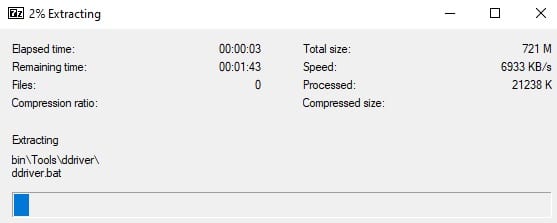
2. Scan the downloaded file with your antivirus, then extract or run it.
3. Review the list of components and clear any you do not want.
4. Start the installation and let it add each selected runtime.
5. Restart your PC if prompted so the components register.
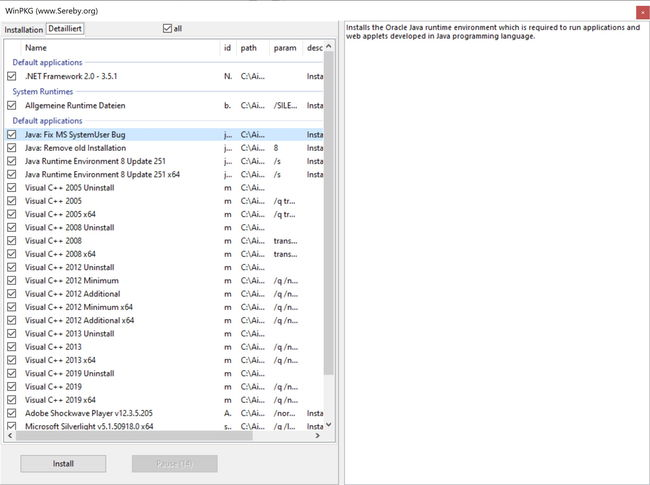
Selecting which runtime components to install from the bundle.
Option 2: Ninite
Ninite builds a single custom installer from your chosen apps and runtimes, always fetching the latest versions and skipping bundled toolbars.
1. Open the official Ninite website.
2. Tick the runtimes and apps you need (for example .NET and Java).
3. Click "Get Your Ninite" to download a custom installer.
4. Run the installer — it downloads and installs each item silently.
<w:bottom w:val="single" w:color="E2F0E1" w:sz="2" w:space="4"/><w:left w:val="single" w:color="2E7D32" w:sz="24" w:space="8"/><w:right w:val="single" w:color="E2F0E1" w:sz="2" w:space="4"/></w:pBdr><w:shd w:fill="E2F0E1" w:color="auto" w:val="clear"/><w:spacing w:before="80" w:after="160"/><w:ind w:left="120" w:right="120"/></w:pPr><w:r><w:rPr><w:b/><w:bCs/><w:color w:val="2E7D32"/><w:sz w:val="21"/><w:szCs w:val="21"/><w:rFonts w:ascii="Calibri" w:cs="Calibri" w:eastAsia="Calibri" w:hAnsi="Calibri"/></w:rPr><w:t xml:space="preserve">Tip: Ninite is safe to re-run later; it will update everything it manages to the current version without reinstalling what is already up to date.
Install Key Runtimes Directly (Recommended)
- Visual C++ Redistributables: download the latest supported versions from Microsoft’s official page.
- .NET: install the .NET Framework and modern .NET runtimes from Microsoft.
- Java: get the current Java Runtime from Oracle or a trusted OpenJDK build.
- DirectX: use the Microsoft DirectX End-User Runtime Web Installer for legacy DirectX 9 components.
Troubleshooting
Problem: An app still reports a missing DLL after installing runtimes.
Solution: Identify the exact runtime it needs (often a specific Visual C++ year and architecture) and install both the x86 and x64 versions from Microsoft.
Problem: The bundler installs unwanted extra software.
Solution: Read each screen carefully and deselect optional add-ons. Prefer Ninite, which never bundles extras, or install runtimes individually from the vendor.
Problem: Installation fails partway through.
Solution: Run the installer as administrator, temporarily pause aggressive antivirus, and ensure Windows Update is not installing a conflicting component at the same time.
Problem: A runtime appears installed but is outdated.
Solution: Re-run Ninite or the vendor installer to update it. Some apps require a specific older runtime, so keep those alongside the latest versions.
Conclusion
Runtime bundlers like All in One Runtimes and Ninite save time by installing the Visual C++, .NET, Java and DirectX libraries that most Windows software relies on. Download bundlers only from their official sites, and for critical components go straight to Microsoft and Oracle to guarantee genuine, current files.
About TechHub
This guide is part of the TechHub Knowledge Base. For more step-by-step IT guides and support, visit techhub.com.lk.