Overview
Windows programs සහ games ගොඩක් Visual C++ Redistributables, .NET Framework, Java, Silverlight සහ DirectX වගේ shared runtime libraries මත රඳා පවතිනවා. හැම එකක්ම manually install කිරීම කම්මැලියි, සහ missing runtime එකක් නිතරම cryptic "DLL not found" errors ඇති කරනවා. Runtime bundlers වලින් වඩාත් common libraries එකට එක pass එකකින් install කරන්න පුළුවන්. මේ guide එකෙන් ඒවා safe විදිහට පාවිච්චි කරන්නේ කොහොමද කියලා පැහැදිලි කරලා හැම component එකකටම official sources පෙන්නනවා.
Common Windows runtime libraries සම්පූර්ණ set එකක් එක step එකකින් install කිරීම.
Warning: Runtime bundlers ඒවාගේ official websites වලින් විතරක් download කරලා install කරන්න කලින් scan කරන්න. පුළුවන් හැම වෙලාවකම, genuine, up-to-date files ලැබෙනවා කියලා තහවුරු කරගන්න individual runtimes කෙලින්ම vendor (Microsoft, Oracle) ගෙන් ලබාගන්න.
Key Takeaways
- Common runtimes වලට Visual C++ Redistributables, .NET, Java, Silverlight සහ DirectX ඇතුළත් වෙනවා.
- All in One Runtimes සහ Ninite වගේ bundlers එක download එකකින් libraries කිහිපයක් install කරනවා.
- Runtime installers වලට components සම්පූර්ණයෙන් register වෙන්න restart එකක් අවශ්ය වෙන්න පුළුවන්.
- උපරිම විශ්වාසයට, key runtimes කෙලින්ම Microsoft සහ Oracle ගෙන් download කරන්න.
Option 1: All in One Runtimes
All in One Runtimes කියන්නේ වැඩිම Windows software වලට අවශ්ය runtime libraries curated set එකක් install කරන free package එකක්.
1. All in One Runtimes package එක එහි official website එකෙන් download කරන්න.
2. download කරපු file එක ඔයාගේ antivirus එකෙන් scan කරලා, extract කරන්න හෝ run කරන්න.
3. components list එක review කරලා ඕන නැති ඒවා clear කරන්න.
4. installation එක start කරලා තෝරාගත් හැම runtime එකක්ම add කරන්න ඉඩ දෙන්න.
5. components register වෙන්න prompt වුණොත් ඔයාගේ PC එක restart කරන්න.
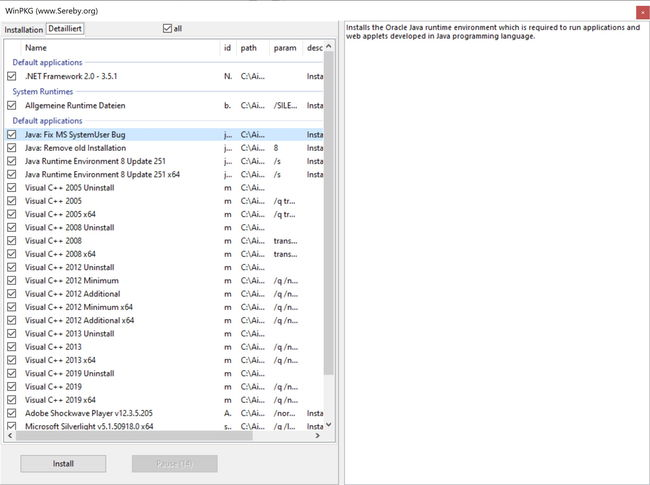
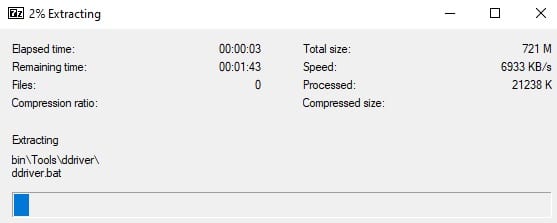
bundle එකෙන් install කරන්න මොන runtime components ද කියලා තෝරාගැනීම.
Option 2: Ninite
Ninite ඔයා තෝරගත් apps සහ runtimes වලින් single custom installer එකක් හදනවා, හැමවිටම latest versions fetch කරලා bundled toolbars skip කරලා.
1. official Ninite website එක open කරන්න.
2. ඔයාට ඕන runtimes සහ apps tick කරන්න (උදාහරණයක් විදිහට .NET සහ Java).
3. custom installer එකක් download කරන්න "Get Your Ninite" click කරන්න.
4. installer එක run කරන්න — ඒක හැම item එකක්ම silently download කරලා install කරනවා.
Tip: Ninite පස්සේ ආපහු run කරන්න safe; ඒක manage කරන හැම දේම already up to date ඒවා reinstall කරන්නේ නැතුව current version එකට update කරනවා.
Install Key Runtimes Directly (Recommended)
- Visual C++ Redistributables: latest supported versions Microsoft ගේ official page එකෙන් download කරන්න.
- .NET: .NET Framework එකයි modern .NET runtimes එකයි Microsoft ගෙන් install කරන්න.
- Java: current Java Runtime එක Oracle ගෙන් හෝ trusted OpenJDK build එකකින් ලබාගන්න.
- DirectX: legacy DirectX 9 components වලට Microsoft DirectX End-User Runtime Web Installer එක පාවිච්චි කරන්න.
Troubleshooting
Problem: runtimes install කරාට පස්සෙත් app එකක් missing DLL එකක් report කරනවා.
Solution: ඒකට අවශ්ය හරියටම runtime එක identify කරන්න (බොහෝ විට specific Visual C++ year එකක් සහ architecture එකක්) සහ x86 සහ x64 versions දෙකම Microsoft ගෙන් install කරන්න.
Problem: bundler එක ඕන නැති extra software install කරනවා.
Solution: හැම screen එකක්ම හොඳට කියවලා optional add-ons deselect කරන්න. extras කවදාවත් bundle නොකරන Ninite වඩාත් කැමති වෙන්න, හෝ runtimes vendor ගෙන් තනිතනිව install කරන්න.
Problem: installation එක අතරමගදී fail වෙනවා.
Solution: installer එක administrator විදිහට run කරන්න, aggressive antivirus එක තාවකාලිකව pause කරන්න, සහ Windows Update එකම වෙලාවේ conflicting component එකක් install කරන්නේ නැති බව තහවුරු කරගන්න.
Problem: runtime එකක් install වෙලා වගේ පේනවා ඒත් outdated.
Solution: Ninite හෝ vendor installer එක ආපහු run කරලා update කරන්න. සමහර apps වලට specific පරණ runtime එකක් අවශ්යයි, ඒ නිසා ඒවා latest versions එක්ක තියාගන්න.
Conclusion
All in One Runtimes සහ Ninite වගේ runtime bundlers වැඩිම Windows software රඳා පවතින Visual C++, .NET, Java සහ DirectX libraries install කරලා කාලය ඉතිරි කරනවා. bundlers ඒවාගේ official sites වලින් විතරක් download කරන්න, සහ critical components වලට genuine, current files සහතික කරගන්න කෙලින්ම Microsoft සහ Oracle වෙත යන්න.
About TechHub
මේ guide එක TechHub Knowledge Base එකේ කොටසක්. තව step-by-step IT guides සහ support වලට techhub.com.lk එකට යන්න.