Overview
YouTube වලට Microsoft Store එකේ official Windows app එකක් නෑ, ඒත් ඒක Chrome හෝ Edge එකෙන් Progressive Web App (PWA) එකක් විදිහට install කරන්න පුළුවන්. PWA එකක් native app එකක් වගේම ඒකේම window එකක, ඒකේම icon එකක් එක්ක run වෙනවා. මේ guide එකෙන් ක්රම දෙකම පෙන්නනවා.
Windows 11 එකේ YouTube desktop app (PWA) එකක් විදිහට install කරන්න.
Key Takeaways
- YouTube වලට Store app එකක් නෑ; ඒ වෙනුවට PWA එකක් විදිහට install කරන්න.
- Chrome සහ Edge දෙකටම YouTube app එකක් විදිහට install කරන්න පුළුවන්.
- PWA එකට ඒකේම window එකක්, taskbar icon එකක්, සහ Start menu entry එකක් ලැබෙනවා.
- Website එක්ක automatically update වෙනවා.
Method 1 — Google Chrome එකෙන් Install කරන්න
1. Chrome open කරලා youtube.com වලට යන්න.
2. Three-dot menu එක > Cast, save, and share (හෝ Save and share) > Install page as app… click කරන්න (හෝ address bar එකේ install icon එක).
3. Install confirm කරන්න.
4. YouTube ඒකේම window එකක open වෙලා Start menu එකේ සහ taskbar එකේ පෙන්නනවා.
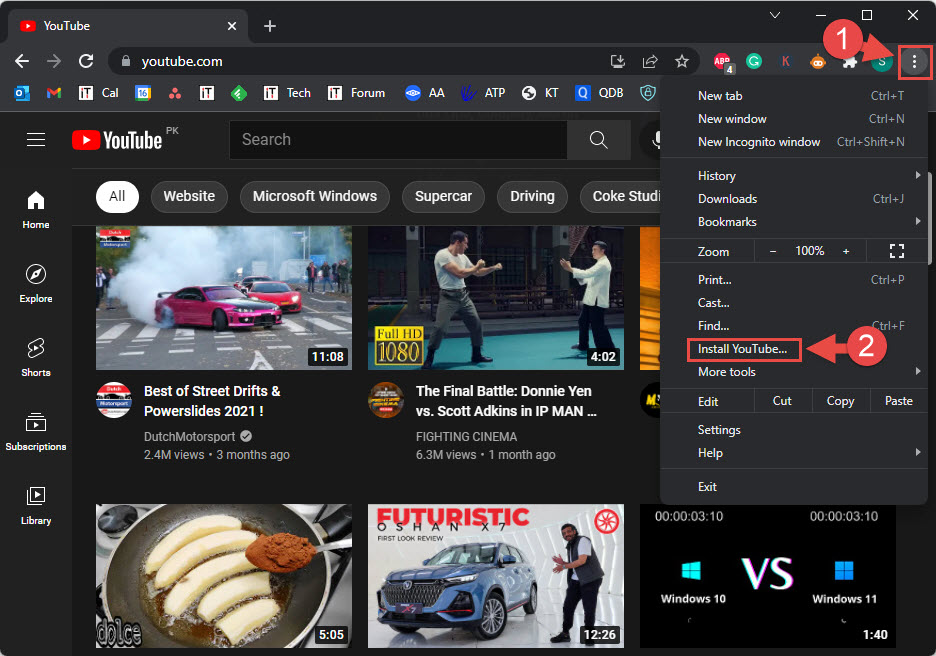
Google Chrome එකෙන් YouTube app එක install කරන්න.
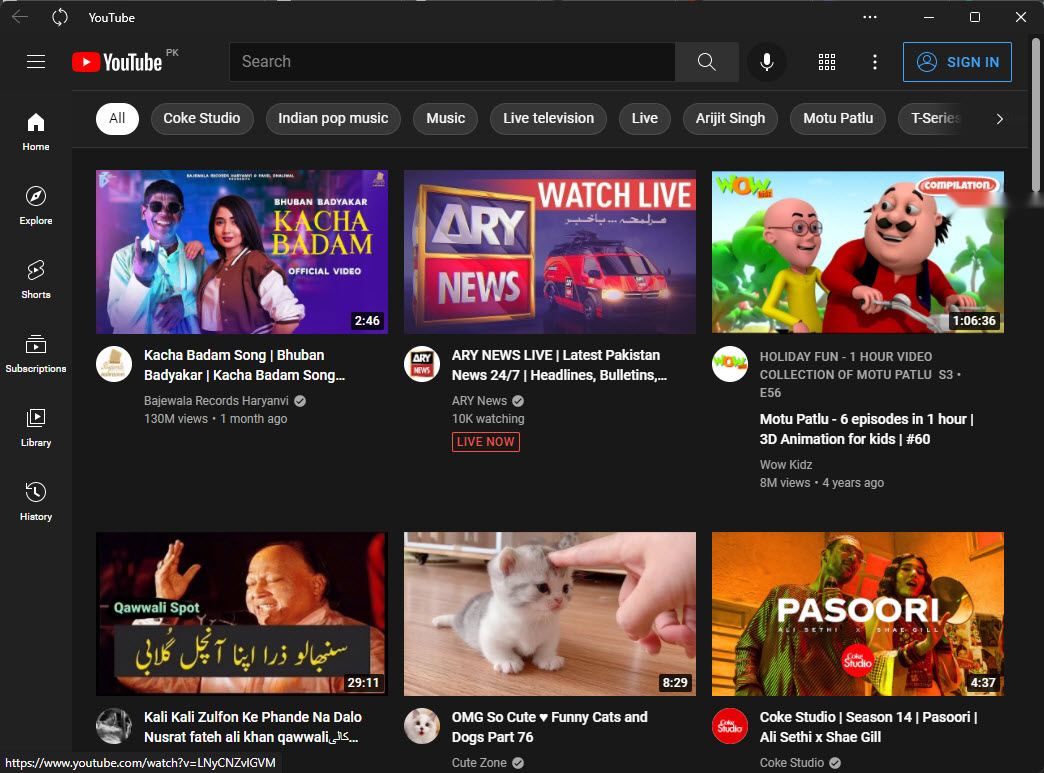
YouTube PWA එක ඒකේම window එකක install වෙලා run වෙනවා.
Method 2 — Microsoft Edge එකෙන් Install කරන්න
1. Edge open කරලා youtube.com වලට යන්න.
2. Three-dot menu එක > Apps > Install this site as an app click කරන්න.
3. Name කරලා (YouTube) Install click කරන්න.
4. Prompt වුණොත් taskbar/Start එකට pin කරන්න තෝරන්න.
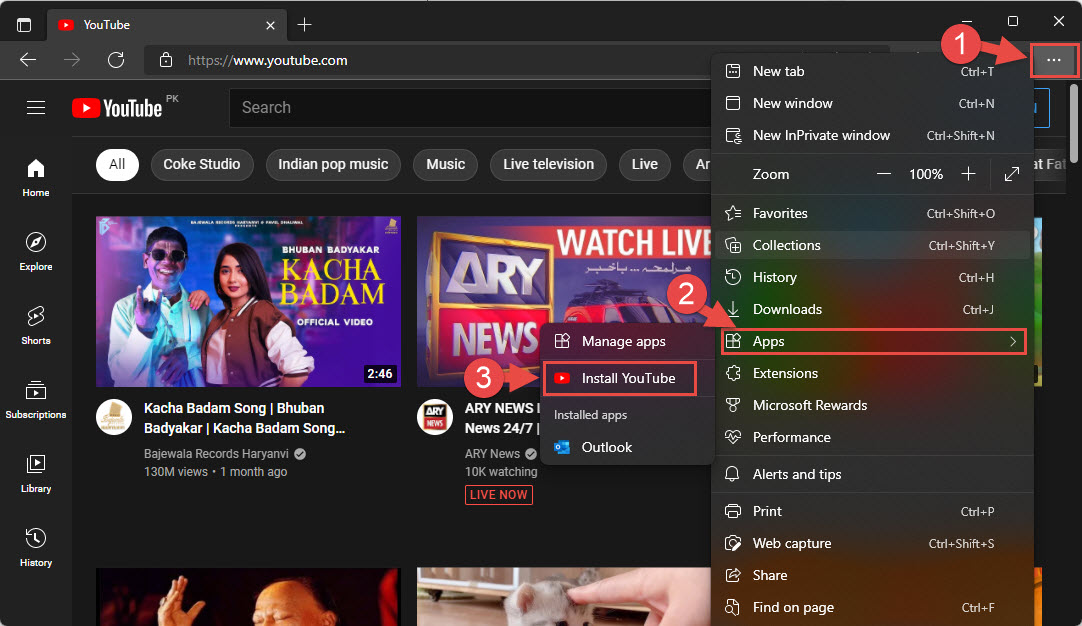
Microsoft Edge එකෙන් YouTube app එක install කරන්න.
Tip: Installed YouTube app එක ඕනෑම program එකක් වගේම one-click access එකට taskbar එකට pin කරන්න පුළුවන්.
Troubleshooting
Problem: Install option එකක් නෑ.
Solution: ඔබ youtube.com එකේ ඉන්නවා කියලා (video embed එකක නෙවෙයි), browser එක up to date කියලා බලන්න; install icon එක supported pages වල address bar එකේ පෙන්නනවා.
Problem: App එක open වෙන්නේ නෑ.
Solution: Browser එකෙන් reinstall කරලා, ඒක install කරපු browser එක තවම තියෙනවා කියලා බලන්න (PWA එක ඒක මත rely කරනවා).
Problem: Uninstall කරන්න ඕන.
Solution: Settings > Apps > Installed apps open කරලා YouTube uninstall කරන්න, නැත්නම් browser එකේ Apps page එකෙන් remove කරන්න.
Problem: Sign-in නෑ, නැත්නම් log out වෙනවා.
Solution: App window එක ඇතුළේ YouTube වලට sign in වෙන්න; ඒක website එක වගේ ඒකේම session එක තියාගන්නවා.
Conclusion
YouTube PWA එකක් විදිහට install කරන එකෙන් Store download එකක් නැතුව clean, dedicated desktop app එකක් ලැබෙනවා. Chrome එකේ "Install page as app" හෝ Edge එකේ "Install this site as an app" පාවිච්චි කරලා, taskbar එකට pin කරන්න.
About TechHub
මේ guide එක TechHub Knowledge Base එකේ කොටසක්. තව step-by-step IT guides සහ support වලට techhub.com.lk එකට යන්න.