Overview
If you have seen a "WDAGUtilityAccount" among your user accounts, you might wonder what it is and whether it is a security risk. It is a legitimate built-in Windows account tied to Microsoft Defender Application Guard. This guide explains it and how to manage it.
WDAGUtilityAccount is a built-in Windows system account.
Key Takeaways
- WDAGUtilityAccount supports Microsoft Defender Application Guard (WDAG).
- It is a legitimate built-in account, disabled by default — not malware.
- You normally should not (and cannot easily) delete it.
- It is inactive unless Application Guard is in use.
What Is It For?
WDAG (Windows Defender Application Guard) isolates untrusted websites/documents in a lightweight container to protect your PC. The WDAGUtilityAccount is the built-in account Windows uses to run that isolated environment. It stays disabled until WDAG is active.
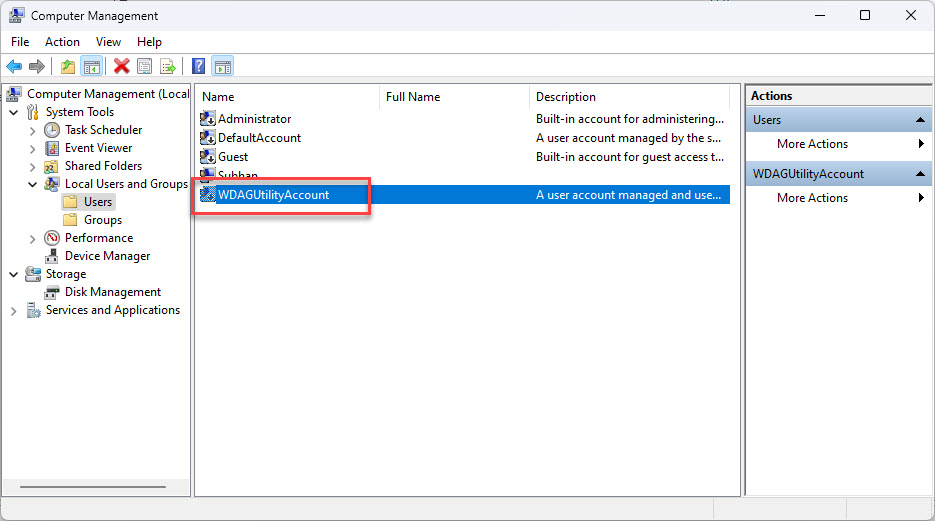
WDAGUtilityAccount shown in Local Users and Groups.
Is It Safe?
- Yes — it is a standard Windows account, not a virus.
- It is disabled by default and has no password set for interactive logon.
- Seeing it is normal and not a sign of compromise.
Can You Delete It?
1. Open Computer Management > Local Users and Groups > Users (Pro/Enterprise).
2. You will see WDAGUtilityAccount; attempting to delete a built-in account is blocked.
3. Leave it in place — removing it can break Application Guard.
4. You can confirm its disabled state here rather than deleting it.
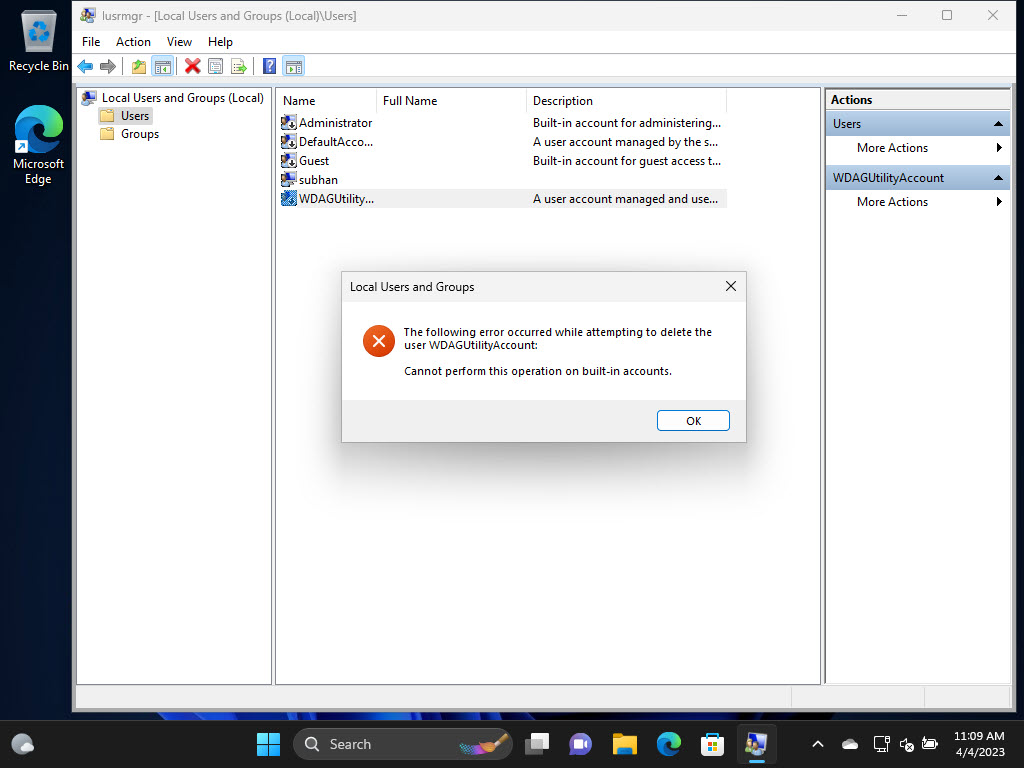
Windows blocks deleting built-in accounts like this one.
Troubleshooting
Problem: I think it might be malware.
Solution: It is a legitimate built-in account. Run a Windows Security scan for peace of mind, but it does not need removing.
Problem: I cannot delete it.
Solution: That is expected — built-in accounts cannot be deleted. Leave it disabled.
Problem: It appears enabled.
Solution: It activates only when Application Guard runs; if you do not use WDAG, it should remain disabled.
Problem: I do not use Application Guard.
Solution: No action needed — the account stays dormant. You can leave WDAG off without removing the account.
Conclusion
WDAGUtilityAccount is a harmless, built-in Windows account for Microsoft Defender Application Guard. It is disabled by default, cannot be deleted, and requires no action — its presence is completely normal.
</w:pBdr><w:spacing w:before="220" w:after="40"/></w:pPr><w:r><w:rPr><w:b/><w:bCs/><w:color w:val="0B5394"/><w:sz w:val="21"/><w:szCs w:val="21"/><w:rFonts w:ascii="Calibri" w:cs="Calibri" w:eastAsia="Calibri" w:hAnsi="Calibri"/></w:rPr><w:t xml:space="preserve">About TechHub
This guide is part of the TechHub Knowledge Base. For more step-by-step IT guides and support, visit techhub.com.lk.