Overview
ඔබේ user accounts අතර "WDAGUtilityAccount" එකක් දැකලා තියෙනවා නම්, ඒක මොකක්ද, security risk එකක්ද කියලා හිතෙන්න පුළුවන්. ඒක Microsoft Defender Application Guard එකට tied වුණ legitimate built-in Windows account එකක්. මේ guide එකෙන් ඒක සහ manage කරන ආකාරය පැහැදිලි කරනවා.
WDAGUtilityAccount කියන්නේ built-in Windows system account එකක්.
Key Takeaways
- WDAGUtilityAccount එකෙන් Microsoft Defender Application Guard (WDAG) support කරනවා.
- ඒක legitimate built-in account එකක්, default විදිහට disabled — malware නෙවෙයි.
- සාමාන්යයෙන් ඒක delete කරන්න ඕන නෑ (ලේසියෙන් බෑ).
- Application Guard පාවිච්චි නොකරනකම් ඒක inactive.
ඒක මොකටද?
WDAG (Windows Defender Application Guard) එකෙන් untrusted websites/documents lightweight container එකක isolate කරලා ඔබේ PC එක protect කරනවා. WDAGUtilityAccount එක තමයි Windows ඒ isolated environment එක run කරන්න පාවිච්චි කරන built-in account එක. WDAG active වෙනකම් ඒක disabled පවතිනවා.
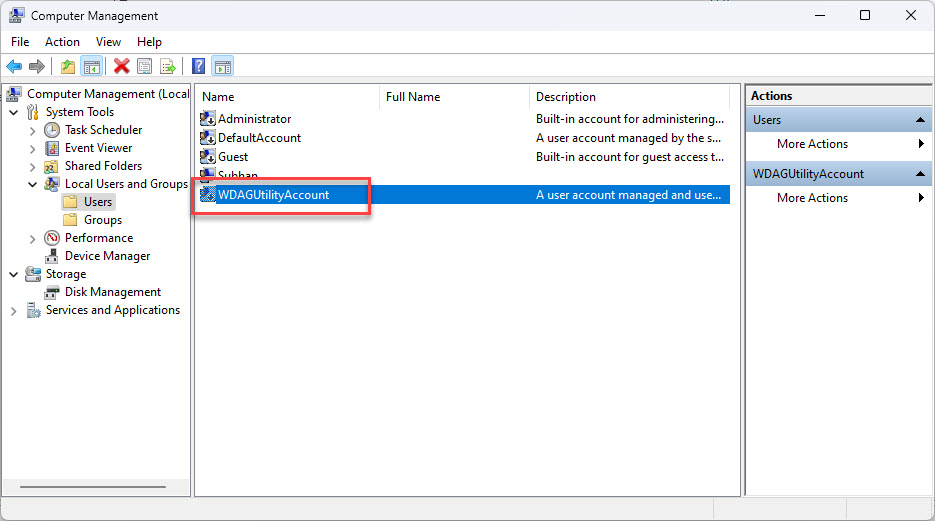
Local Users and Groups එකේ පෙන්නන WDAGUtilityAccount.
ඒක Safe ද?
- ඔව් — ඒක standard Windows account එකක්, virus එකක් නෙවෙයි.
- ඒක default විදිහට disabled, interactive logon වලට password එකක් set කරලා නෑ.
- ඒක දකින එක normal, compromise එකක ලකුණක් නෙවෙයි.
ඒක Delete කරන්න පුළුවන්ද?
1. Computer Management > Local Users and Groups > Users open කරන්න (Pro/Enterprise).
2. WDAGUtilityAccount එක පෙන්නනවා; built-in account එකක් delete කරන්න try කරන එක block වෙනවා.
3. ඒක තියෙන තැන තියන්න — remove කරන එකෙන් Application Guard break වෙන්න පුළුවන්.
4. Delete කරනවා වෙනුවට ඒකේ disabled state එක මෙතන confirm කරන්න පුළුවන්.
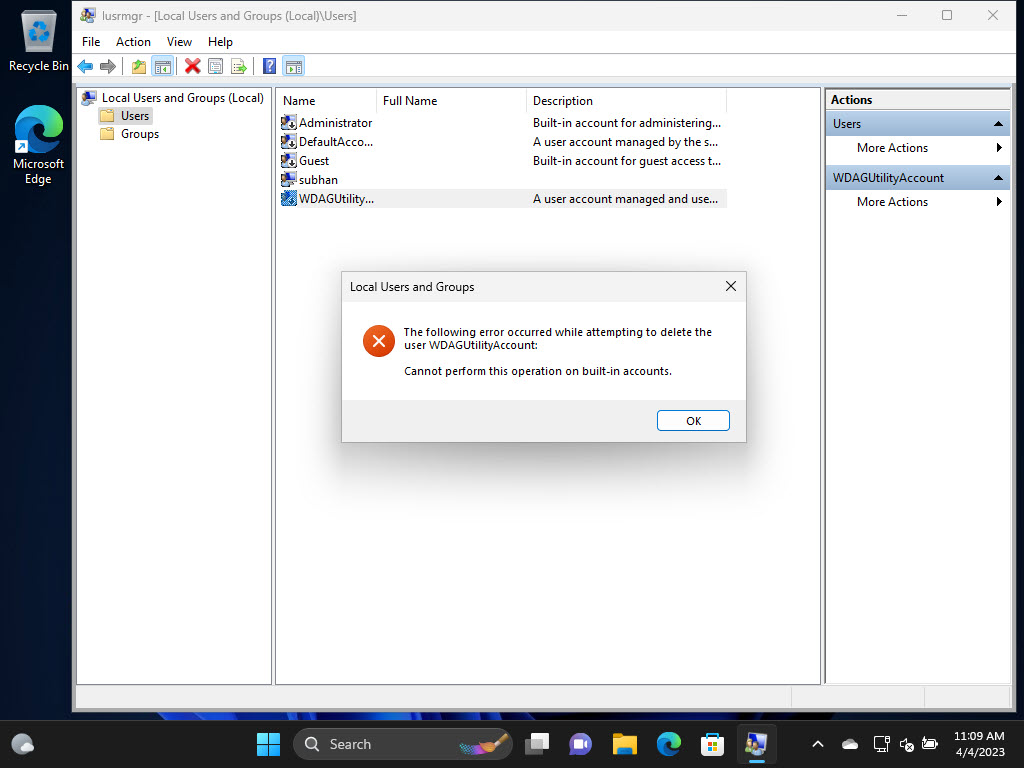
මේ වගේ built-in accounts delete කරන එක Windows block කරනවා.
Troubleshooting
Problem: ඒක malware වෙන්න පුළුවන් කියලා හිතනවා.
Solution: ඒක legitimate built-in account එකක්. Peace of mind වලට Windows Security scan එකක් run කරන්න, ඒත් ඒක remove කරන්න ඕන නෑ.
Problem: ඒක delete කරන්න බෑ.
Solution: ඒක expected — built-in accounts delete කරන්න බෑ. Disabled තියන්න.
Problem: ඒක enabled විදිහට පෙන්නනවා.
Solution: ඒක activate වෙන්නේ Application Guard run වුණාම විතරයි; WDAG පාවිච්චි නොකරනවා නම්, ඒක disabled පවතින්න ඕන.
Problem: මම Application Guard පාවිච්චි කරන්නේ නෑ.
Solution: කරන්න මුකුත් නෑ — account එක dormant පවතිනවා. Account එක remove නොකර WDAG off තියන්න පුළුවන්.
Conclusion
WDAGUtilityAccount කියන්නේ Microsoft Defender Application Guard වලට harmless, built-in Windows account එකක්. ඒක default විදිහට disabled, delete කරන්න බෑ, කිසි action එකක් ඕන නෑ — ඒක තියෙන එක සම්පූර්ණයෙන් normal.
About TechHub
මේ guide එක TechHub Knowledge Base එකේ කොටසක්. තව step-by-step IT guides සහ support වලට techhub.com.lk එකට යන්න.