Overview
Wi-Fi standards, defined by the IEEE 802.11 family, determine how fast and reliably your devices connect wirelessly. Each generation improves speed, range, and efficiency. This guide explains the evolution of Wi-Fi from the original 802.11 to Wi-Fi 7, the security protocols that protect your network, channel widths, and how to find out which standard your own hardware supports.
Wi-Fi standards have evolved from the original 802.11 to Wi-Fi 7.
Key Takeaways
- Wi-Fi standards are set by the IEEE under the 802.11 name; the “Wi-Fi 4/5/6/7” labels are simpler marketing names.
- Newer generations add speed, capacity in crowded areas, and better battery efficiency.
- Security has progressed from WEP to WPA2 and now WPA3 — always use the newest your devices support.
- Both your router and your device must support a standard to benefit from it.
What Are Wi-Fi Standards?
A Wi-Fi standard is a set of technical specifications, published by the IEEE as part of the 802.11 family, that defines how wireless devices communicate. Standardisation ensures that a laptop, phone, or router from any manufacturer can interoperate. The Wi-Fi Alliance also assigns the friendlier generation names (Wi-Fi 4, 5, 6, 7) to make the standards easier to recognise.
Evolution of Wi-Fi Standards
- 802.11 legacy (1997) — the original standard, up to 2 Mbps on the 2.4 GHz band.
- 802.11a / Wi-Fi 1 (1999) — up to 54 Mbps on 5 GHz.
- 802.11b / Wi-Fi 2 (1999) — up to 11 Mbps on 2.4 GHz, widely adopted early on.
- 802.11g / Wi-Fi 3 (2003) — up to 54 Mbps on 2.4 GHz.
- 802.11n / Wi-Fi 4 (2009) — up to ~600 Mbps, dual-band 2.4/5 GHz, introduced MIMO.
- 802.11ac / Wi-Fi 5 (2014) — multi-gigabit speeds on 5 GHz with wider channels.
- 802.11ax / Wi-Fi 6 (2019) — higher efficiency in busy environments; Wi-Fi 6E (2020) added the 6 GHz band.
- 802.11be / Wi-Fi 7 (2024) — very high throughput, 320 MHz channels, and multi-link operation.
Frequency Bands
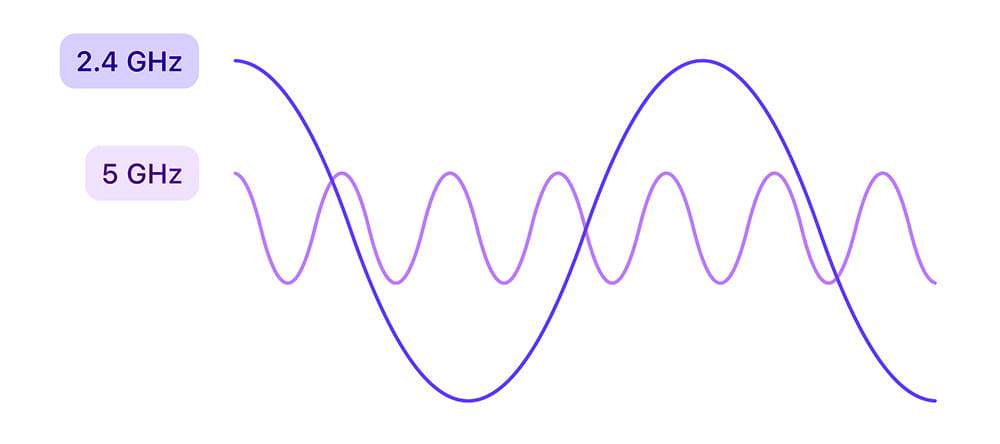
- 2.4 GHz — longer range and better wall penetration, but slower and more congested.
- 5 GHz — faster with less interference, but shorter range.
- 6 GHz — introduced with Wi-Fi 6E/7 for clean, high-speed channels (device and region support required).
Wi-Fi Security Protocols
- WEP — the original, now obsolete and insecure; avoid it.
- WPA — an interim improvement over WEP, also outdated.
- WPA2 — long the standard; strong when used with AES.
- WPA3 — the current standard with stronger encryption and protection against password-guessing attacks.
Tip: Set your router to WPA3 (or WPA2/WPA3 mixed mode) for the best security your devices support.
Channel Widths
Wider channels carry more data but use more spectrum and can cause interference in crowded areas. Common widths are 20 MHz and 40 MHz (2.4 GHz), 80 MHz and 160 MHz (5 GHz), and up to 320 MHz with Wi-Fi 7 on 6 GHz. On busy 2.4 GHz networks, 20 MHz is often the most reliable choice.
How to Check Which Wi-Fi Standard Your PC Supports
1. Press Windows key + R, type cmd, and press Enter.
2. Run the command: netsh wlan show drivers
3. Look at the "Radio types supported" line — it lists the 802.11 standards (for example 802.11ax) your adapter supports.
4. To see your current connection details, run: netsh wlan show interfaces
Frequently Asked Questions
Problem: My router is Wi-Fi 6 but speeds are slow.
Solution: Your connecting device must also support Wi-Fi 6, and you should be on the 5 GHz (or 6 GHz) band. Check the device’s adapter capabilities and band.
Problem: Should I use 2.4 GHz or 5 GHz?
Solution: Use 5 GHz (or 6 GHz) for speed when close to the router, and 2.4 GHz for range through walls or at a distance.
Problem: Is Wi-Fi 7 backward compatible?
Solution: Yes. Newer standards are backward compatible, so older devices still connect — just at their own maximum standard.
Problem: Which security setting is safest?
Solution: WPA3 where supported. If some devices are older, use WPA2/WPA3 mixed mode rather than dropping to WPA2 only.
Conclusion
Understanding Wi-Fi standards helps you choose the right router, band, and security for your needs. For the best experience, match your devices to the newest standard they support, prefer the 5 GHz or 6 GHz bands for speed, and secure your network with WPA3.
</w:pBdr><w:spacing w:before="220" w:after="40"/></w:pPr><w:r><w:rPr><w:b/><w:bCs/><w:color w:val="0B5394"/><w:sz w:val="21"/><w:szCs w:val="21"/><w:rFonts w:ascii="Calibri" w:cs="Calibri" w:eastAsia="Calibri" w:hAnsi="Calibri"/></w:rPr><w:t xml:space="preserve">About TechHub
This guide is part of the TechHub Knowledge Base. For more step-by-step IT guides and support, visit techhub.com.lk.