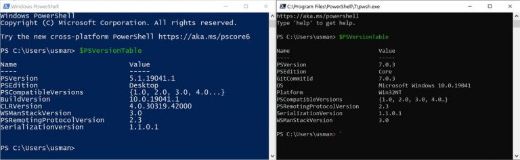
Windows PowerShell vs PowerShell (Core): වෙනස මොකක්ද?
PowerShell edition දෙක, ඒවා අතර වෙනස්කම්, සහ මොකක් කවදා පාවිච්චි කරන්නද කියලා තේරුම් ගන්න.
Overview
PowerShell දෙකක් තියෙනවා: Windows එකට built-in වෙලා එන "Windows PowerShell" (5.1) සහ අලුත් cross-platform "PowerShell" (කලින් PowerShell Core කියල හැඳින්වූ, 7+). මේ guide එකෙන් ඒවා අතර වෙනස සහ මොකක් කවදා පාවිච්චි කරන්නද කියල පැහැදිලි කරනවා — ඒවා දෙකම එකට side by side run කරන්න පුළුවන්.
Windows PowerShell vs PowerShell (Core).
Key Takeaways
- Windows PowerShell 5.1 කියන්නේ Windows එකට built-in වෙලා එන එකක්, Windows-only.
- PowerShell 7+ කියන්නේ cross-platform, open-source, දිගටම develop වෙන එකක්.
- ඒවා දෙකම side by side install වෙනවා (powershell.exe vs pwsh.exe).
- අලුත් scripting සාමාන්යයෙන් PowerShell 7+ එකට target කරන්න ඕන.
Windows PowerShell (5.1)
- Windows එකත් එක්කම එනවා; full .NET Framework එක උඩ run වෙනවා.
- Command: powershell.exe.
- පරණ Windows-only modules එක්ක හොඳම compatibility එක තියෙනවා.
- අලුත් features එනවා නෑ (maintenance විතරයි).
PowerShell 7+ (කලින් Core)
- Cross-platform (Windows, macOS, Linux); modern .NET එක උඩ හදලා.
- Command: pwsh.exe.
- වේගවත්, අලුත් operators සහ features එක්ක.
- ඉදිරියට යද්දී recommend කරන edition එක මේකයි.
Install PowerShell 7 Side by Side
Note: PowerShell 7 එක download කරන්නේ Microsoft ගේ official source එකෙන් විතරයි (GitHub releases හෝ winget).
1. winget එකෙන් install කරන්න: winget install Microsoft.PowerShell
2. නැත්නම් Microsoft ගේ official PowerShell GitHub releases එකෙන් MSI එක download කරගන්න.
3. එක pwsh විදිහට install වෙනවා, built-in Windows PowerShell 5.1 එකත් එක්ක.
4. Start එකෙන් "PowerShell 7" එක launch කරන්න, නැත්නම් pwsh run කරන්න.
Which Should You Use?
- අලුත් scripts/cross-platform: PowerShell 7+.
- 5.1 එක ඕන කරන legacy Windows-only modules: Windows PowerShell.
- දෙකම එකට තියෙන්න පුළුවන් — task එකට අනුව තෝරගන්න.
Troubleshooting
Problem: Module එකක් 5.1 එකේ වැඩ කරනවා, ඒත් 7 එකේ නෑ.
Solution: සමහර පරණ modules Windows-PowerShell-only; ඒවා 5.1 එකේ run කරන්න නැත්නම් PS7 එකේ තියෙන Windows Compatibility feature එක පාවිච්චි කරන්න.
Problem: pwsh not found.
Solution: PowerShell 7 install කරන්න (winget install Microsoft.PowerShell) සහ අලුත් terminal එකක් open කරන්න.
Problem: මම ඉන්නේ මොන version එකේද?
Solution: $PSVersionTable.PSVersion run කරන්න; 5.1 = Windows PowerShell, 7.x = PowerShell (Core).
Problem: Scripts වෙනස් විදිහට behave කරනවා.
Solution: Target edition එකේ test කරන්න; PS7 එකෙන් සමහර default behaviours සහ cmdlet outputs වෙනස් කරලා තියෙනවා.
Conclusion
Windows PowerShell 5.1 කියන්නේ built-in, Windows-only edition එක; PowerShell 7+ කියන්නේ modern, cross-platform successor එක. PS7 එක 5.1 එකත් එක්ක install කරන්න, අලුත් වැඩ වලට PS7 පාවිච්චි කරන්න, legacy Windows-only modules වලට 5.1 තියාගන්න.