How to Get Command Prompt Back in the Win + X Menu
Swap PowerShell for Command Prompt (or add both) in the Windows power-user menu.
Overview
Windows replaced Command Prompt with PowerShell/Terminal in the Win + X (power-user) menu. If you prefer Command Prompt there, this guide shows how to switch it back via a taskbar setting.
Getting Command Prompt back in the Win + X menu.
Key Takeaways
- Win + X (or right-click Start) shows the power-user menu.
- A taskbar setting swaps PowerShell for Command Prompt there.
- You can still open either from Start search anytime.
- On Windows 11, the menu may show Terminal instead.
Swap PowerShell for Command Prompt (Windows 10)
1. Right-click the taskbar > Taskbar settings.
2. Find "Replace Command Prompt with Windows PowerShell in the menu…".
3. Turn it OFF.
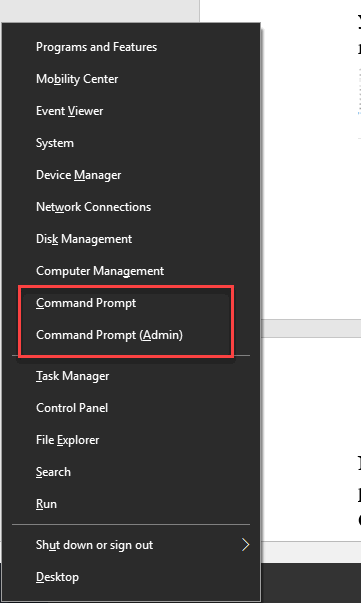
4. Now Win + X shows "Command Prompt" and "Command Prompt (Admin)".
Toggle the Command Prompt / PowerShell setting.
Windows 11 Note
1. Windows 11’s Win + X menu shows "Terminal"/"Terminal (Admin)".
2. Set your default profile in Windows Terminal > Settings > Default profile to Command Prompt.
3. Then Terminal opens to Command Prompt by default.
Open Command Prompt Anytime
1. Press Start and type cmd.
2. Press Enter (or Ctrl + Shift + Enter for admin).
3. Or run "cmd" from the Run dialog (Windows + R).
Troubleshooting
Problem: No taskbar toggle.
Solution: Newer builds/Windows 11 removed it — set Command Prompt as the default profile in Windows Terminal instead.
Problem: Still shows PowerShell/Terminal.
Solution: Sign out/in after toggling, or change the Terminal default profile on Windows 11.
Problem: Want both.
Solution: Use Windows Terminal, which lets you open Command Prompt and PowerShell tabs side by side.
Problem: Prefer PowerShell.
Solution: Leave the setting on (Windows 10) or keep the Terminal default as PowerShell.
Conclusion
On Windows 10, turn off the "Replace Command Prompt with PowerShell" taskbar setting to restore Command Prompt in the Win + X menu. On Windows 11, set Command Prompt as the default profile in Windows Terminal to achieve the same effect.