How to Create, Restore, and Delete Volume Shadow Copies in Windows
Use Shadow Copies (VSS) to snapshot a drive and recover previous versions of files.
Overview
Volume Shadow Copy (VSS) takes point-in-time snapshots of a drive so you can restore previous versions of files or recover from mistakes. This guide shows how to create, restore from, and delete shadow copies.
Working with Volume Shadow Copies.
Key Takeaways
- Shadow Copies are point-in-time snapshots of a volume.
- They enable "Previous Versions" file recovery.
- Enable via System Protection / configure via schedule.
- Manage them with the vssadmin command.
Enable and Create a Shadow Copy
1. Open "System Protection" (run SystemPropertiesProtection).
2. Select the drive and click Configure > "Turn on system protection".
3. Click Create to make a restore point/shadow copy now.
4. Or right-click the drive > Configure Shadow Copies to schedule them.
Restore a Previous Version
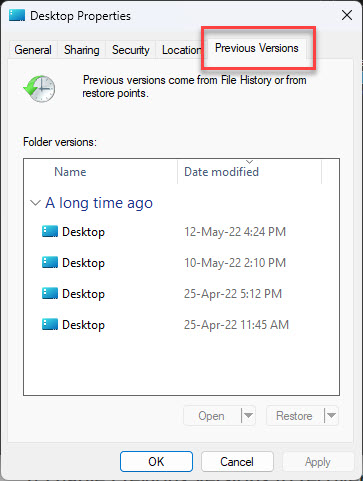
1. Right-click a file or folder > "Restore previous versions" (or Properties > Previous Versions).
2. Select a version from a shadow copy.
3. Click Restore (or Copy to keep the current one too).
Delete Shadow Copies
1. GUI: right-click the drive > Configure Shadow Copies > select entries > Delete Now.
2. Command line: run vssadmin list shadows to see them.
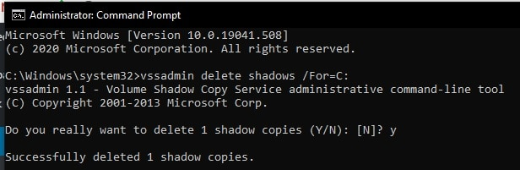
3. Delete all: vssadmin delete shadows /for=C: /all
4. Or delete the oldest: vssadmin delete shadows /for=C: /oldest
Troubleshooting
Problem: No "Previous Versions" available.
Solution: Enable System Protection for the drive and create restore points/shadow copies first.
Problem: Shadow copies use too much space.
Solution: Reduce the max storage in Configure, or delete old copies with vssadmin.
Problem: vssadmin access denied.
Solution: Run Command Prompt as administrator.
Problem: VSS errors in Event Viewer.
Solution: Ensure the "Volume Shadow Copy" service is running (services.msc) and the disk has free space.
Conclusion
Volume Shadow Copies give you built-in point-in-time recovery: enable System Protection to create them, restore files via "Previous Versions", and manage or clear them with the Configure Shadow Copies dialog or vssadmin. They complement — but don’t replace — a real backup.