Overview
ඔයා Task Manager එක open කරලා ctfmon.exe කියන process එකක් දැකලා තියෙනවා නම්, ඒක මොකද කරන්නේ සහ ඒක safe ද කියලා ඔයාට හිතෙන්න පුළුවන්. Ctfmon.exe කියන්නේ alternative text input methods support කරන legitimate Windows component එකක්. මේ guide එකෙන් process එක මොකක්ද, ඒක virus එකක්ද, සහ ඒක safe විදිහට enable හෝ disable කරන්නේ කොහොමද කියලා පැහැදිලි කරනවා.
Key Takeaways
- ctfmon.exe (CTF Loader) මගින් handwriting, speech, සහ language input වගේ alternative text input manage කරනවා.
- මේක System32 folder එකේ තියෙන genuine Windows file එකක්.
- මේක disable කරන එකෙන් voice typing, touch keyboard, සහ සමහර language features කැඩෙන්න පුළුවන්.
- System32 එකෙන් පිට ctfmon.exe copy එකක් තියෙන එක malware වෙන්න පුළුවන් නිසා scan කරන්න ඕනේ.
What Is the ctfmon.exe Process?
Ctfmon.exe කියන්නේ Collaborative Translation Framework Monitor, බොහෝ විට CTF Loader කියලා කියනවා. ඒකෙන් Alternative User Input Text Input Processor එක සහ Microsoft Office Language Bar එක activate කරනවා. practical විදිහට, ඒකෙන් touch keyboard, handwriting recognition, speech input, සහ input languages අතර switch වීම වගේ features enable කරනවා. මේ services අවශ්ය වෙන කොට Windows මේක automatically start කරනවා.
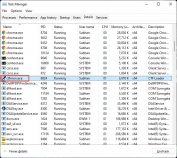
ctfmon.exe Task Manager එකේ run වීම.
Is ctfmon.exe a Virus?
Genuine ctfmon.exe එක virus එකක් නෙවෙයි. හැබැයි, සමහර වෙලාවට malware එම file name එකම පාවිච්චි කරලා disguise වෙනවා. ඔයාට authenticity එක verify කරන්න පුළුවන් එහි location එක check කරලා.
1. Ctrl + Shift + Esc එකෙන් Task Manager එක open කරලා Details tab එකට යන්න.
2. ctfmon.exe right-click කරලා Open file location තෝරන්න.
3. file එක C:\Windows\System32 එකේ තියෙනවද කියලා confirm කරන්න.
4. file එක වෙන ඕනෑම folder එකකින් run වෙනවා නම්, Windows Security හෝ ඔයාගේ antivirus එකෙන් full scan එකක් run කරන්න.
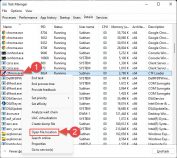
ctfmon.exe එකේ file location එක verify කිරීම.
Note: Legitimate ctfmon.exe එකක් හැම විටම තියෙන්නේ C:\Windows\System32 එකේ. වෙන location එකක තියෙන ඕනෑම copy එකක් suspicious විදිහට සලකලා ඔයාගේ system එක scan කරන්න.
How to Disable ctfmon.exe
ඔයාට process එක stop කරන්න පුළුවන්, හැබැයි input feature එකකට ඕනේ වෙන කොට ඒක restart වෙනවා කියලා මතක තියාගන්න. disable කරලාම තියාගන්න, startup සහ scheduled tasks adjust කරන්න.
Warning: ctfmon.exe disable කරන එකෙන් touch keyboard, handwriting, voice typing, සහ language switching කැඩෙන්න පුළුවන්. මේ features පාවිච්චි නොකරනවා නම් විතරක් disable කරලා, input tools වැඩ නොකළොත් ආයෙත් re-enable කරන්න ready වෙන්න.
1. Task Manager open කරලා, Details tab එකේ ctfmon.exe තෝරලා, current session එකට ඒක stop කරන්න End task click කරන්න.
2. ඒක automatically start වෙන එක වළක්වන්න, Task Scheduler open කරලා Task Scheduler Library > Microsoft > Windows > TextServicesFramework වලට browse කරන්න.
3. MsCtfMonitor task එක disable කරන්න.
4. change එක apply කරන්න computer එක restart කරන්න.
How to Enable ctfmon.exe on Startup
input features වැඩ කරන එක නතර වෙලා නම්, process එක re-enable කරන්න.
1. Task Scheduler open කරලා Microsoft > Windows > TextServicesFramework වලට යන්න.
2. MsCtfMonitor task එක right-click කරලා Enable තෝරන්න.
3. විකල්පයක් විදිහට, C:\Windows\System32 එකෙන් ctfmon.exe කෙලින්ම run කරලා ඒක වහාම start කරන්න.
4. process එක Windows එක්ක automatically load වෙන්න PC එක restart කරන්න.
Tip: ඔයාට ctfmon.exe වරින් වර විතරක් ඕනේ නම්, enable කරලාම තියන්න. ඒක ගොඩක් අඩු memory එකක් පාවිච්චි කරනවා, සහ input feature එකකට ඕනේ වෙන කොට විතරයි active වෙන්නේ.
Troubleshooting
Problem: End task කරාට පස්සෙත් ctfmon.exe නැවත නැවත restart වෙනවා.
Solution: මේක normal — input feature එකක් පාවිච්චි කරන කොට Windows ඒක relaunch කරනවා. ඒක restart වීම වළක්වන්න MsCtfMonitor scheduled task එක disable කරන්න.
Problem: touch keyboard හෝ voice typing වැඩ කරන එක නතර වුණා.
Solution: MsCtfMonitor task එක re-enable කරන්න හෝ System32 එකෙන් ctfmon.exe run කරලා, ඊට පස්සේ restart කරන්න. මේ features process එක මත depend වෙනවා.
Problem: මට System32 එකෙන් පිට ctfmon.exe එකක් හම්බුණා.
Solution: ඒක malware වල warning sign එකක්. Windows Security එකෙන් full scan එකක් run කරලා ඒක හොයාගන්න threats අයින් කරන්න.
Problem: ctfmon.exe අසාමාන්ය විදිහට high resources පාවිච්චි කරනවා.
Solution: PC එක restart කරලා pending Windows updates check කරන්න. genuine file එකෙන් persistent high usage එකක් rare, බොහෝ විට update එකකින් හෝ reboot එකකින් clear වෙනවා.
Conclusion
Ctfmon.exe කියන්නේ alternative text input methods power කරන normal, lightweight Windows process එකක්. එහි genuine System32 location එකේ ඒක safe සහ run වෙන්න දෙන එක තමයි හොඳම. touch, handwriting, හෝ voice input පාවිච්චි නොකරනවා නම් ඔයාට Task Scheduler එකෙන් ඒක disable කරන්න පුළුවන්, හැබැයි එම features respond කරන එක නතර වුණොත් ආයෙත් re-enable කරන්න.
About TechHub
මේ guide එක TechHub Knowledge Base එකේ කොටසක්. තව step-by-step IT guides සහ support වලට techhub.com.lk එකට යන්න.